
react-native-calendars

react-native-calendars copied to clipboard
 wix
wix
TimelineList is not started on Monday if set numberOfDays to CalendarProvider
Description
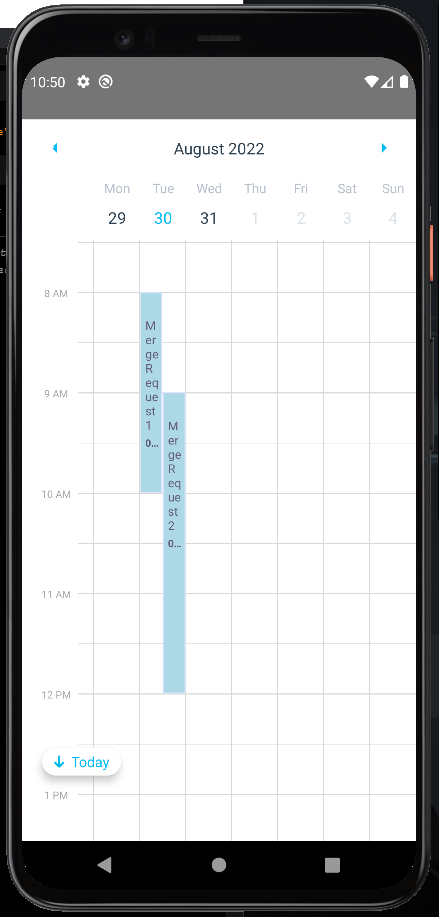
When I set numberOfDays={7} to CalendarProvider, the indicator for today time is gone, and the start date is not from Monday but started from the current date even I already set <ExpandableCalendar firstDay={1}/>.
Expected Behavior
- Start date should be on Monday
- Today current time indicator should showing
Observed Behavior
- Start date started on the current date
- Today current time indicator is not showing (if I manually set the start date to Monday using
date={moment().startOf('isoWeek').toString()})
Environment
- Android 10 emulator, Pixel 4XL
Screenshots

import React, { useEffect } from "react";
import {
  CalendarProvider,
  CalendarUtils,
  ExpandableCalendar,
  TimelineEventProps,
  TimelineList
} from "react-native-calendars";
import moment from "moment";
import { groupBy } from "lodash";

export default function Calendar() {
  // HOOKS
  const dispatch = useAppDispatch();
  const events: TimelineEventProps[] = [
    {
      id: "abc",
      start: `${moment().format("YYYY-MM-DD")} 08:00:00`,
      end: `${moment().format("YYYY-MM-DD")} 10:00:00`,
      title: "Merge Request to React Native Calendars",
      summary: "Merge Request 1"
    },
    {
      id: "def",
      start: `${moment().format("YYYY-MM-DD")} 09:00:00`,
      end: `${moment().format("YYYY-MM-DD")} 12:00:00`,
      title: "Merge Request to React Native Calendars",
      summary: "Merge Request 2"
    }
  ];

  const evensByDate = groupBy(events, e => CalendarUtils.getCalendarDateString(e.start));

  // FUNCTIONS
  const onEventPress = (props: TimelineEventProps) => {
    console.log(props.id);
  };

  // VIEWS
  return (
    <CalendarProvider
      date={moment().toISOString()}
      numberOfDays={7}
      showTodayButton
    >
      <ExpandableCalendar firstDay={1}/>
      <TimelineList
        events={evensByDate}
        timelineProps={{
          format24h: false,
          rightEdgeSpacing: 5,
          overlapEventsSpacing: 5,
          onEventPress
        }}
        showNowIndicator
        scrollToNow
        initialTime={{ hour: 9, minutes: 0 }}
      />
    </CalendarProvider>
  );
}
If I set the date on CalendarProvider to Monday manually, the today indicator is not shown.
Also, when I clicked the "Today" button on the bottom left, the bug above will reappear where the start date will start on the current date.
 // VIEWS
  return (
    <CalendarProvider
      date={moment().startOf('isoWeek').toString()}
      numberOfDays={7}
      showTodayButton
    >
      <ExpandableCalendar firstDay={1}/>
      <TimelineList
        events={evensByDate}
        timelineProps={{
          format24h: false,
          rightEdgeSpacing: 5,
          overlapEventsSpacing: 5,
          onEventPress
        }}
        showNowIndicator
        scrollToNow
        initialTime={{ hour: 9, minutes: 0 }}
      />
    </CalendarProvider>
  );
