
fig

fig copied to clipboard
 withfig
Dotfiles Plugins are not working
Description:
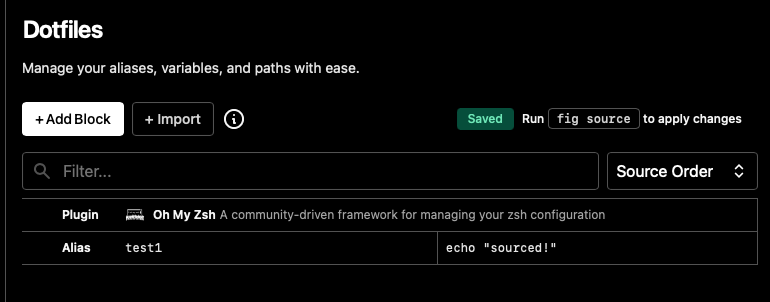
Dotfiles Plugins blocks are ignored. For example: "Oh my zsh" plugin is set above the alias definition, however the alias is confirmed to be sourced but omz command is not working and rubyrussel shell is not showing.
Fig settings:
Terminal:

fig doctor reports that everything is fine.
Details:
| OS | Fig | Shell |
|---|---|---|
| macOS 12.3.1 (21E258) | 1.0.58 | /bin/zsh |
fig diagnostic
Fig Diagnostics
Fig details:
- Fig version: Version 1.0.58 (B472) [U.S.]
- Bundle path: /Applications/Fig.app
- Autocomplete: true
- Settings.json: true
- Accessibility: true
- Number of specs: 0
- Symlinked dotfiles: false
- Only insert on tab: false
- Keybindings path:
- Installation Script: true
- PseudoTerminal Path: /opt/homebrew/opt/openjdk@11/bin:/Users/dimar/Library/Caches/fnm_multishells/85997_1658485610091/bin:/opt/homebrew/bin:/opt/homebrew/sbin:/usr/local/bin:/usr/bin:/bin:/usr/sbin:/sbin:/Applications/Wireshark.app/Contents/MacOS:/Users/dimar/.fig/bin:/Users/dimar/.local/bin:/Users/dimar/.gem/ruby/2.7.0/bin:/Users/dimar/.local/bin:/Users/dimar/go/bin
- SecureKeyboardInput: false
- SecureKeyboardProcess:
Hardware Info:
- Model Name: MacBook Pro
- Model Identifier: MacBookPro18,3
- Chip: Apple M1 Pro
- Cores: 10 (8 performance and 2 efficiency)
- Memory: 32 GB
OS Info:
- macOS 12.3.1 (21E258)
Environment:
- User Shell: /bin/zsh
- Current Directory: /Users/dimar
- CLI Installed: true
- Executable Location: /opt/homebrew/bin/fig
- Current Window ID: ???
- Active Process: ??? (???) - ???
- Installed via Brew: true
- Environment Variables:
- TERM_SESSION_ID=w0t0p1:CD414878-4941-4CCA-8051-55E6BED92ED5
- PATH=/opt/homebrew/opt/openjdk@11/bin:/Users/dimar/Library/Caches/fnm_multishells/86183_1658485626393/bin:/opt/homebrew/bin:/opt/homebrew/sbin:/usr/local/bin:/usr/bin:/bin:/usr/sbin:/sbin:/Applications/Wireshark.app/Contents/MacOS:/Users/dimar/.fig/bin:/Users/dimar/.local/bin:/Users/dimar/.gem/ruby/2.7.0/bin:/Users/dimar/.local/bin:/Users/dimar/go/bin
- TERM=xterm-256color
- FIG_INTEGRATION_VERSION=8
- FIG_TERM=1
- FIG_TERM_VERSION=4.4.1
- FIG_WORKFLOWS_KEYBIND=^f
- FIG_PID=86148
Integrations:
- SSH: false
- TMUX: false
- iTerm: installed!
- Hyper: application is not present.
- Visual Studio Code: installed!
- Docker: false
