
fig

fig copied to clipboard
 withfig
Autocomplete stops working
Description:
Autocomplete stops working...
Tried fig doctor but it said "Everything looks good".
Details:
| OS | Fig | Shell |
|---|---|---|
| macOS 12.2.1 (21D62) | 1.0.58 | /bin/zsh |
fig diagnostic
Fig Diagnostics
Fig details:
- Fig version: Version 1.0.58 (B463) [ABC]
- Bundle path: /Applications/Fig.app
- Autocomplete: true
- Settings.json: true
- Accessibility: true
- Number of specs: 0
- Symlinked dotfiles: false
- Only insert on tab: false
- Keybindings path:
- Installation Script: true
- PseudoTerminal Path: /Users/skywt/.pyenv/shims:/opt/homebrew/bin:/opt/homebrew/sbin:/usr/local/bin:/usr/bin:/bin:/usr/sbin:/sbin:/Applications/VMware Fusion Tech Preview.app/Contents/Public:/usr/local/go/bin:/Library/Apple/usr/bin:/Users/skywt/.fig/bin:/Users/skywt/.local/bin
- SecureKeyboardInput: false
- SecureKeyboardProcess:
Hardware Info:
- Model Name: MacBook Air
- Model Identifier: MacBookAir10,1
- Chip: Apple M1
- Cores: 8 (4 performance and 4 efficiency)
- Memory: 8 GB
OS Info:
- macOS 12.2.1 (21D62)
Environment:
- User Shell: /bin/zsh
- Current Directory: /Users/skywt
- CLI Installed: true
- Executable Location: /opt/homebrew/bin/fig
- Current Window ID: 189473/% (com.apple.Terminal)
- Active Process: zsh (57779) - not a tty
- Installed via Brew: true
- Environment Variables:
- TERM=xterm-256color
- TERM_SESSION_ID=42CB5BB0-DB4C-4501-BAEB-08C12DDBF30F
- PATH=/Users/skywt/.pyenv/shims:/opt/homebrew/bin:/opt/homebrew/sbin:/usr/local/bin:/usr/bin:/bin:/usr/sbin:/sbin:/Applications/VMware Fusion Tech Preview.app/Contents/Public:/usr/local/go/bin:/Library/Apple/usr/bin:/Users/skywt/.fig/bin:/Users/skywt/.local/bin
- FIG_INTEGRATION_VERSION=8
- FIG_TERM=1
- FIG_TERM_VERSION=4.4.0
- FIG_PID=57779
Integrations:
- SSH: false
- TMUX: false
- iTerm: application is not present.
- Hyper: application is not present.
- Visual Studio Code: installed!
- Docker: false

Hey @Skywt2003, sorry about the error. Does this continue after completely restarting your terminal (⌘Q) and restarting fig? (fig restart)
Another thing to try:
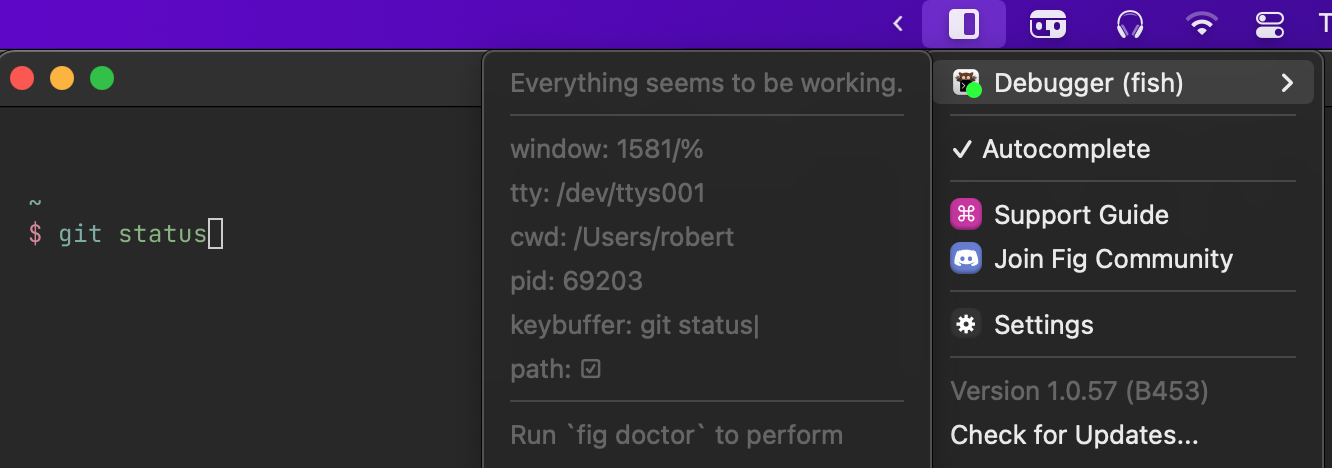
- Type out something in the terminal, eg.
git commit, and don't press enter - Click the ◧ Fig menubar icon, hover over debugger
- Is the text you wrote shown in the debugger?

This issue has been automatically closed because there has been no activity for 14 days.
![github-actions[bot] avatar](https://avatars.githubusercontent.com/in/15368?v=4 "Published by a pub.dev verified publisher")