
autocomplete
 autocomplete copied to clipboard
 withfig
Fig mis-handles tabs when it's attempting file completion using touch with a matching dir name
For example:
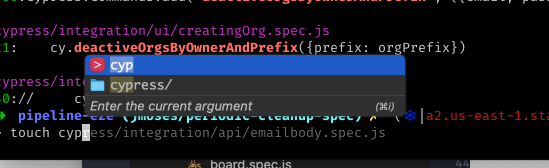
You can see that I've entered touch cyp[tab], and that my zsh-history plugin has offered a suggestion, and that fig has also offered directories that match what I have typed, but the top selection in fig is selected (and it's my partial entry). However, my expected behavior here is that hitting tab will complete the existing dirname (cypress), but current fig just beeps and shakes at me, as the "non existent" entry is selected.
Especially if there is only a single match entry to my what I have entered, I would expect fig to behave as a normal shell auto-completion, and fill the dirname.
> fig --version
fig 1.3.1
Reproduction:
mkdir foobar
cd foobar
mkdir foo
touch fo[TAB]

Suggesting cyp is an expected behaviour. Some tools like touch allow you to create a "non-existing" file but (in your case for example) when there is a partially matching folder you would have to close the fig popup before inserting touch fig. So for some tools we suggest the currently typed token such that it is possible to type enter or tab directly from fig.
See here https://github.com/withfig/autocomplete/pull/852

I think my issue would have probably not been a real big thing if I could
In theory they should be default? Is there a way to dump my config, like as json or something?
