
wire-desktop
 wire-desktop copied to clipboard
 wireapp
No pictures or video in chat
Wire version: 3.9.2895 Operating system: Manjaro Linux 5.2.8-1, Kde plasma 5.16.4 Which antivirus software do you have installed: None
What steps will reproduce the problem?
- ... Shared pictures of video do not show in the frames
- ...
- ...
What is the expected result? After sending or receiving pictures should become visible. ...
What is the actual result? Only a grayish frame is visible without the expected picture or video. ...
Please provide any additional information below. Attach a screenshot if possible.
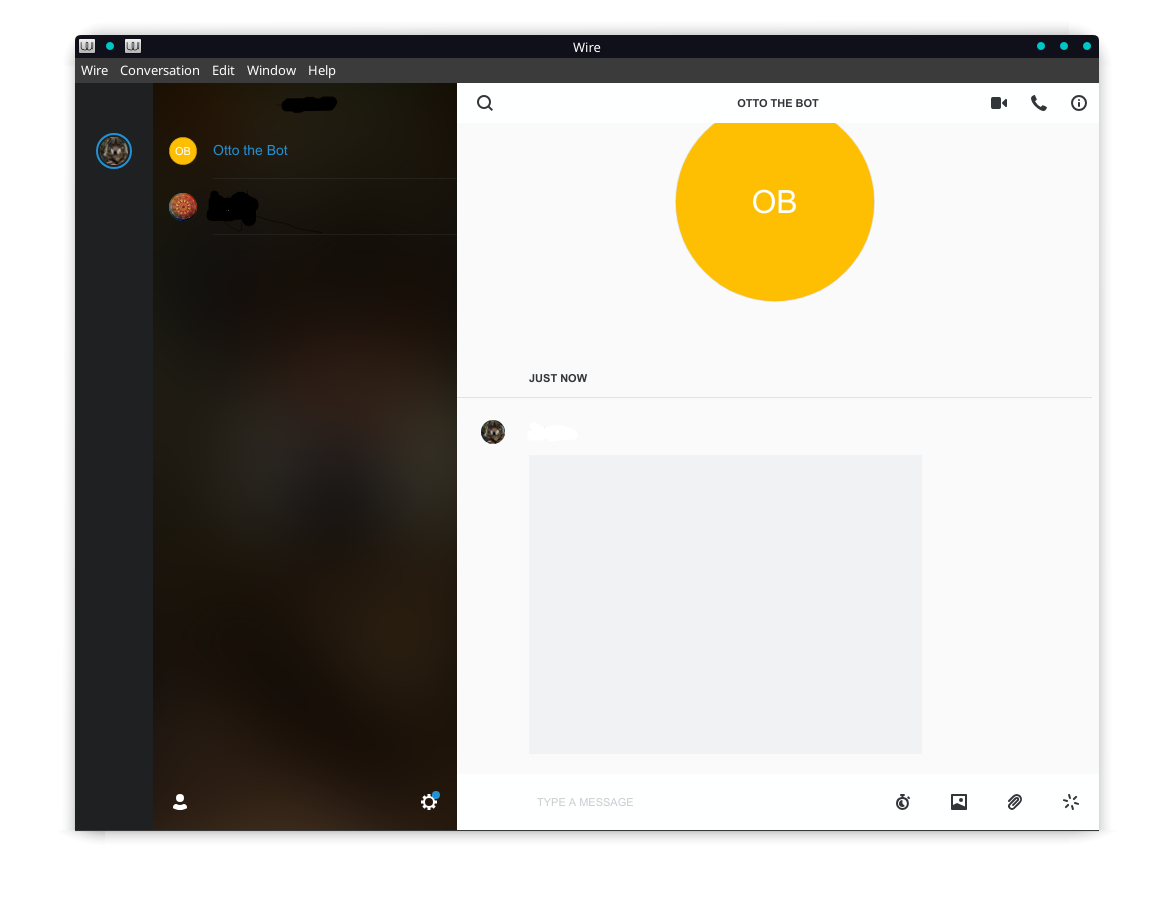
...

Hi @axioma06, how did you manage to connect to Otto the Bot? We retired him a long time ago. :smiley:
Can you please try again with the latest version of Wire Desktop?
And do you have a VPN or proxy set up?
Hi @ffflorian Otto the Bot just seems to connect. Not using it other than as an example of this issue. Otto is just sticking around it seems.
I will be waiting until Manjaro/Arch update their Wire package which I hope will be available soon. I have been using Wire-desktop for about 2 years and never had a problem until I updated to the current version. Hope the newer version will solve the problem. Will give feedback after the update.
To answer your last question. I am no using VPN or a Proxy set up.
I am having the same problem on my desktop manjaro, with the GNOME DE. It does work on my laptop though, with GNOME Manjaro as well (unfortunately I do not have access to the laptop currently so I won't be able to give more detailed info on the software on it). I have the CLI tool for ProtonVPN installed on my system, but images do not show up regardless of whether or not it is on. Looking forward to this being patched, it's quite annoying.
Example image, though not different from OP's:


I've been having the same issue for a couple of weeks now. At first I hoped it would be fixed by the next update and did not do much about it. I don't remember the version it started with, but I'm currently on Version 3.10.2904.
I used the wire-desktop package form the AUR for months, but than arch pulled it into the community repo. And I think since that update wire had this issue.
Since Manjaro is based on Arch, my guess is that Manjaro adopted the bug by using the arch community package. Full disclosure I'm not 100% certain how the packaging of manjaro works exactly, but from what I understand they do further testing before migrating the arch packages into their repos right?

I believe so, but as I mentioned, my laptop runs Manjaro and doesn't have this problem. So I don't think it's problem with Manjaro
@axioma06 @pepper-jk @Sajo8 can you please start wire-desktop with the following arguments:
wire-desktop --enable-logging --devtools
Then, in the devtools, please copy-paste the following into the console and press enter:
$('webview').openDevTools();
A second window opens, you can close the first one but please keep this one open.
Now open one of the conversations which are broken and please post a screenshot of the second window here.
Thanks!
Here is the log from the dev-tools and the terminal:
app.wire.com-1567149932431.log wire_terminal.log
What I found interesting in the terminal was:
[5517:0830/092126.933344:ERROR:simple_version_upgrade.cc(164)] Inconsistent cache version.
[5517:0830/092126.933761:ERROR:simple_backend_impl.cc(711)] Simple Cache Backend: wrong file structure on disk: /home/pepper-jk/.config/Wire/Service Worker/CacheStorage/37e27b30c6fbe4303741abc848ca135e61a105f0/421a4dce-430a-423c-a90d-7a904b9358b5
[5517:0830/092126.934709:ERROR:disk_cache.cc(168)] Unable to create cache
You still need it as screenshots?
Thanks @pepper-jk! I don't need it as screenshot, the log is enough :slightly_smiling_face:
Here is the log from Developer tools and a copy from Terminal.
developer tool - app.wire.com-1567166552461.log Wire -terminal log

Some people reported the same issue on Windows, so I dont think it's Linux specific: https://github.com/wireapp/wire-desktop/issues/2864
He has the same issue on Windows 10, latest version of Wire, no antivirus. This problem does not occur on mobile.

Fixed it!
I ran
wire-desktop --enable-loggingin console hoping to find some helpful info there. There were two messages that looked promising:[8890:0819/154501.079960:ERROR:simple_backend_impl.cc(711)] Simple Cache Backend: wrong file structure on disk: /home/user/.config/Wire/Service Worker/CacheStorage/0123456789abcdef0123456789abcdef01234567/01234567-89ab-cdef-0123-456789abcdef [8890:0819/154501.080102:ERROR:disk_cache.cc(168)] Unable to create cacheI quit Wire and ran this:
cd ~/.config/Wire/Service\ Worker/
mv CacheStorage CacheStorage_backup
After starting Wire again, I saw that images are working normally at last.
This did the trick for me as well.