

 wireapp
Wire doesn't see at all my video camera
Hello,
I use Wire version: 3.2.2840 Operating system: Linux - Ubuntu 18.04 LTS 64 bits Which antivirus software do you have installed: ClamAv
What steps will reproduce the problem?
- I don't see the camera at all. Audio calls are perfect, but I can't not perform video call.
- Should I see the camera in the "Audio / Video Settings"?
- Why in audio / video I see the microphone and don't see the camera when they are one device? I use Logitech C920. In Skype the camera works. I closed the Skype so the reason the camera does'n work is not in the other application which use the camera.

Regards,
Rumen

I had the same problem on Linux - Ubuntu 18.04 LTS 64 bits when I had installed wire from the Snap store according to https://blog.ubuntu.com/2018/08/30/top-10-linux-apps-for-entertainment-and-leisure. The problem disappeared by installing from repository according to https://github.com/wireapp/wire-desktop/wiki/How-to-install-Wire-for-Desktop-on-Linux instead.

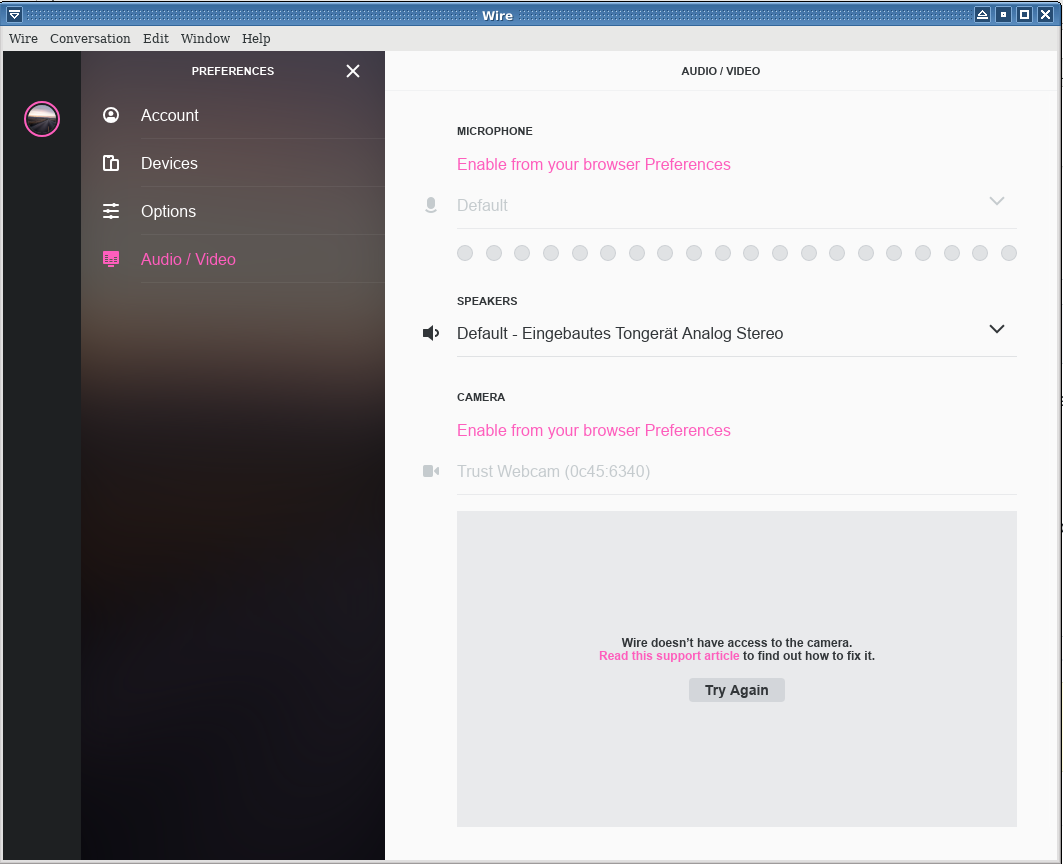
I have similar problem (actually more severe). I had previously used the wire desktop-app sucessfuly on Dell Vostro which had built-in microphone and webcam. All worked without a problem. I changed the gear recently and got the laptop without the webcam. I again installed the app as appimage. I could do the audiocalls, but obviously no video calls. I tried to attach the USB camera, and while Wire see it in preferences, it is blocked ("Wire has no access to the camera") and there is links"Enable from your browser Preferences". Not only camera but also microphone is blocked now too :/ . Both however works ok in browser app.wire.com . I am not sure if through frustration I had not clicked to disallow the mic/cam in wire-desktop. I tried to reinstalling it (both appimage and deb ways) clearing .cache, .configs/Wire and can't get the wire-desktop to be able to use at least microphone. That is sad.

I can confirm the problem. I use Linux Mint 19 Tara with a Terra Mobile 1341 (Notebook). In the browser the webcam works without problems. In the desktop app which i installed via repo, there is only a black window when i go to the option Audio/Video. Enabling and disabling the webcam doesn't change anything. I would like to use the desktop app instead of the web version because the quality fo audio and video seems better to me when i use it via installed app (tried it also via Android app).

@berwag - for the Snap, a simpler work-around is: snap connect wire:camera core:camera and enter your password when prompted. This gives Wire permission to use the camera. This really should be done automatically when the snap package is installed, so I think this is a bug, but possibly not the same problem being described by the OP.

@bitinerant : Thanks for your hint about 'snap connect' - That brings me a step nearer to a solution. @all : Now I have the same problem as @sem-geologist, both with the program installed from Snap and the version installed from repository (which worked some months ago). The software detects camera and microphone, but I don't get them enabled. I get the message "Enable from your browser Preferences", but there is no browser or setting in the App where I could do that. In Firefox app.wire.comm works.
Can confirm here, too. Using it with Archlinux and recently migrated to a newer machine but took the harddisk with me.
->no camera and mic, but working in all other Video apps.
When I repeatedly click on the 'Try again'-Button, the camera LED shortly flashes and the preview Windows gets white and mic line is visible. Half of a second later, all has vanished again.
Wire Desktop 3.9

Here is some additional description for my flavor of the problem:
Environment: Wire versions: e.g. 3.9.2895 from repository or 3.10.0-unknown from staging GitHub Ubuntu 18.04.2 LTS, Kernel 4.15.0-48-lowlatency x86_64 Antivirus-Software etc.: ESET, AppArmor
Attached please find a screenshot. I can also observe the short flashing reported by @hamars .
The problem does not occur with:
- Firefox online version,
- Version taken from GitHub and started by "yarn start" on my personal directory (First I observed that Wire versions >= 3.4.2890 had the problem but I couldn't reproduce that later.)
The problem does occur with:
- Chrome online version (even when camera and mic allowed in browser!),
- Version installed from Repository https://wire-app.wire.com/linux/debian,
- Version installed from deb-Package produced by "yarn build:linux" from staging-version from GitHub
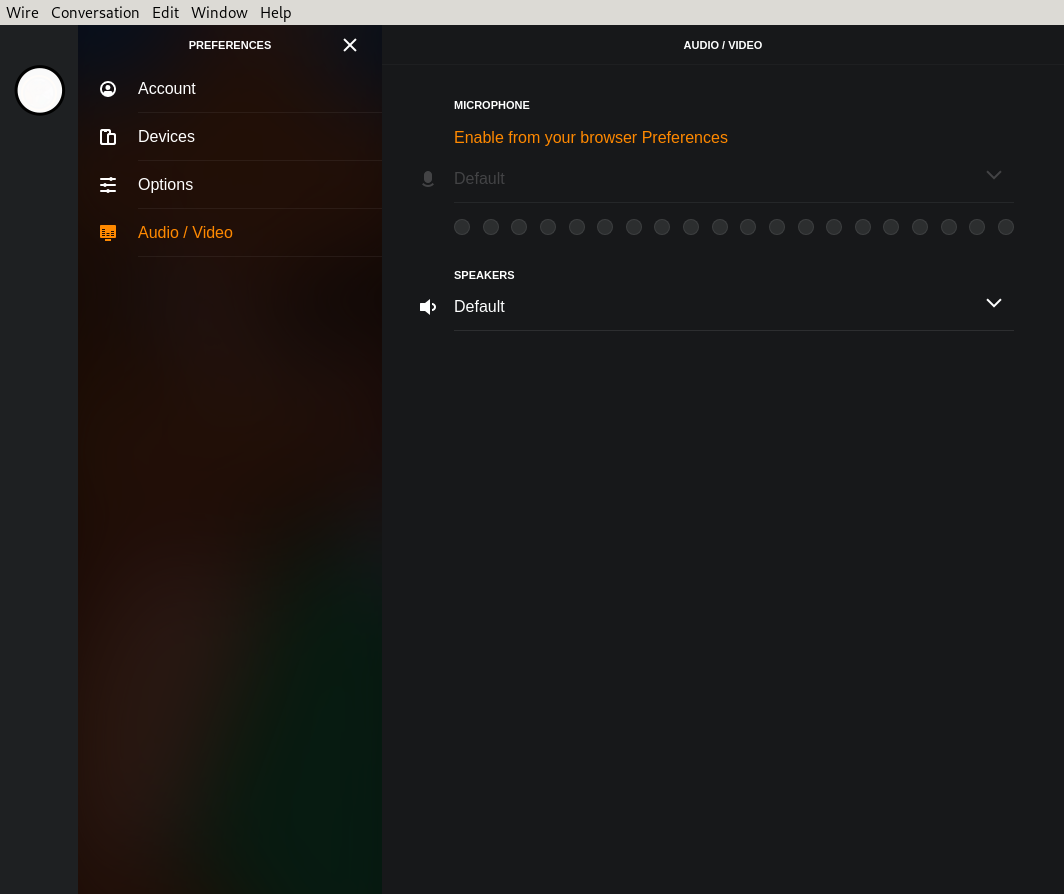
I experience the same issue. It used to show both input and output devices in older versions of Wire which used to be a drop-down list, and now it is disabled and there is "Enable from your browser Preferences", what does it even mean in the context of the desktop application? What does Wire for desktop have to do with my browser that may or may not exist? I know Wire uses Electron which is an instance of a browser, but this is completely irrelevant. This is an obvious regression, it should work with and without an independent browser. It used to work. If I might respectfully suggest: please do not break what works. I suggest reverting back to being able to choose both the input and output device without the need of any settings from an independent browser (or application) because it makes absolutely no sense to do it this way, not sure it is even possible because the two are NOT connected, and if they are, they should not be.
I use Wire for desktop, I do NOT use it from a browser, this suggestion that I should somehow "Enable from your browser Preferences" for the desktop version makes absolutely no sense and I do believe it is a bug, an obvious regression.
Wire for desktop (Linux): version: 3.3.2872
I might sound a bit hostile and I apologize for it and my apparent crankiness, but I am getting fed up with the decisions and actions of the Wire developers. There are many missing features that other secure alternatives offer, thus reasons for using Wire may cease to exist. I might file another issue for extremely high CPU usage at idle state which might have to do with the fact that it uses Electron (hooray). The missing features are relatively easy to implement but I have no way of contributing as I lack access, otherwise I would have already done so. I would really love to know what the company spends its time and money on instead of fixing obvious bugs that would have been easy to detect by taking the time to actually run the program (!!!) or instead of implementing features that competitors DO NOT lack. I have so many issues with Wire at this point that other alternatives might actually be more worth to use. I used to recommend Wire for people but I might just stop it and actively boycott unless management gets their priorities straight.

OK, now it shows only the speakers part, nothing else, despite having my microphone plugged in. Regardless, I think it is supposed to show both the microphone and the camera bit, along with the speakers. It used to.
Version 3.3.2872
Wire for Web Version 2019.09.24.1157
I do not know why it says "Web" when I am clearly using the desktop version. shrugs.
It seems to be that the bug exists on the installation package from ubuntu software center. Remove it and install wire following this guide https://github.com/wireapp/wire-desktop/wiki/How-to-install-Wire-for-Desktop-on-Linux

