

 wintercms
Make errors in components show the correct path
Winter CMS Build
1.1
PHP Version
7.4
Database engine
SQLite
Plugins installed
No response
Issue description
If you have an error in a component, the error page does not give any indication of which actual line of code is producing the error either in the error message or the stack trace.
For example:
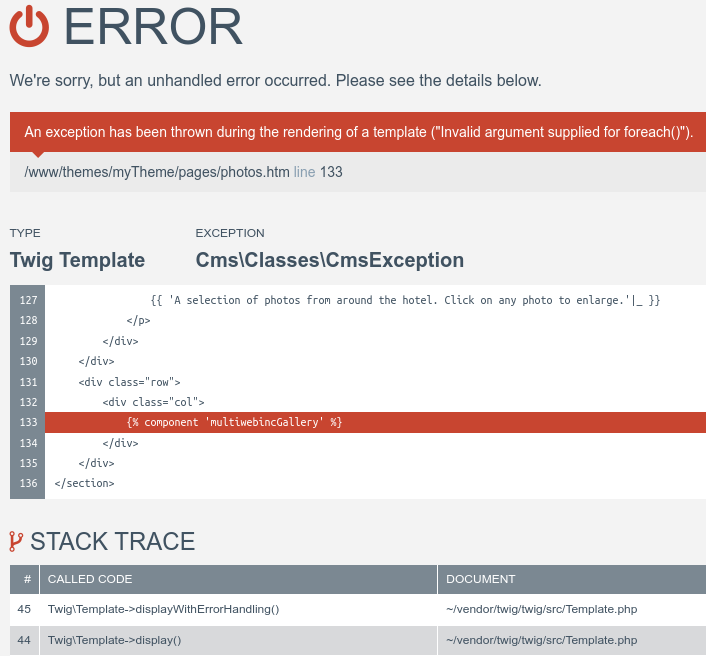
The line given (/www/themes/myTheme/pages/photos.htm line 133) is simply the line where the component is being included into the page. The actual line producing the error can literally be anywhere.
Steps to replicate
This happened to me when I had a model that implemented TranslatableModel, but didn't define a $translatable property.
class MyClass extends Model
{
    // ...
    public $implement = ['@Winter.Translate.Behaviors.TranslatableModel'];

    // public $translatable = ['images'];
}

I'm not sure if with Winter you make a habit of modifying/extending the files from other vendors, but in vendor/twig/twig/src/Template.php, if you remove the second catch in displayWithErrorHandling(), it fixes the problem.
    protected function displayWithErrorHandling(array $context, array $blocks = [])
    {
        try {
            $this->doDisplay($context, $blocks);
        } catch (Error $e) {
            if (!$e->getSourceContext()) {
                $e->setSourceContext($this->getSourceContext());
            }

            // this is mostly useful for \Twig\Error\LoaderError exceptions
            // see \Twig\Error\LoaderError
            if (-1 === $e->getTemplateLine()) {
                $e->guess();
            }

            throw $e;
        }
        // catch (\Exception $e) {
        //     $e = new RuntimeError(sprintf('An exception has been thrown during the rendering of a template ("%s").', $e->getMessage()), -1, $this->getSourceContext(), $e);
        //     $e->guess();

        //     throw $e;
        // }
    }
Now the path and the stack trace represent what's actually causing the error:
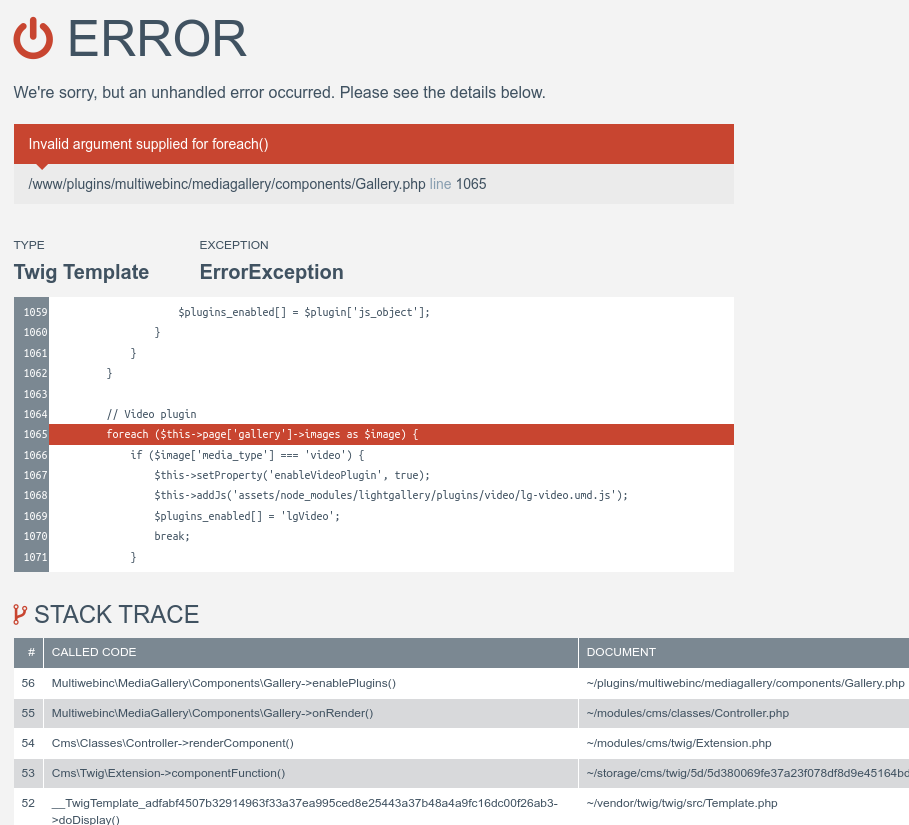
I believe the solution is actually to make the following lines of code work with the current version of Winter: https://github.com/wintercms/winter/blob/develop/modules/system/classes/ErrorHandler.php#L20-L35; but since we're planning on switching to Ignition for the error page handler with the upgrade to Laravel 9 I'll probably look into that then.

@LukeTowers Oh, Ignition looks amazing. Laravel 9 was also released today too.
This issue will be closed and archived in 3 days, as there has been no activity in the last 60 days. If this issue is still relevant or you would like to see it actioned, please respond and we will re-open this issue. If this issue is critical to your business, consider joining the Premium Support Program where a Service Level Agreement is offered.
![github-actions[bot] avatar](https://avatars.githubusercontent.com/in/15368?v=4 "Published by a pub.dev verified publisher")
This issue will be closed and archived in 3 days, as there has been no activity in this issue for the last 6 months. If this issue is still relevant or you would like to see it actioned, please respond within 3 days. If this issue is critical for your business, please reach out to us at [email protected].
@multiwebinc Winter 1.2 with Laravel 9 support is now out. Have you had a chance to test this out on Winter 1.2?

@bennothommo Sorry for the delay. I just tried with 1.2.0 and it hasn't been fixed.
I think this happens when there is an error in the component's onRender() method. I tried adding an error to several other methods and it displays the error correctly.
e.g. This outputs the error like in the first screenshot:
public function onRender()
{
    throw new \Exception('test');
}
@multiwebinc are you able to try out the ignition plugin and see if that helps? You might have to use this WIP PR: https://github.com/wintercms/wn-ignition-plugin/pull/2 but @robertalexa should be finishing it up within the week.
Sorry for the long delay. I just installed via composer require winter/wn-ignition-plugin:dev-wip/1.2 and then in a plugin added the code from my previous comment and I get a 500 response with the following errors in the log:
2023/02/01 23:25:05 [error] 2005954#2005954: *12419 FastCGI sent in stderr: "PHP message: PHP Fatal error:  Uncaught TypeError: Winter\Ignition\Middleware\AddWinterContextData::handle(): Argument #1 ($report) must be of type Facade\FlareClient\Report, Spatie\FlareClient\Report given, called in /path/to/winter/vendor/laravel/framework/src/Illuminate/Pipeline/Pipeline.php on line 180 and defined in /path/to/winter/plugins/winter/ignition/middleware/AddWinterContextData.php:12
Stack trace:
#0 /path/to/winter/vendor/laravel/framework/src/Illuminate/Pipeline/Pipeline.php(180): Winter\Ignition\Middleware\AddWinterContextData->handle()
#1 /path/to/winter/vendor/spatie/flare-client-php/src/FlareMiddleware/AddSolutions.php(28): Illuminate\Pipeline\Pipeline->Illuminate\Pipeline\{closure}()
#2 /path/to/winter/vendor/laravel/framework/src/Illuminate/Pipeline/Pipeline.php(180): Spatie\FlareClient\FlareMiddleware\AddSolutions->handle()
#3 /home/mike/Seafile/www/laravel/octo...PHP message: PHP Fatal error:  Uncaught TypeError: Winter\Ignition\Middleware\AddWinterContextData::handle(): Argument #1 ($report) must be of type Facade\FlareClient\Report, Spatie\FlareClient\Report given, called in /path/to/winter/vendor/laravel/framework/src/Illuminate/Pipeline/Pipeline.php on line 180 and defined in /path/to/winter/plugins/winter/ignition/middleware/AddWinterContextData.php:12
Stack trace:
#0 /path/to/winter/vendor/laravel/framework/src/Illuminate/Pipeline/Pipeline.php(180): Winter\Ignition\Middleware\AddWinterContextData->handle()
#1 /path/to/winter/vendor/spatie/flare-client-php/src/FlareMiddleware/AddSolutions.php(28): Illuminate\Pipeline\Pipeline->Illuminate\Pipeline\{closure}()
#2 /path/to/winter/vendor/laravel/framework/src/Illuminate/Pipeline/Pipeline.php(180): Spatie\FlareClient\FlareMiddleware\AddS
@multiwebinc can you try again with the main branch of the Ignition plugin?
@LukeTowers No, that doesn't appear to work for me. If I throw an Exception in a component's onRender method, the error page does not mention the file the error was thrown in.
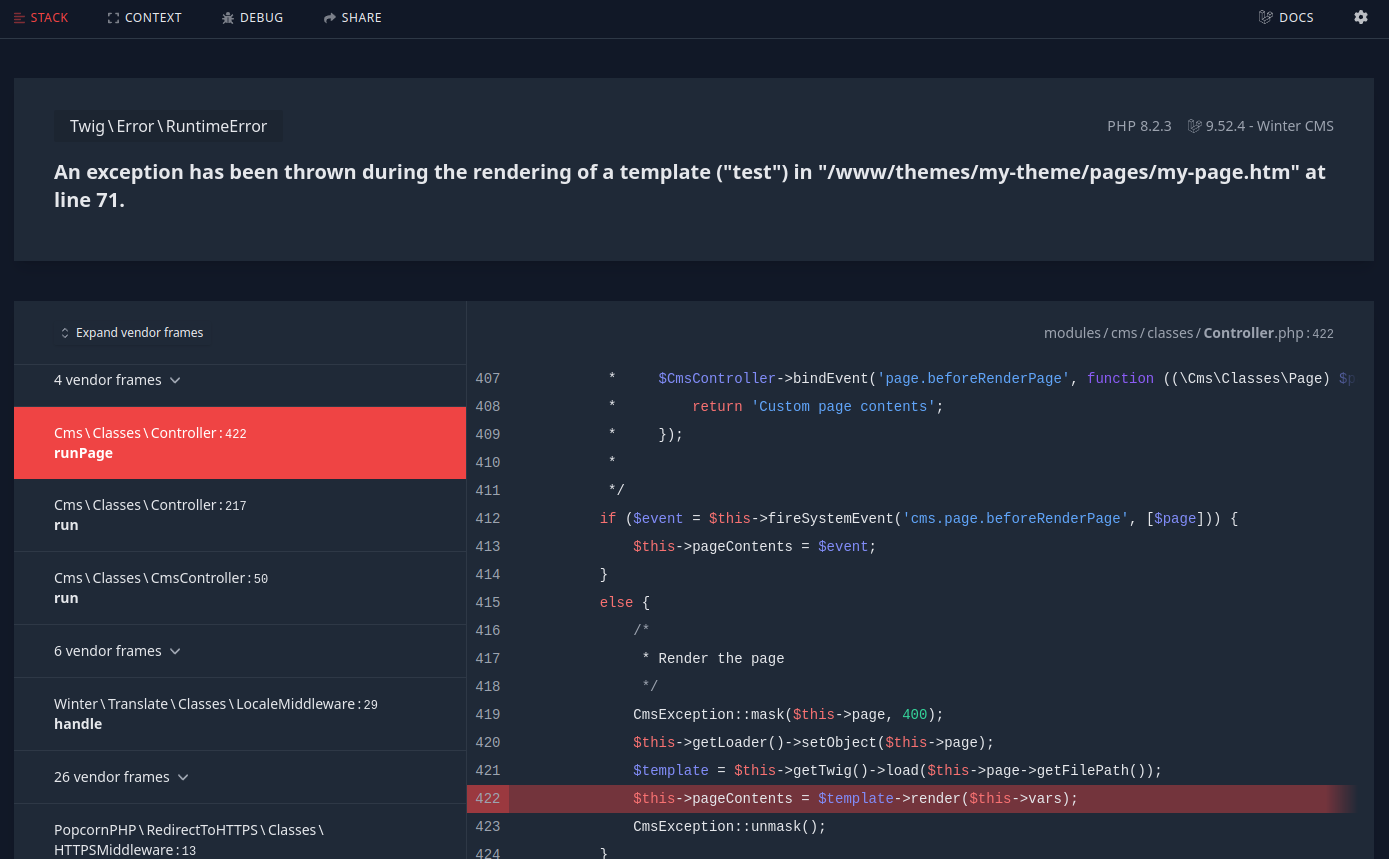
@multiwebinc I think the solution (for both Winter default and Ignition) is to get https://github.com/wintercms/winter/blob/develop/modules/system/classes/ErrorHandler.php#L20-L35 working again, do you have a few minutes to play around with that as an example to see where it needs to live now in order to take care of the issue?
This issue will be closed and archived in 3 days, as there has been no activity in this issue for the last 6 months. If this issue is still relevant or you would like to see it actioned, please respond within 3 days. If this issue is critical for your business, please reach out to us at [email protected].
This issue will be closed and archived in 3 days, as there has been no activity in this issue for the last 6 months. If this issue is still relevant or you would like to see it actioned, please respond within 3 days. If this issue is critical for your business, please reach out to us at [email protected].