

 winder
Usability Improvements: Visualizer
The top left cube looks like something from CAD software, but defies convention by being apparently non-interactive. Click face to aim camera directly at that plane, click and drag to move (which you don't need since your entire module has comparable functionality)
- [ ] Clickable corner-cube (with visual indicator of the highlighted face?).
- [x] Visualizer toolbar actions with preset view angles.
- [ ] Double click to reset view angle to default.
- [ ] Remove
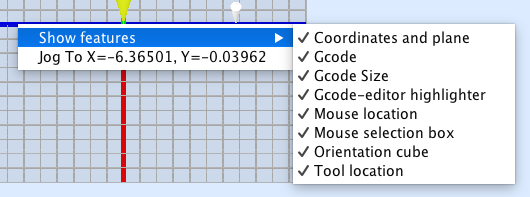
Jog Tobutton from right-click menu (or move it to a sub menu). - [x] Move right-click enable/disable options to a sub menu.
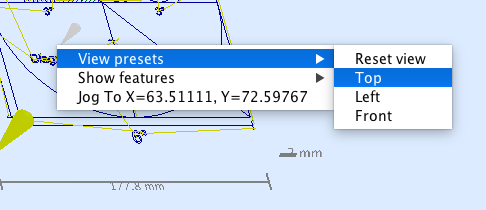
- [x] Add the visualizer preset view angle actions (from above) to the right-click menu.

I'd opt for a view cube like how Solid works does it or the cube may be enough as a datum instead. You only have to see the top, front, and left of a tool path see what it's doing.
I'd keep the jog to control as right click. I find it very handy and a sub menu makes it lose the convenience.
I would add a "get coord" command to see where a tool path physically will go (XYZ value)
On Sep 4, 2017 3:56 PM, "Will Winder" [email protected] wrote:
The top left cube looks like something from CAD software, but defies convention by being apparently non-interactive. Click face to aim camera directly at that plane, click and drag to move (which you don't need since your entire module has comparable functionality)
- Clickable corner-cube (with visual indicator of the highlighted face?).
- Visualizer toolbar actions with preset view angles.
- Double click to reset view angle to default.
- Remove Jog To button from right-click menu (or move it to a sub menu).
- Move right-click enable/disable options to a sub menu.
- Add the visualizer preset view angle actions (from above) to the right-click menu.
— You are receiving this because you are subscribed to this thread. Reply to this email directly, view it on GitHub https://github.com/winder/Universal-G-Code-Sender/issues/737, or mute the thread https://github.com/notifications/unsubscribe-auth/AQlzDJ9zWK8aUlsAHKp-4gaT_vChKHIgks5sfEfFgaJpZM4PMLyj .


Added a submenu with view presets: Top, Left, Front and Reset (that will rotate to a isometric-like view):
Can you add those presets to the faces of the cube in the corner?
On Feb 18, 2018 9:26 AM, "Joacim Breiler" [email protected] wrote:
Added a submenu with view presets: Top, Left, Front and Reset (that will rotate to a isometric-like view): [image: screenshot 2018-02-18 14 20 37] https://user-images.githubusercontent.com/8962024/36352315-4ecf14cc-14b7-11e8-8928-41a48f02e4c8.png
— You are receiving this because you commented. Reply to this email directly, view it on GitHub https://github.com/winder/Universal-G-Code-Sender/issues/737#issuecomment-366516039, or mute the thread https://github.com/notifications/unsubscribe-auth/AQlzDBJeqSo1hPzBORl4OkfE0Xvixj_qks5tWCTzgaJpZM4PMLyj .
Note to self, I've been reading up on Ardor3D which could be a suitable scene graph library to use for implementing this other stuff: https://github.com/Renanse/Ardor3D