

 whyboris
Gallery to Playlist Feature
Hi there,
I'm checking out the windows 10 demo and it seems like everything I've been wanting. Thank you for developing this and charging a nominal fee for it. I'm pretty much sold :)
I did find an issue, where I needed to create another directory that my PC is looking for to launch the temporary .pls file.
In the "Main Settings" when I enable "Open all current gallery videos as a playlist" it is looking for an appdata directory that doesn't exist. I have a "Video-Hub-App-3" folder, but it's searching for the previous directory.
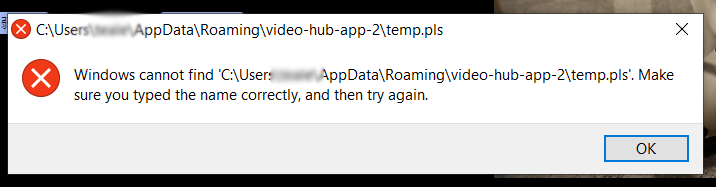
Once I created Video-Hub-App-2 in my appdata folder it worked. However, it launches in VLC. Whereas, when I click a video in the hub it opens with my default video player (PotPlayer). I'm looking for a way to send a curated list from the current gallery in VideoHub to PotPlayer. As it's default functionality is to play the first video you click on in a file explorer folder, and simultaneously add all videos from that folder into a new playlist. After which, I would have the option of saving a VideoHub curated playlist in PotPlayer.
That is my first wish, and the second would be to add darkmode to the settings window too. Thank you!

Granted, I can always go to the AppData temporary playlist directory and "open with" PotPlayer. So it's just another step really. Thanks again for sharing with the community!
Thank you for finding a bug! I'll try to replicate and then fix 👍 Currently, if I remember, there are two scenarios:
- If VHA is using your system default player, the
.plsfile will open with your system's default player for these types of files (can be different than your system's preferred video for opening.mp4and similar files). - If VHA has a "preferred video player" set (in the settings) it will try to open the
.plsfile with that player
🤞 I hope that's the behavior you encountered (other than the bug where a folder didn't exist and needed to be created manually)
p.s. - there is a dark mode in existence as well. There's even a keyboard shortcut for it 😉 CTRL + D unless you change it to something else.

Thanks for getting back to me whyboris!
It was #1, I made PotPlayer my default player for .pls files now, and it works perfectly!
Thanks so much, this program is what I've been wanting and I've purchased a copy.
Yeah, the dark mode is the first setting I found, great UI! I also love that you can customize it to include the buttons you use frequently and only have to go to the settings menu when you're doing something different than usual.
5 Stars!