
html
 html copied to clipboard
 whatwg
width and height attributes on <table> should perhaps allow 0 as a value
Spec at https://html.spec.whatwg.org/multipage/rendering.html#tables-2:attr-table-height says:
The table element's height attribute maps to the dimension property (ignoring zero) 'height' on the table element.
The table element's width attribute maps to the dimension property (ignoring zero) 'width' on the table element.
But all of Gecko, WebKit, Blink allow 0 for the height, and WebKit/Blink allow 0 for width, as far as I can tell. Testcase:
<table style="border: 1px solid green; display: block" width="0">
  <tr>
    <td>
      Hello
    </td>
  </tr>
</table>

<table style="border: 1px solid green; display: block" height="0">
  <tr>
    <td>
      Hello
    </td>
  </tr>
</table>
I would be fine with aligning Gecko with the others for width (and might just do that in https://bugzilla.mozilla.org/show_bug.cgi?id=1560055) and think we should align the spec with browsers here.

Spec at https://html.spec.whatwg.org/multipage/rendering.html#tables-2 (wish I could link directly to the relevant bit!)
You can actually — it’s just that the way for doing it isn’t easily discoverable
Here’s how:
The table element's height attribute maps to the dimension property (ignoring zero) 'height' on the table element.
That’s https://html.spec.whatwg.org/multipage/rendering.html#tables-2:attr-table-height
The table element's width attribute maps to the dimension property (ignoring zero) 'width' on the table element.
That’s https://html.spec.whatwg.org/multipage/rendering.html#tables-2:attr-table-width
The way you can discover those anchors is:
-
Click on some hyperlinked term in the text you want to get an anchor for; e.g. click on
height. That’ll take you to https://html.spec.whatwg.org/multipage/obsolete.html#attr-table-height -
At https://html.spec.whatwg.org/multipage/obsolete.html#attr-table-height, click on the word
height, and you’ll get a dfn popup showing all the references in the spec to the term dfn with IDattr-table-height: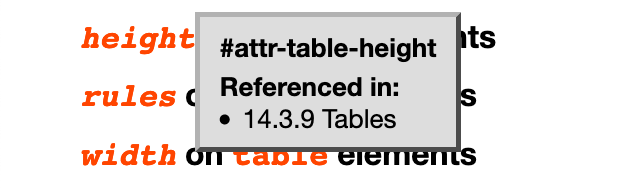
-
Click on the 14.3.9 Tables text in that popup; that’ll take you back to https://html.spec.whatwg.org/multipage/rendering.html#tables-2:attr-table-height
Obviously if the Referenced in bulleted list in that dfn popup has more than one item in it (which unlike this particular case, most of them do), then it’s more work to figure out which particular reference from that list is the one you need…
But in cases where you really want to link down directly into some specific point in the spec (e.g., especially the case where you’re citing a specific step way down in some algorithm), if the text you want to cite has some hyperlink reference to a defined term in it, then the hyperlink reference has its own anchor, and you can find it using the steps above.
Alternatively, you can just inspect the relevant text in the DOM inspector and copy the anchor.

@sideshowbarker Thanks! I just assumed it wasn't linkable since there was no indication it would be; should have checked inspector...
I'd recommend that someone wanting to tackle this issue looks at #4716 and #4717 first (and maybe fixes those) and based on that creates the necessary tests and change for this issue.

For what it's worth, once the web platform test from https://github.com/mozilla/gecko-dev/commit/3dd95a2c8fd02545d2e623d95aa36bf116a3a6c2 merges upstream, the tests end will be quite simple: just twiddle the boolean for the relevant tests in the html/rendering/dimension-attributes.html wpt.


Yeah, it is. Also, in general you don't need to ask to work on something. You do need to be able to sign https://participate.whatwg.org/agreement. Hope that helps!

We generally don't assign issues. We wait for someone to submit a helpful pull request.

is this issue still open i would like to contribute in it , and what issue is it exactly?


So I quickly took a look at the behavior in Firefox, Chrome, and Safari, and I'm a little confused on what should be changed here, unless I'm misunderstanding something.
All three browsers do pass the WPT, where it asks that tables with height="0" and width="0" return zero from getAttribute("height") and getAttribute("width") respectively. However, visually, the browsers seem to only respect height="0". When width="0" is set it visually isn't respected at all. So I see three ways to approach this:
- Should this just be reported as a rendering bug, where
width="0"should be visually respected? I don't mind filing the bugs for the three browsers. In which case changing the spec here should be straightforward and I can submit that. - Maybe the spec is okay, and browsers should ignore
height="0"like they currently ignorewidth="0"? In which case no change is needed here but bugs still should be filed. - Maybe the spec can just say ignore
width="0", but don't ignoreheight="0". But the inconsistency feels weird.
Not sure what the correct answer is, but just writing down my observations. Codepen for convenience.

/cc @dbaron as someone who's worked on table layout, in at least Blink recently.
All three browsers do pass the WPT
Interestingly, I'm seeing all browsers passing the WPT for table + width, but failing it for table + height. That indicates to me that the spec + tests should be fixed for height, so that height doesn't ignore 0.
I don't know how to square that with earlier conversations in this issue, which indicate that WebKit/Blink ignore 0 for width. Maybe they fixed themselves!
So I think the path forward is:
- Fix HTML to not ignore 0 for height, since no browsers do.
- Update the WPT correspondingly.
This corresponds to your (3). I don't think we need to be particularly consistent here; tables are old and weird, and dimension attributes are even older and weirder.
Note that the WPT has similar all-browser failures for col + width, tr + height, and hr + width. Maybe someone wants to tackle those at the same time?
Hey I would like to contribute for this issue . Can you please assign it to me?

FWIW, my work on table layout is mostly not recent, and was back when I worked on Gecko.
That said, fixing this to match the WPT results seems reasonable to me. The Chromium behavior was changed in https://chromium-review.googlesource.com/c/chromium/src/+/2458587 .
It's also worth noting that there are places where the CSS table layout algorithm also specifically ignores 0 widths on certain table parts.
