

 wesnoth
[Feature Request] Make screen fade in/out affect everything on a map including units
Describe the desired feature
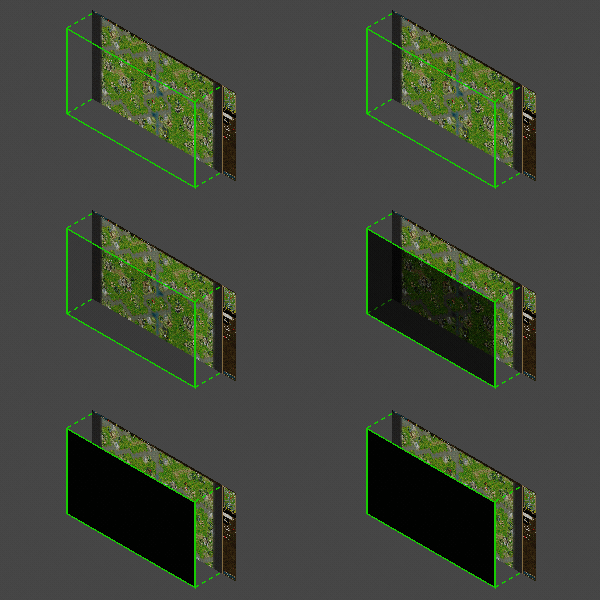
Currently fade in and out effects are handled by delayed steps of [color_adjust] which tints the color of the screen except for units, their hp bars and labels. So basically it looks like this:
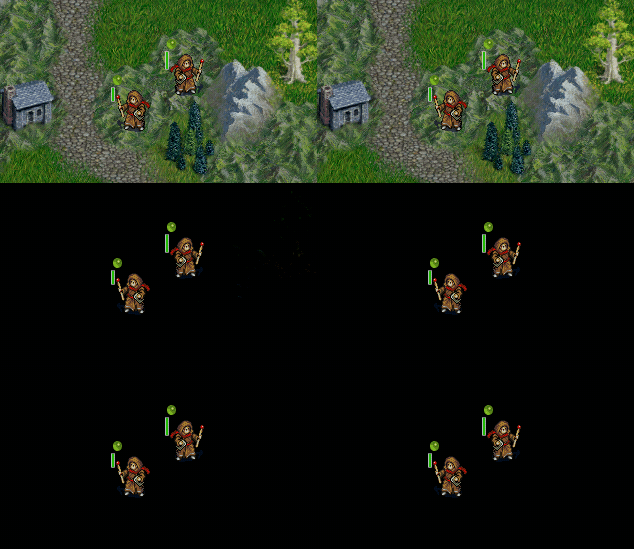 (BfW 1.16.x - final fade result: units stand on the black screen)
If someone wants to quickly test this and see for themselves, they can just create a simple custom event with {FADE_TO_BLACK} and :fire it in-game:
(BfW 1.16.x - final fade result: units stand on the black screen)
If someone wants to quickly test this and see for themselves, they can just create a simple custom event with {FADE_TO_BLACK} and :fire it in-game:
[event] name=fade {FADE_TO_BLACK} [/event]
In my opinion the more "immersive" way to perform such visual transitions would be to make them affect everything players see on a map (including units, labels, etc.). Then it would look like this:
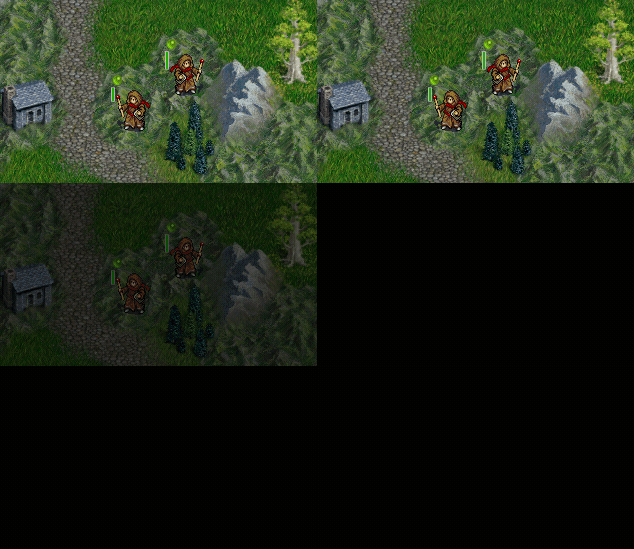 (my proposal - notice the units and their hp bars are also slowly fading to black - final fade result: the perfectly black screen)
The example above could work great for a final scene of a campaign right before showing the Credits screen.
(my proposal - notice the units and their hp bars are also slowly fading to black - final fade result: the perfectly black screen)
The example above could work great for a final scene of a campaign right before showing the Credits screen.
Also, this could be really useful in case of special effects like powerful spells illuminating the entire map. I am aware there are macros like FLASH_WHITE etc. but they are based on [color_adjust] which does not affect units.
An improved fade to white effect, combined with additive blend mode (if supported) could look like this:
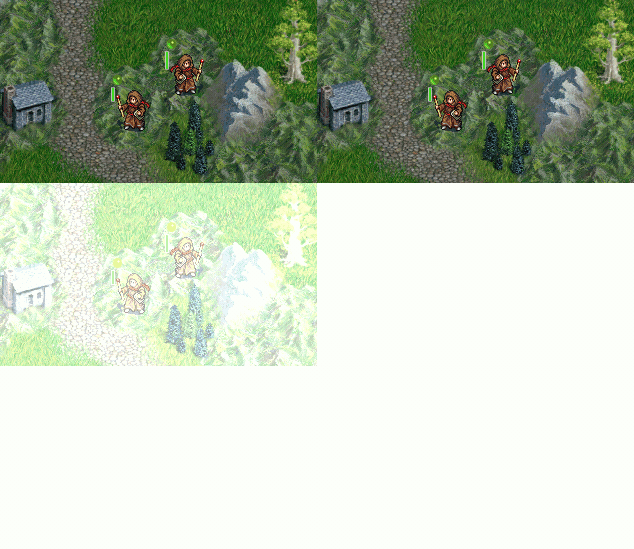
This kind of improved transitions could be handled by a new [screen_fade] tag supporting keys like: type (fade_in, fade_out, instant), delay (ms), red, green, blue (0-255), affect_units (yes/no), blending_mode (multiply, add), interpolation (linear, cubic, sinusoidal), etc. for complete control. In this solution the behavior of the [color_adjust] tag would not be changed at all and the two tags could co-exist with each other.
I do realize this is a small low-priority cosmetic proposal, but still it would be really nice to have, especially that mainline campaigns and UMC often use fade effects for things like cutscenes. Improving those effects could make such cutscenes look much better in my opinion. Besides, the vast majority of games I know, use this kind of complete fading so why not have this in BfW as well?
(Note: If such feature is already present and achievable by using lua or other methods, please let me know. I just might not be aware of it.)

I believe currently it's done by using something like that in combination with fades but it's not as smooth.
        [hide_unit]
            [filter]
            [/filter]
        [/hide_unit]
This code simply hides all units on the map but also it does it instantaneously so sometimes players can see that units already disappeared or already appeared before fade in or out is finished. Complete fades would be better solution.

I haven't tried it in a scenario, but it looks like you can black out the screen with [time], so would some sort of [replace_schedule] macro work? Keeping the unit sprites un-faded can be useful for reasons of focus, so it would be nice to have both options available.

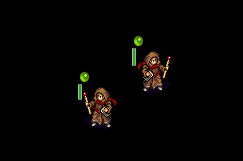
Using [time] to black out the screen doesn't affect units, so it works exactly like [color_adjust]. Here's the code I used.
		[replace_schedule]
			[time]
				id=test
				name= _ "test"
				image=misc/time-schedules/default/schedule-dawn.png
				red=-255
				green=-255
				blue=-255
			[/time]
			current_time=0
		[/replace_schedule]
And here's the result - unit sprites are still visible (1.16.3):
Of course keeping them visible during fade sequences is useful for reasons of focus as doofus-01 said, but there might be some situations where this is not strictly necessary and fading -everything- in a smooth manner (including unit sprites) could produce a more pleasant visual experience in my opinion. Using [hide_unit] after completing the fade to black sequence to get rid of all visible units and make the screen completely black is something I often use in TLU, but the effect is not smooth but "instantaneous" as Hejnewar described. My Feature Request tries to solve that in a way.
I believe one of the options to achieve smooth fading of everything would be to implement a special render layer above the main map section of the game screen which could be accessed with WML. Something like this:
I believe one of the options to achieve smooth fading of everything would be to implement a special render layer above the main map section of the game screen which could be accessed with WML.
It might be possible to do that with terrain-graphics. Doing it one-hex-at-a-time wouldn't require anticipating the map size, but may be laggy.
Layers above and below the map, that support animation, can be bigger than the map (or tiled), and can scroll at a different absolute speed (like for parallax scrolling) would be pretty nice.
Turns out terrain-graphics didn't completely work, even if I'd figured out how to trigger it in a useful way.
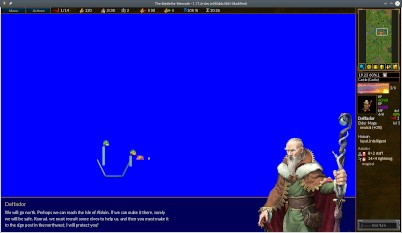
But [item]halo= with terrain=* as a location filter seems to work. Or maybe just no x,y= works; I didn't look into this too much.
#define COMPLETE_FADE_STEP COLOR AMOUNT
    terrain/alphamask.png~BLEND({COLOR},1.0)~O({AMOUNT}):300#enddef

#define COMPLETE_FADE_TO_BLACK
    [lock_view]
    [/lock_view]
    [item]
        name=fade_to_black
        terrain=*
        halo="
            {COMPLETE_FADE_STEP (0,0,255) 0.1},
            {COMPLETE_FADE_STEP (0,0,255) 0.2},
            {COMPLETE_FADE_STEP (0,0,255) 0.3},
            {COMPLETE_FADE_STEP (0,0,255) 0.4},
            {COMPLETE_FADE_STEP (0,0,255) 0.5},
            {COMPLETE_FADE_STEP (0,0,255) 0.6},
            {COMPLETE_FADE_STEP (0,0,255) 0.7},
            {COMPLETE_FADE_STEP (0,0,255) 0.8},
            {COMPLETE_FADE_STEP (0,0,255) 0.9},
            {COMPLETE_FADE_STEP (0,0,255) 1.0}
            "
     [/item]
     [delay]
            time=2000
     [/delay]
     [item]
        name=final_black
        terrain=*
        halo="terrain/alphamask.png~BLEND(0,0,255,1.0)"
     [/item]
#enddef
The animation times and [delay] time might have sync issues, and this may be a hack abusing the item tag, but it seems to work on 1.16 and master.
Nice, that's definitely a progress but... this solution doesn't affect animated halos in unit idle animations. These are still rendered on top of everything. I am talking about something like this:
    [idle_anim]
        start_time=0
        [frame]
            image="units/darkblood-saurians/chosenofforest.png"
            halo="halo/chosenofforest-magic[1~8,7~1].png:75" #this one is still rendered on top of everything
        [/frame]
    [/idle_anim]
Here's the screenshot:

The game probably assigns a "high priority" status for halo animations and draws them on top of everything else. This is probably a limitation (or a feature) of the current rendering engine.
I am pretty sure having a separate "rendering layer" above the map would solve this, but it may require a total overhaul of said rendering system.
The issue with halo animations can be considered as an edge case, because there are few units which have such animations.
To sum up: doofus-01 has provided an acceptable solution/hack, which is not perfect, but will be sufficient for those trying to implement complete fades in their projects. Still having a separate "rendering layer" above the map would be pretty nice, so I am leaving the decision about closing this FR up to developers.
I might add a full-screen fade surface... two questions:
- should it cover just the game map? Or also the UI portion as well?
- what should it ideally look like in WML and where should it go?

I might add a full-screen fade surface... two questions:
1. should it cover just the game map? Or also the UI portion as well?

2. what should it ideally look like in WML and where should it go?
Re: 1) ideally there should be a dedicated wml key to select the behavior of the fade surface. Something like affect_ui=(yes,no). If that's too complicated to implement, restricting the fade surface to the game map only will do just fine.
Re: 2) I imagine this as a new [screen_fade] tag and I think it should belong to InterfaceActionsWML.
[screen_fade]
	type=(fade_in, fade_out, fade_in_out)
	duration=(ms) #if 0 the effect is instantaneous
	red,green,blue=(0-255,0-255,0-255)
	affect_ui=(yes, no)
	affect_units=(yes, no)
	blending_mode=(normal, multiply, add)
[/screen_fade]
I've been thinking about including the interpolation= key but scrapped the idea, because most people would use linear anyway.
P.S. @mesilliac I'd like you to know that I really appreciate your help in improving the rendering engine. Just as Hejnewar said on Discord, I too am thankful for everything you've done for this game. 😉
The current implementation is
[screen_fade]
	duration=(ms) #if 0 the effect is instantaneous
	red,green,blue=(0-255,0-255,0-255)
	alpha=(0-255)
[/screen_fade]
Fade in/out can be done by setting alpha to 255 for fade out and 0 for fade in. It will actually keep the fade atferwards, so you could say fade to (128,128,128,128) and leave it for a persistent fog effect.
I briefly tried to add an option for fading the UI as well, but there are some problems with the old GUI-1 buttons. I might end up doing it anyway but it will be a bit hacky if so.
For fades not affecting units it's a bit difficult as units are drawn as part of terrain. But this can still be done using the old [color_adjust] method so i think that's okay. That method is however very slow. It needs SDL 2.0.18 to optimize.
A blend mode option could pretty easily be added.
Interpolation would also be easy to add but i don't think wesnoth has any tweening functions yet.
There's also the issue that colour operations are all done in sRGB space... wesnoth's colour handling is really not very accurate at all.
The code for this relies on #6855 so i'll put up a PR for this once that is merged.
Fade in/out can be done by setting alpha to 255 for fade out and 0 for fade in. It will actually keep the fade afterwards, so you could say fade to (128,128,128,128) and leave it for a persistent fog effect.
Nice! This will surely come in handy.
I like the current implementation and I am pretty sure some mainline campaigns will already benefit from it. More advanced parameters (like interpolation and blend modes) can always be added in the future if the need arises.
Thanks for implementing this, @mesilliac 😉

There is a screen fade effect used in Easter Invasion scenario 17b, after killing a requisite number of liches. I verified in 1.16 units still show through the effect while in current master (1.17.17+dev) the units are covered by the effect. So I think this is completed.