

 wesnoth
MacOS: 1.13.10b requires High Performance Graphics
Minor nit but I noticed that Wesnoth 1.13.10b on OS X 10.12.6 MacBook Pro (Retina, 15-inch, Late 2013) activates the NVidia graphics, eating the battery. Can this be tweaked? I think it's just a pinfo file thing...

It looks like Wesnoth is too aggressive with rendering at high FPS.
Normally, you should be able to control this via the CLI when starting Wesnoth. --max-fps 30 for example would limit it to 30 frames per second; --fps displays the frames per second when playing a game. (In terminal, if you were to cd /Applications/Wesnoth.app/Contents/MacOS you can then type ./Wesnoth --max-fps 30 --fps. However, that’s not capping the frame-rate for me, so it may be a bug.)

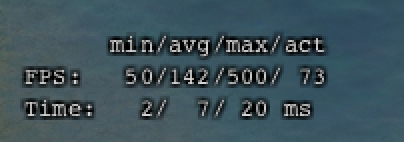
This is an example of the frame-rate I am getting on my Mac with --max-fps set to 30:
On top of FPS cap, switching to a built-in video card looks like a good idea. Should be doable, though, need to watch out for a minimum OpenGL version provided by built-in and discrete cards - they can differ.

Based on further discussion on Discord, it seems that --max-fps XX does work based on checking CPU usage, but the data displayed by --fps may not be accurate, or at least doesn't make immediate sense:

It isn't very clear to me why min-max is reported as 40-100, but actual is reported as 10.

@Pentarctagon That happens because min/max/avg ignore the delays that the engine uses to limit the FPS. They tell you what the FPS would be like without the cap.

We need somebody with a MacBook with a GeForce (@hrubymar10?) to try this:
- see if Wesnoth uses discrete adapter (GeForce);
- try adding this to, say,
wesnoth.cppand see if it changes anything:
// https://stackoverflow.com/questions/16823372/forcing-machine-to-use-dedicated-graphics-card/39047129#39047129
#ifdef _WIN32
#define WESNOTH_EXPORT __declspec(dllexport)
#elif defined __APPLE__
#define WESNOTH_EXPORT __attribute__((visibility("default")))
#endif
extern "C"
{
WESNOTH_EXPORT unsigned long NvOptimusEnablement = 0;
WESNOTH_EXPORT int AmdPowerXpressRequestHighPerformance = 0;
}
Might be useful on Windows/Linux too.
Hey folks, I just tried this with BoW 1.14.5 on MacOS Mojave (Macbook Pro 2013, Intel IGP). I have set --max-fps 15 --fps and it appears to work, well I see number around 15-20 in the last column called "act". If that stands for "actual" then I can confirm it works fine. However I see some huge numbers at min/max/avg columns (over 200), need to confirm after some gameplay.
Edit: Comments above explains that "act" is really expected value. It is slightly above my cap set to 15 but that is fine :-)
Edit 2: Correction, when I launched the game for the 2nd time, "act" was getting as high as 120 fps. :-(

I'm wondering how Wesnoth activates the dedicated GPU on a laptop. I thought up till now (currently 1.14.9 release) all rendering is still being done in software. What could be triggering the GPU in this case?

The rendering system has been upgraded and overhauled. It should no longer devour battery, but i'm not sure if this issue as stated is resolved. It seems related or similar to #5494 which was confirmed resolved. Can anyone confirm one way or the other whether this is still a problem with 1.17.6?

1.17.6 still has a “Requires High Performance Graphics” requirement on MacOS (I’m still running 10.14.6 Mojave) turning on the GPU when it’s launched.
On Jul 22, 2022, at 7:24 PM, Tommy @.***> wrote:
The rendering system has been upgraded and overhauled. It should no longer devour battery, but i'm not sure if this issue as stated is resolved. It seems related to #5494 which was confirmed resolved. Can anyone confirm one way or the other whether this is still a problem with 1.17.6?
— Reply to this email directly, view it on GitHub, or unsubscribe. You are receiving this because you authored the thread.
I think it would be up to @hrubymar10 to decide whether that's needed, then. It might be, since it's using the GPU now, but I don't know what that setting does so I can't be sure.
