

 werman
Not clear on how to install and use.
The instructions on how to use this for pipewire is not clear. You guys link to each other but you don't actually say were to edit/save the files.

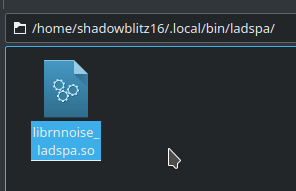
so I just put it in ~/.local/bin/ladspa/librnnoise_ladspa.so but it can't find it when I start the service
shadowblitz16@Kubuntu-Node202:~/Documents/dev/pipewire$ PIPEWIRE_DEBUG=2 pipewire -c ~/.local/share/pipewire/noise-suppression.conf
[E][32845.211665] default      | [ ladspa_plugin.c:  268 load_ladspa_plugin()] failed to load plugin '~/.local/bin/ladspa/librnnoise_ladspa.so': No such file or directory
[E][32845.211735] mod.filter-chain | [module-filter-ch: 1242 setup_graph()] no inputs
[E][32845.211758] mod.filter-chain | [module-filter-ch: 1730 pipewire__module_init()] can't load graph: Invalid argument
[E][32845.211902] pw.conf      | [          conf.c:  412 load_module()] 0x559444b0fc30: could not load mandatory module "libpipewire-module-filter-chain": Invalid argument
[E][32845.212085] default      | [      pipewire.c:  123 main()] failed to create context: Invalid argument
~/.local/share/pipewire/noise-suppression-conf
# Noise canceling source
#
# start with pipewire -c filter-chain/source-rnnoise.conf
#
context.properties = {
    log.level        = 0
}

context.spa-libs = {
    audio.convert.* = audioconvert/libspa-audioconvert
    support.*       = support/libspa-support
}

context.modules = [
    {   name = libpipewire-module-rtkit
        args = {
            #nice.level   = -11
            #rt.prio      = 88
            #rt.time.soft = 200000
            #rt.time.hard = 200000
        }
        flags = [ ifexists nofail ]
    }
    {   name = libpipewire-module-protocol-native }
    {   name = libpipewire-module-client-node }
    {   name = libpipewire-module-adapter }

    {   name = libpipewire-module-filter-chain
        args = {
            node.name =  "rnnoise_source"
            node.description =  "Noise Canceling source"
            media.name =  "Noise Canceling source"
            filter.graph = {
                nodes = [
                    {
                        type = ladspa
                        name = rnnoise
                        plugin = ~/.local/bin/ladspa/librnnoise_ladspa.so
                        label = noise_suppressor_stereo
                        control = {
                            "VAD Threshold (%)" 50.0
                        }
                    }
                ]
            }
            capture.props = {
                node.passive = true
            }
            playback.props = {
                media.class = Audio/Source
            }
        }
    }
]
~/.config/systemd/user/pipewire-noise-suppression-chain.service
[Unit]
Description=PipeWire Input Filter Chain
After=pipewire.service
BindsTo=pipewire.service

[Service]
ExecStart=/usr/bin/pipewire -c ~/.local/share/pipewire/noise-cancel.conf
Type=simple
Restart=on-failure

[Install]
WantedBy=pipewire.service
plugin = ~/.local/bin/ladspa/librnnoise_ladspa.so
This should be an absolute path and not a relative. E.g.
plugin = /home/shadowblitz16/.local/bin/ladspa/librnnoise_ladspa.so


I agree, but I am missing what to do for Raspbian. Do I need to compile from sources myself? And if so, how? Or can we use x64.so file by just downloading it as well?

Raspian is based on Debian
Just make sure that the required packages are installed, there isn't anything different between distros other than the packages
huh what? literally nothing got solved under this thread. i have the same issue as the original author of this issue

huh what? literally nothing got solved under this thread. i have the same issue as the original author of this issue
What exactly the issue do you have? Which step doesn't work or isn't clear for you?
Keep in mind that for a single click solution it would be better to use EasyEffects (formerly pulseeffects).
But yes, I'll add a few clarification to the readme.
Thank you for the feedback! In between I managed to get it running (although I get too much voice cut off at the beginning of my words when using it as hands-free mic filter for my CarPC (Raspberry Pi4). I am not sure if I could adapt that.
But my initial problem was to understand what I have to do to set it all up - of course I was newbie on that topic and that may have caused my confusion. Actually I was at the same time very confused about pulse audio configuration as well, but also got that running.
I think an example asound.conf and clarification of the question of configuration should be done in /etc/asound.conf or in /home/pi/.asoundrc would help a others lot.
Von meinem iPhone gesendet
Am 15.01.2022 um 00:04 schrieb Danil @.***>:
huh what? literally nothing got solved under this thread. i have the same issue as the original author of this issue
What exactly the issue do you have? Which step doesn't work or isn't clear for you?
Keep in mind that for a single click solution it would be better to use EasyEffects (formerly pulseeffects).
But yes, I'll add a few clarification to the readme.
— Reply to this email directly, view it on GitHub, or unsubscribe. Triage notifications on the go with GitHub Mobile for iOS or Android. You are receiving this because you commented.
huh what? literally nothing got solved under this thread. i have the same issue as the original author of this issue
What exactly the issue do you have? Which step doesn't work or isn't clear for you?
Keep in mind that for a single click solution it would be better to use EasyEffects (formerly pulseeffects).
But yes, I'll add a few clarification to the readme.
Tried easyeffects, don't want to use it for the same reasons you mentioned in your doc. But can't seem to figure out how to install the said plugin for pipewire. Running on arch linux
P.S: I usually get away with AUR for packages outside official builds so never had to deal with anything out of PKGBUILDs. Really clueless