

 webpack-contrib
Hot Module Replacement not reloading page After HTML changes
I'm having this issue using HtmlWebpackPlugin along side webpack-hot-middleware where the hot middle-ware don't refresh the page after html changes . and here is a snippet of my
webback.config.js
const path = require('path');
const HtmlWebpackPlugin = require('html-webpack-plugin');
const webpack = require('webpack');

module.exports = {
  context: path.resolve(__dirname), // string (absolute path!)

  entry: { // string | object | array
    main:['webpack-hot-middleware/client?path=/__webpack_hmr&timeout=20000&reload=true', './src/js/main']
  },
  // Here the application starts executing
  // and webpack starts bundling
  output: {

    path: path.resolve(__dirname, 'dist'), // string

    filename: 'js/[name].js', // string
    // the filename template for entry chunks

    publicPath: '/', // string
  },
  plugins: [
    new HtmlWebpackPlugin({
      title: 'Titanium',
      template: path.resolve(__dirname, './src/index.html'),
      inject: true,
    }),
    new webpack.HotModuleReplacementPlugin(),
    new webpack.NoEmitOnErrorsPlugin()
  ],
  // list of additional plugins
  resolve: {
    extensions: [' ', '.js', '.es6']
  },
}
Server.js
// import express
const express = require('express');
// create the express instance
const app = express();

(function() {

  // Step 1: Create & configure a webpack compiler
  const webpack = require('webpack');
  const webpackConf = require('./webpack.config.dev.js');
  const webpackCompiller = webpack(webpackConf);

  // Step 2: Attach the dev middleware to the compiler & the server
  app.use(require("webpack-dev-middleware")(
    webpackCompiller,
    {
      publicPath: webpackConf.output.publicPath,

      stats: {
        colors: true
      },
    })
  );
  // webpackDevMiddleware serves the files emitted from webpack
  // over an express server
  // documentation : https://github.com/webpack/webpack-dev-middleware


  // Step 3: Attach the hot middleware to the compiler & the server
  app.use(require("webpack-hot-middleware")(webpackCompiller));
  // Webpack hot reloading attached to express server
  // documentation : https://github.com/glenjamin/webpack-hot-middleware

})();

app.listen(3000, function(err) {
  if (err) {
    return console.error(err);
  }

  console.log('Listening at http://localhost:3000/');
});
here is the output on the console and change event are emitted by the browser view is not changed at all


This is after you make an HTML change?
The HTML plugin doesn't interact the usual way with the bundle, so the standard hot reloading API doesn't work with it.
You might be able to use the custom-even binding stuff from https://github.com/glenjamin/webpack-hot-middleware/issues/23 to wire up some custom behaviour when the HTML changes.
Sorry this isn't documented, i'll make a note to get this added.
I vaguely remember seeing some examples of people doing this for html plugin, but can't remember where now.

Yes @glenjamin it's after i make an HTML change and save the files knowing that the cli console pickup the changes but nothing is updated on the browser view and as you said i saw a lot of threads about this specific problem but non of them was useful most of the issues discussions are related to react specific behaviour so non of them is useful here not sure even if it's a webpackHTMLPlugin 's problem or hot reload's related and i really need to find a way around or a hack
Working Solution
So here is how i managed to solve this problem thanks to @glenjamin and @mcmire on #23 And here is the demo repository
FILE STRUCTURE
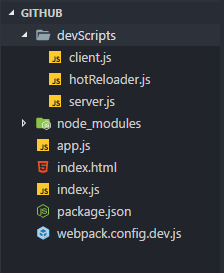
this is the augmented hot reload client ./devScripts/Client.js
// client.js
(function() {
    'use strict';
    const webpackHotMiddlewareClient = require('webpack-hot-middleware/client?reload=true');

    webpackHotMiddlewareClient.subscribe(function(payload) {
        if (payload.action === 'reload' || payload.reload === true) {
            window.location.reload();
        }
    });

    module.exports = webpackHotMiddlewareClient;
}());
this is the file watcher it watches for html changes using the chokidar utility ./devScripts/hotReloader.js
(function() {
  'use strict';
  const path = require('path');
  const chokidar = require('chokidar');

  function activate(server) {
    /**
     * Here, we use Chokidar to force page reloading for some other file types
     * like html changes or php if you want
     */
    const watcher = chokidar.watch([
        path.resolve(__dirname, '../index.html'),// index.html is on the root folder
    ]);
    watcher.on('ready', function() {
        console.log('Initial scan complete. Ready for changes');
    });
    watcher.on('change', function(path) {
        console.log('File [' + path + '] changed !');
        // reload the client on file changes
        server.reloadClient();
    });
  }
  // here we export an activate function to activate the watcher
  module.exports = {
    activate: activate,
  };
}());
now we have to Setup the express server
./devScripts/server.js
const path = require('path');
// import express
const express = require('express');

// import webpack and the dev & hot middlewares
const webpack = require('webpack');
const webpackDevMiddleware = require('webpack-dev-middleware');
const webpackHotMiddleware = require('webpack-hot-middleware');

function createServer() {
  // Step 1: create the express instance
  const app = express();

  // Step 2: Create & configure a webpack compiler
  const webpackConf = require('../webpack.config.dev.js');
  const webpackCompiller = webpack(webpackConf);

  const hotMiddleware = webpackHotMiddleware(webpackCompiller);
  const devMiddleWare = webpackDevMiddleware(
    webpackCompiller,
    {
      publicPath: webpackConf.output.publicPath,
   });

  // Step 3: Attach the dev middleware and hot middleware to the server
  app.use(devMiddleWare);
  app.use(hotMiddleware);

  function startServer() {
    app.listen(3000, function(err) {
      if (err) {
        console.error(err);
        return;
      }
      // log server running
      console.log('Listening at http://localhost:3000/');
    });
  }// end function start server

  /**
   *
   */
  function reloadClient() {
    hotMiddleware.publish({action: 'reload'});
  }// end function RelaodClient

  return {
    start: startServer,
    reloadClient: reloadClient,
  };
}
module.exports = createServer();
finally we have the root index.js which is the bootstrap file that runs all of this
./index.js
const path = require('path');
const server = require(path.resolve(__dirname,'./devScripts/server'));
const hotReloader = require(path.resolve(__dirname,'./devScripts/hotReloader'));

// Activate the costum hotReloader
hotReloader.activate(server);
// start the server
server.start();
now the webpack config contents are as follow webpack.config.dev.js
const path = require('path');
const HtmlWebpackPlugin = require('html-webpack-plugin');
const webpack = require('webpack');

module.exports = {
  context: path.resolve(__dirname),  // the home directory for webpack

  // here we import the augmented (custom) hot reloader client
  entry: { // string | object | array
    main:['./devScripts/client', './app']
  },

  output: {

    path: path.resolve(__dirname, 'dist'), // the target directory for all output files

    filename: 'js/[name].js', // the filename template for entry chunks

    publicPath: '/', // the url to the output directory resolved relative to the HTML page

  },
  plugins: [
    new webpack.HotModuleReplacementPlugin(),
    new webpack.NoEmitOnErrorsPlugin(),
    new HtmlWebpackPlugin({
      title: 'Titanium',
      template: path.resolve(__dirname, './index.html'),
      inject: true,
    }),
  ],
  devtool: 'source-map', // use source-map for production
  stats: 'errors-only',  // lets you precisely control what bundle information gets displayed
}
Hi, thanks for sharing this. Can you comment on the reason for this workaround?

this because of problems when trying to use webpack-html-plugin with hot reload as @glenjamin stated The HTML plugin doesn't interact the usual way with the bundle
Got it. I've been having problems with this as well, but I wasn't using webpack-html-plugin. Just express and webpack-dev-middleware and I couldn't get it to work.

