webpack-contrib
Angular scripts chunk is opaque (again)
Issue description
Looks like #160 except that I am running latest [email protected]...
...and Angular 8 (maybe that's the root of the problem).
Technical info
- Webpack Bundle Analyzer version: 3.3.2
- Webpack version: 0.6.9
- Angular CLI version: 8.1.0
- Node.js version: v10.16.0
- npm/yarn version: 1.16.0
- OS: Windows 10
Debug info
Reproduction steps:
- Download a test project from StackBlitz: https://stackblitz.com/edit/angular-analyze-scripts-bundle
The project has several scripts imported using "scripts" in angular.json:
//...
"scripts": [
    "node_modules/jquery/dist/jquery.min.js",
    "node_modules/vis/dist/vis.min.js"
]
//...
- Run commands below
yarn
yarn run ng build --prod --stats-json
yarn run webpack-bundle-analyzer ./dist/demo/stats.json -m static -r webpack-bundle-analyzer-report.html
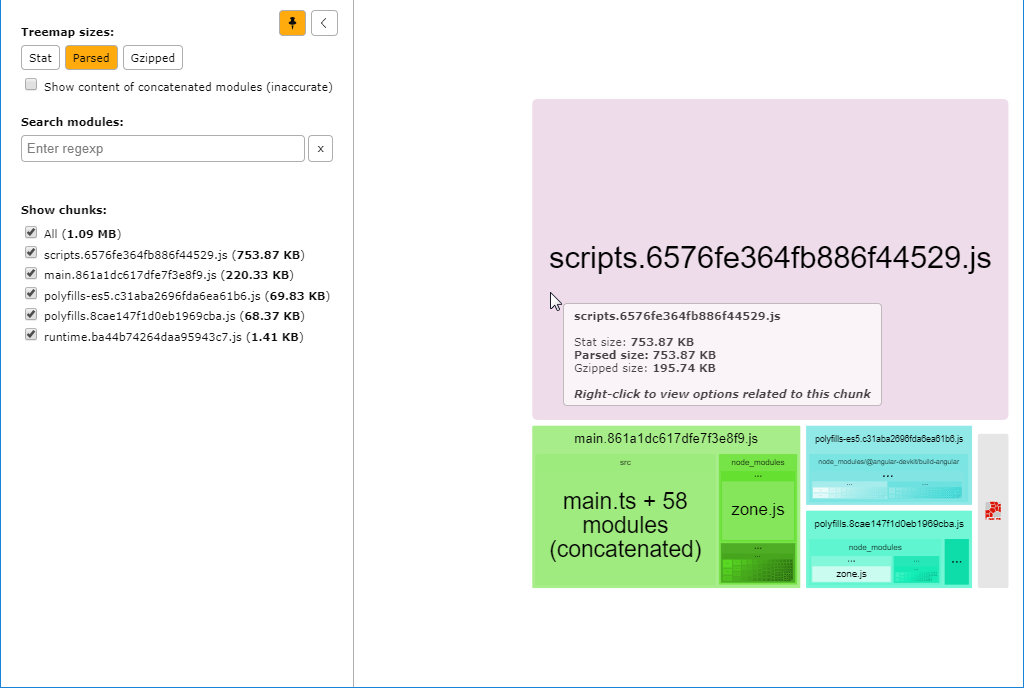
The screenshot above is taken from the generated report. Note that the scripts chunk is displayed as "opaque" (without any contents), while in fact it consists of jquery.min.js and vis.min.js.
The stats.json file is also attached above.

Thanks for the bug report. I'm not sure if it's possible to get anything other than an opaque chunk visible — the stats.json you attached might not contain enough information to figure out what modules make up the scripts chunk.