

 webcompat
cmcreg.bancosantander.es - Unable to type in the "Codigo PIN" number
URL: https://cmcreg.bancosantander.es/nhb-keygeneration/
Browser / Version: Firefox 105.0 Operating System: Android Tested Another Browser: Yes Chrome
Problem type: Site is not usable Description: Unable to type Steps to Reproduce: Pincode input doesn't work on mobile. To get to it, you first need to type a random NIF like "23518204Z" on the second field and click next.
After hitting "Siguiente" (next), the "Código pin" field is unusable (as soon as you type it gets deleted).
Browser Configuration
- None
From webcompat.com with ❤️

Thanks for the report, I was able to reproduce the issue.
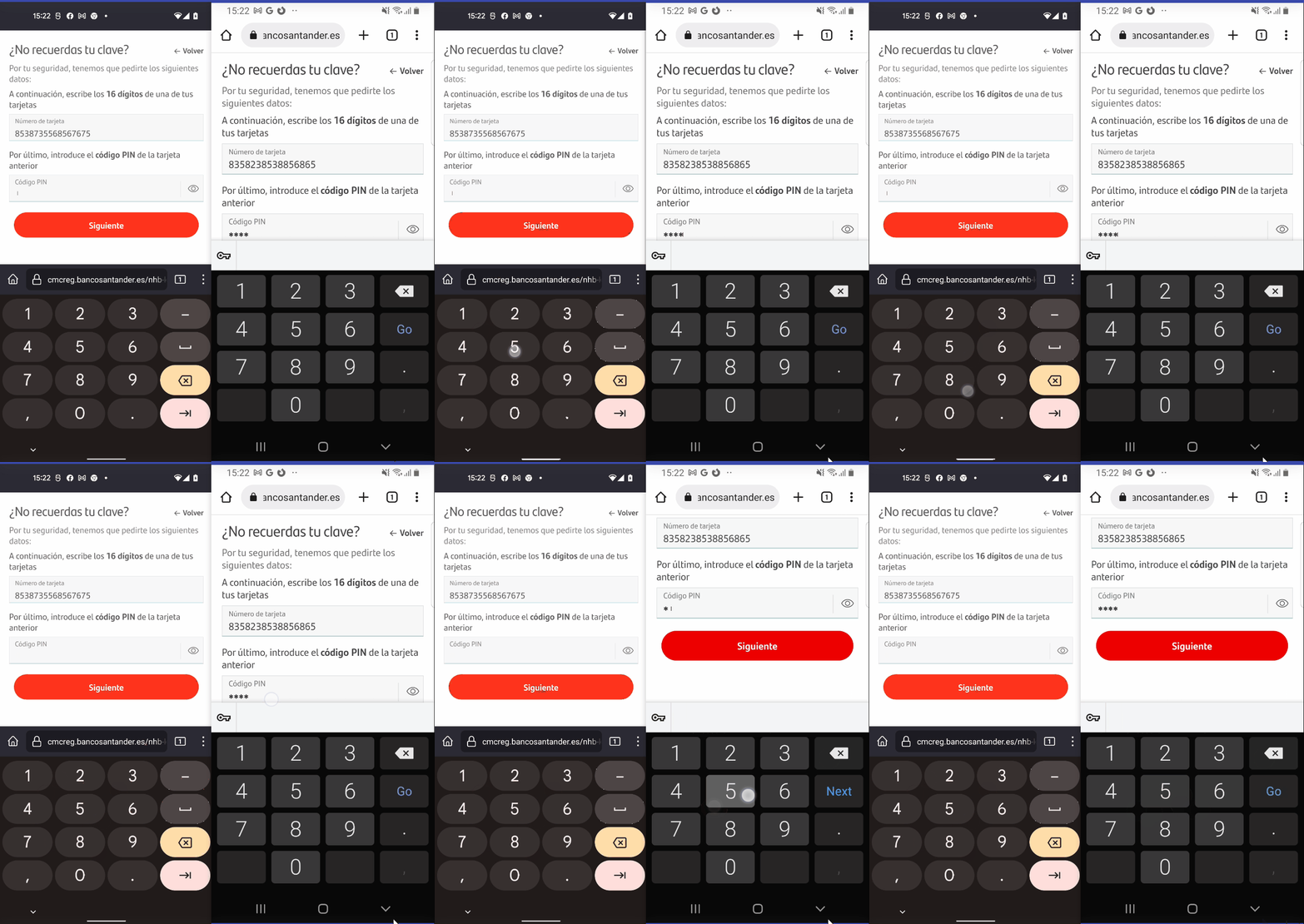
Affected area:
<div _ngcontent-ahu-c162="" class="card-digit-pin">
  <p _ngcontent-ahu-c162="" fxflex="100" class="title" style="flex: 1 1 100%; box-sizing: border-box; max-width: 100%;">Por último, introduce el <strong>código PIN</strong> de la tarjeta anterior </p>
  <div _ngcontent-ahu-c162="" fxflex="100" fxlayout="row wrap" fxlayoutalign="space-between start" style="flex: 1 1 100%; box-sizing: border-box; flex-flow: row wrap; display: flex; place-content: flex-start space-between; align-items: flex-start; max-width: 100%;">
    <div _ngcontent-ahu-c162="" fxlayout="row" fxflex="100" class="clave" style="flex: 1 1 100%; box-sizing: border-box; max-width: 100%; flex-direction: row; display: flex;">
      <div _ngcontent-ahu-c162="" fxflex="100" fxlayout="row wrap" fxlayoutalign="space-between center" fxlayoutgap="5px" placeholder="Clave de acceso" class="clave-container md-block has_placeholder" style="flex: 1 1 100%; box-sizing: border-box; flex-flow: row wrap; display: flex; place-content: center space-between; align-items: center; max-width: 100%;">
        <mat-label _ngcontent-ahu-c162="" fxflex="60" fxlayout="row" class="placeholder" style="margin-right: 5px; flex: 1 1 60%; box-sizing: border-box; max-width: 60%; flex-direction: row; display: flex;"> Código PIN</mat-label>
        <div _ngcontent-ahu-c162="" fxflex="73" fxlayout="row" class="pass-container" style="margin-right: 5px; flex: 1 1 73%; box-sizing: border-box; max-width: 73%; flex-direction: row; display: flex;">
          <app-password _ngcontent-ahu-c162="" fxflex="100" fxlayout="row" style="flex: 1 1 100%; box-sizing: border-box; max-width: 100%; flex-direction: row; display: flex;">
            <form novalidate="" apponeinput="" fxlayout="row wrap" style="flex-flow: row wrap; box-sizing: border-box; display: flex; flex: 1 1 100%; place-content: center flex-start; align-items: center; max-width: 45%;" class="ng-invalid ng-dirty ng-touched">
              <input apppatternonly="" appnextfocus="" appmaxlength="" fxflex="8" fxlayout="row" id="psw" aria-label="pass" class="md-input pass-positions ng-star-inserted ng-dirty ng-touched ng-invalid" name="formControlPass0" type="number" style="flex-direction: row; box-sizing: border-box; display: flex; flex: 1 1 8%; max-width: 8%;" autocomplete="off" maxlength="1">
              <input apppatternonly="" appnextfocus="" appmaxlength="" fxflex="8" fxlayout="row" id="psw" aria-label="pass" class="md-input pass-positions ng-pristine ng-invalid ng-star-inserted ng-touched" name="formControlPass1" type="number" style="flex-direction: row; box-sizing: border-box; display: flex; flex: 1 1 8%; max-width: 8%;" autocomplete="off" maxlength="1">
              <input apppatternonly="" appnextfocus="" appmaxlength="" fxflex="8" fxlayout="row" id="psw" aria-label="pass" class="md-input pass-positions ng-untouched ng-pristine ng-invalid ng-star-inserted" name="formControlPass2" type="number" style="flex-direction: row; box-sizing: border-box; display: flex; flex: 1 1 8%; max-width: 8%;" autocomplete="off" maxlength="1">
              <input apppatternonly="" appnextfocus="" appmaxlength="" fxflex="8" fxlayout="row" id="psw" aria-label="pass" class="md-input pass-positions ng-untouched ng-pristine ng-invalid ng-star-inserted" name="formControlPass3" type="number" style="flex-direction: row; box-sizing: border-box; display: flex; flex: 1 1 8%; max-width: 8%;" autocomplete="off" maxlength="1">
              <!---->
              <!---->
              <!---->
            </form>
          </app-password>
        </div>
        <div _ngcontent-ahu-c162="" fxflex="10" fxlayout="row wrap" fxlayoutalign="end center" class="pass-icons without-margin-right" style="flex: 1 1 10%; box-sizing: border-box; flex-flow: row wrap; display: flex; place-content: center flex-end; align-items: center; max-width: 10%;">
          <div _ngcontent-ahu-c162="" fxflex="100" fxlayout="row" fxlayoutalign="space-around center" style="flex: 1 1 100%; box-sizing: border-box; flex-direction: row; display: flex; place-content: center space-around; align-items: center; max-width: 100%;">
            <div _ngcontent-ahu-c162="" fxflex="1px" class="icons-separator" style="flex: 1 1 1px; box-sizing: border-box; max-width: 1px; min-width: 1px;"></div>
            <div _ngcontent-ahu-c162="" fxflex="32px" class="eye-wrapper" style="flex: 1 1 32px; box-sizing: border-box; max-width: 32px; min-width: 32px;">
              <!---->
              <em _ngcontent-ahu-c162="" class="o-san-eye ng-star-inserted"></em>
              <!---->
            </div>
          </div>
        </div>
      </div>
    </div>
  </div>
</div>  </div>
</div>
Note: The issue is not reproducible on Chrome.
Tested with: Browser / Version: Firefox Nightly 105.0a1 (🦎 105.0a1-20220816095503), Firefox Release 103.2.0 (🦎 103.0.2-20220802163236) Operating System: Google Pixel 5 (Android 12) - 1080 x 2340 pixels, 19.5:9 ratio (~432 ppi density), Samsung Galaxy S8 (Android 9) - 1440 x 2960 pixels, 18.5:9 ratio (~570 ppi density)
Moving to Needsdiagnosis for further investigation.
[qa_33/2022]

This reproduces for me with a Chrome or Firefox mobile UA string, but not a Firefox desktop one.
Hmm. They seem to be intentionally removing the last character of the password for some reason every time you key-up:
      o.prototype.keyUpPass = function (o) {
        this.error.removeAllWarning();
        var e = o.keyCode || o.which;
        if (229 !== e) if (13 !== e) if (this.communication.isAndroid()) {
          var t = '';
          8 === e ? (t = this.virtualPass.slice(0, - 1), this.deleteCharacter(t)) : 0 !== e && 229 !== e && this.deleteCharacter(this.virtualPass)
        } else this.manejarEvento(e, o);
         else this.submited.emit(!0);
         else this.checkAndroidDesktopMode() ? this.manejarEvento(e, '' + o.target.value) : this.manejarEvento(e, o)
      },
Basically, the code gets into the isAndroid if-statement, then this.deleteCharacter(this.virtualPass), where this.virtualPass is an empty string. This is deleteCharacter:
      o.prototype.deleteCharacter = function (o) {
        var e = this.virtualPass.length - 1;
        e >= 0 && this.formGroupPass.get('formControlPass' + e).setValue(''),
        this.inputsPass._results[e] ? this.inputsPass._results[e].nativeElement.focus() : this.inputsPass._results[this.virtualPass.length] && this.inputsPass._results[this.virtualPass.length].nativeElement.focus(),
        0 === e && (this.showIcon = !1),
        this.form.setValue('newPassword', o),
        this.newPass.emit(o)
      },
It ends up setting the value to an empty string in the second-last line. So this looks fully intentional. Let's see what happens in Chrome. Ah, this.virtualPass is not an empty string, that's the key difference here.
So when is this virtualPass variable set to something in Chrome? Here, as you type:
                this.subscriptions.push(this.form.getForm().subscribe((function(o) {
                    if (c.hBform = o,
                    "string" == typeof c.hBform.newPassword) {
                        c.virtualPass = c.hBform.newPassword;  // right here, to be precise
                        var e = -1;
                        c.formGroupPass && Object.keys(c.formGroupPass.controls).forEach((function(o) {
                            e++,
                            c.formGroupPass.get(o).setValue(c.virtualPass[e])
                        }
                        ))
                    }
                }
Whereas Firefox never ends up in that function, which would explain it. The stack trace for Chrome getting there includes:
e.setValue
o.manejarEvento
o.checkChange
Which is ultimately coming in from polyfills.js via a textInput event. Ugh. So that's it. This seems to be the code:
        s.ɵɵlistener('keyup', (function (o) {
          return s.ɵɵrestoreView(t),
          s.ɵɵnextContext().keyUpPass(o)
        })) ('textInput', (function (o) {
          return s.ɵɵrestoreView(t),
          s.ɵɵnextContext().checkChange(o)
        })),
Firefox never gets the textInput events, because it doesn't support that nonstandard event. If I change the instances of textInput to beforeinput in that entire file, things begin to work properly. Sigh. We might be able to re-use the draftJS intervention for this as well, but the site really ought to be listening for the standard beforeinput event these days, not textInput.


Filed https://bugzilla.mozilla.org/show_bug.cgi?id=1803139 for a possible intervention
