

 webcompat
www.vivobarefoot.com - Unable to filter products
URL: https://www.vivobarefoot.com/eu/mens
Browser / Version: Firefox 103.0 Operating System: Windows 10 Tested Another Browser: Yes Edge
Problem type: Site is not usable Description: Buttons or links not working Steps to Reproduce: The filters (colour, style, use, ...) don't work: the cursor doesn't change and clicking does nothing.
Browser Configuration
- None
From webcompat.com with ❤️

Thanks for the report, I'm able to reproduce the issue.
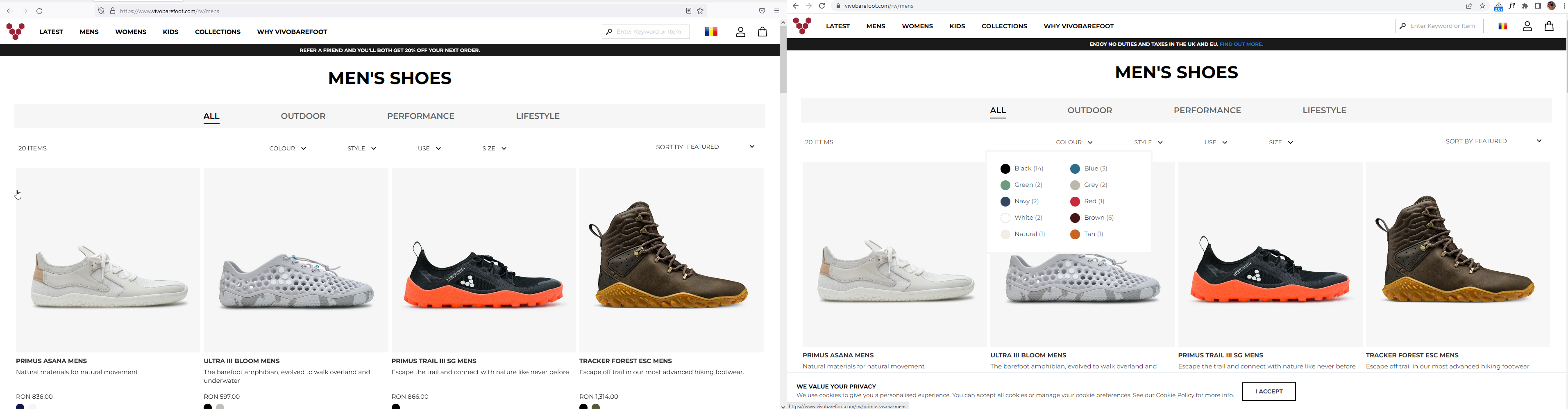
Workaround: If the browser window is resized the filtering is functional.
Note:
- The issue is not reproducible on Chrome.
- The issue is reproducible on Firefox regardless of the ETP status.
- It seems like the Filter section is missing/hidden.
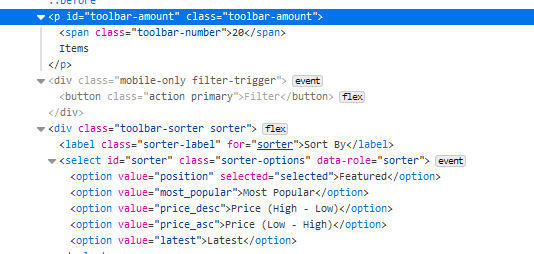
Tested with: Browser / Version: Firefox Nightly 105.0a1 (2022-08-09), Firefox Release 103.0.2 Operating System: Windows 10 Pro
Moving to Needsdiagnosis for further investigation.
[qa_32/2022]

The filters actually seem to work, but there is an element overlaid on top of them (.toolbar-products, the "n items" and "sort by" items to the left and right of the filters) which is preventing it from getting any mouse events. If I add pointer-events:none to that element, it works in Firefox as well.
Oddly, that element also overlaid the same way in Chrome, but that doesn't seem to matter to Chrome. There seems to be something weird going on where the use of flexboxes using ordering prevents mouse clicks when elements are overlaid on one another. I've filed https://bugzilla.mozilla.org/show_bug.cgi?id=1785304 to figure this one out, so let's close this as a duplicate of that.

Actually, this shouldn't be working in Chrome either, based on what Emilio says in the bug I filed. (It's this bug https://bugs.chromium.org/p/chromium/issues/detail?id=606208 that makes it work in Chrome when it ought not to).
The easiest fix here will probably be for the site to add a higher z-index to the filters. This seems to be working in responsive design mode for me, without breaking the "sort by" field:
.page-products .filter-options {
  z-index: 2;
}
