

 wbthomason
hererocks allways fails to install luarocks on windows
-
nvim --version:
NVIM v0.6.1
Build type: RelWithDebInfo
LuaJIT 2.1.0-beta3
Compilado por runneradmin@fv-az152-430

Features: -acl +iconv +tui
See ":help feature-compile"

     archivo "vimrc" del sistema: "$VIM\sysinit.vim"
            predefinido para $VIM: "C:/Program Files/nvim/share/nvim"

Run :checkhealth for more info
-
git --version:
git version 2.34.1.windows.1
- Operating system/version:
Windows 10 Pro
Version: 21H1
Compilation: SO 19043.1466
- Terminal name/version:
PowerShell 7.2.1
Steps to reproduce
- Setup a basic init.lua using packer to try and install a luarokcs dependency
-- some basic lua code here
return packer.startup(function(use, use_rocks)
  use 'wbthomason/packer.nvim'
  use_rocks{
    'winapi'
  }
end)
-- some basic lua code here
- Close Neovim
- Open Neovim
- Run
:PackerSync
Actual behaviour
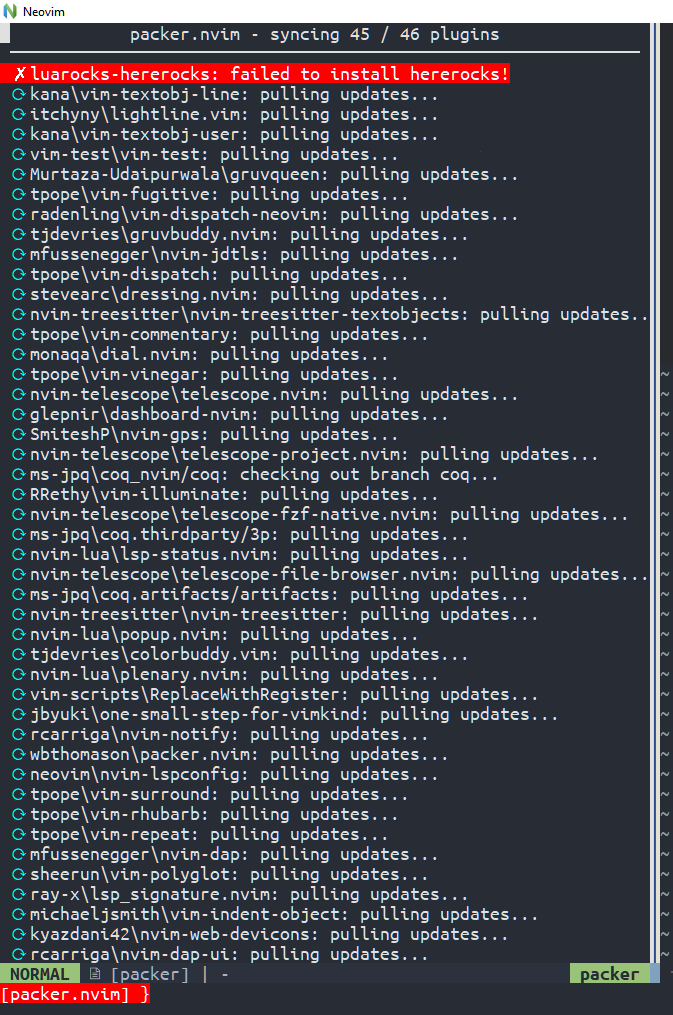
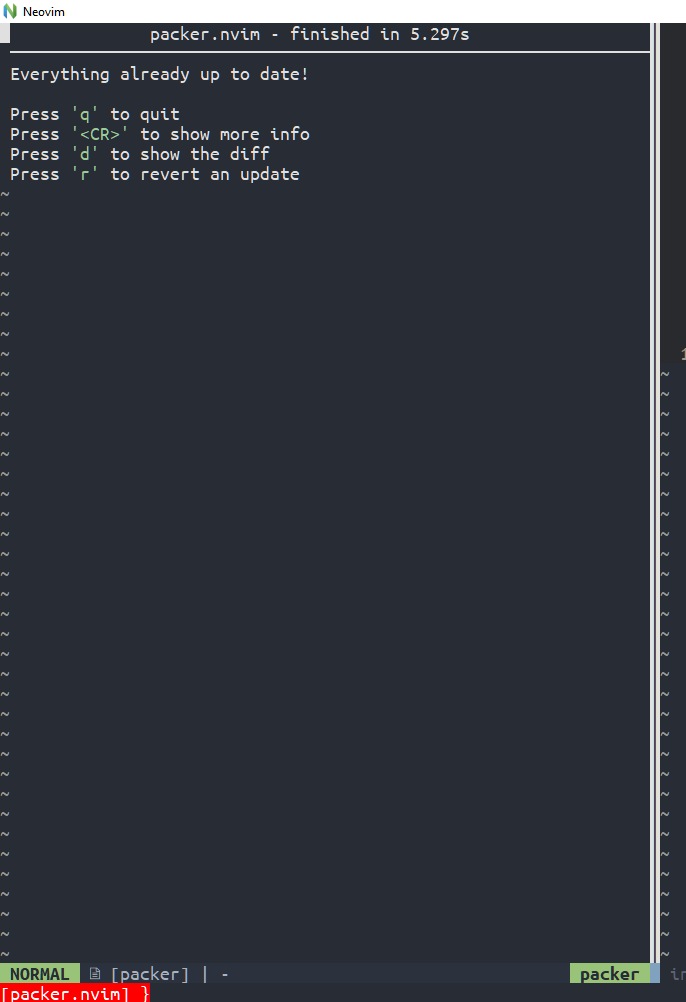
The packer update windows shows an error installing luarocks with hererocks that disappear when all the other updates end.
Expected behaviour
Packer installs luarocks using hererocks and luarocks installs the dependencies specified.
packer files
Plugin specification file(s)
Post or link your plugin specification files here, if you aren't able to provide a minimal reproducer
packer log file
packer compiled file
-- Automatically generated packer.nvim plugin loader code

if vim.api.nvim_call_function('has', {'nvim-0.5'}) ~= 1 then
  vim.api.nvim_command('echohl WarningMsg | echom "Invalid Neovim version for packer.nvim! | echohl None"')
  return
end

vim.api.nvim_command('packadd packer.nvim')

local no_errors, error_msg = pcall(function()

  local time
  local profile_info
  local should_profile = false
  if should_profile then
    local hrtime = vim.loop.hrtime
    profile_info = {}
    time = function(chunk, start)
      if start then
        profile_info[chunk] = hrtime()
      else
        profile_info[chunk] = (hrtime() - profile_info[chunk]) / 1e6
      end
    end
  else
    time = function(chunk, start) end
  end

local function save_profiles(threshold)
  local sorted_times = {}
  for chunk_name, time_taken in pairs(profile_info) do
    sorted_times[#sorted_times + 1] = {chunk_name, time_taken}
  end
  table.sort(sorted_times, function(a, b) return a[2] > b[2] end)
  local results = {}
  for i, elem in ipairs(sorted_times) do
    if not threshold or threshold and elem[2] > threshold then
      results[i] = elem[1] .. ' took ' .. elem[2] .. 'ms'
    end
  end

  _G._packer = _G._packer or {}
  _G._packer.profile_output = results
end

time([[Luarocks path setup]], true)
local package_path_str = "C:\\Users\\pcx\\AppData\\Local\\Temp\\nvim\\packer_hererocks\\2.1.0-beta3\\share\\lua\\5.1\\?.lua;C:\\Users\\pcx\\AppData\\Local\\Temp\\nvim\\packer_hererocks\\2.1.0-beta3\\share\\lua\\5.1\\?\\init.lua;C:\\Users\\pcx\\AppData\\Local\\Temp\\nvim\\packer_hererocks\\2.1.0-beta3\\lib\\luarocks\\rocks-5.1\\?.lua;C:\\Users\\pcx\\AppData\\Local\\Temp\\nvim\\packer_hererocks\\2.1.0-beta3\\lib\\luarocks\\rocks-5.1\\?\\init.lua"
local install_cpath_pattern = "C:\\Users\\pcx\\AppData\\Local\\Temp\\nvim\\packer_hererocks\\2.1.0-beta3\\lib\\lua\\5.1\\?.so"
if not string.find(package.path, package_path_str, 1, true) then
  package.path = package.path .. ';' .. package_path_str
end

if not string.find(package.cpath, install_cpath_pattern, 1, true) then
  package.cpath = package.cpath .. ';' .. install_cpath_pattern
end

time([[Luarocks path setup]], false)
time([[try_loadstring definition]], true)
local function try_loadstring(s, component, name)
  local success, result = pcall(loadstring(s), name, _G.packer_plugins[name])
  if not success then
    vim.schedule(function()
      vim.api.nvim_notify('packer.nvim: Error running ' .. component .. ' for ' .. name .. ': ' .. result, vim.log.levels.ERROR, {})
    end)
  end
  return result
end

time([[try_loadstring definition]], false)
time([[Defining packer_plugins]], true)
_G.packer_plugins = {
  ["packer.nvim"] = {
    loaded = true,
    path = "C:\\Users\\pcx\\AppData\\Local\\nvim-data\\site\\pack\\packer\\start\\packer.nvim",
    url = "https://github.com/wbthomason/packer.nvim"
  }
}

time([[Defining packer_plugins]], false)
if should_profile then save_profiles() end

end)

if not no_errors then
  vim.api.nvim_command('echohl ErrorMsg | echom "Error in packer_compiled: '..error_msg..'" | echom "Please check your config for correctness" | echohl None')
end
Aditional info
I was trying to understand how packer uses hererocks and I get to the part where it executes a command like:
python .\hererocks.py --verbose -j 2.1.0-beta3 -r latest .\2.1.0-beta3\
I tried to runthe command manually to see if something was wrong with it and it failed with the following traceback:
uso : cl [ opci¢n... ] nombre de archivo... [ /link opci¢n de v¡nculo... ]
Fetching LuaJIT 2.1.0-beta3 (target: vs) (cached)
Verifying SHA256 checksum
Building LuaJIT 2.1.0-beta3 (target: vs)
Running msvcbuild.bat
You must open a "Visual Studio .NET Command Prompt" to run this script
Installing LuaJIT 2.1.0-beta3 (target: vs)
Traceback (most recent call last):
  File "C:\Users\pcx\AppData\Local\Temp\nvim\packer_hererocks\hererocks.py", line 2510, in <module>
    main()
  File "C:\Users\pcx\AppData\Local\Temp\nvim\packer_hererocks\hererocks.py", line 2502, in main
    install_programs(argv is not None)
  File "C:\Users\pcx\AppData\Local\Temp\nvim\packer_hererocks\hererocks.py", line 2327, in install_programs
    if LuaJIT(opts.luajit).update_identifiers(identifiers):
  File "C:\Users\pcx\AppData\Local\Temp\nvim\packer_hererocks\hererocks.py", line 609, in update_identifiers
    self.install()
  File "C:\Users\pcx\AppData\Local\Temp\nvim\packer_hererocks\hererocks.py", line 781, in install
    self.make_install()
  File "C:\Users\pcx\AppData\Local\Temp\nvim\packer_hererocks\hererocks.py", line 1780, in make_install
    copy_files(os.path.join(opts.location, "bin"), dll_file)
  File "C:\Users\pcx\AppData\Local\Temp\nvim\packer_hererocks\hererocks.py", line 428, in copy_files
    shutil.copy(src, path)
  File "C:\Users\pcx\miniconda3\lib\shutil.py", line 418, in copy
    copyfile(src, dst, follow_symlinks=follow_symlinks)
  File "C:\Users\pcx\miniconda3\lib\shutil.py", line 264, in copyfile
    with open(src, 'rb') as fsrc, open(dst, 'wb') as fdst:
FileNotFoundError: [Errno 2] No such file or directory: 'lua51.dll'
So I think it could be a problem with hererocks trying to use cl.exe (i don't fully understands what hererocks does, so probably I'm wrong about it). Or maybe it could have something to do with Neovim shipping with lua51.dll on the directory [something]/Nvim/bin/ on Windows.

Thanks for your report! I don't have the ability to test Windows, so it often uncovers edge cases. Could you try running with a non-miniconda Python, just in case that's breaking something hererocks expects with paths?

Running the script with a non-miniconda Python gives the same error
(base) PS C:\Users\pcx\AppData\Local\Temp\nvim\packer_hererocks> & 'C:\Program Files\Python310\python.exe' .\hererocks.py --verbose -j 2.1.0-beta3 -r latest .\2.1.0-beta3\
Using cl.exe found in PATH.
Running cl
Compilador de optimizaci¢n de C/C++ de Microsoft (R) versi¢n 19.16.27045 para x64
(C) Microsoft Corporation. Todos los derechos reservados.

uso : cl [ opci¢n... ] nombre de archivo... [ /link opci¢n de v¡nculo... ]
Fetching LuaJIT 2.1.0-beta3 (target: vs) (cached)
Verifying SHA256 checksum
Building LuaJIT 2.1.0-beta3 (target: vs)
Running msvcbuild.bat
You must open a "Visual Studio .NET Command Prompt" to run this script
Installing LuaJIT 2.1.0-beta3 (target: vs)
Traceback (most recent call last):
  File "C:\Users\pcx\AppData\Local\Temp\nvim\packer_hererocks\hererocks.py", line 2510, in <module>
    main()
  File "C:\Users\pcx\AppData\Local\Temp\nvim\packer_hererocks\hererocks.py", line 2502, in main
    install_programs(argv is not None)
  File "C:\Users\pcx\AppData\Local\Temp\nvim\packer_hererocks\hererocks.py", line 2327, in install_programs
    if LuaJIT(opts.luajit).update_identifiers(identifiers):
  File "C:\Users\pcx\AppData\Local\Temp\nvim\packer_hererocks\hererocks.py", line 609, in update_identifiers
    self.install()
  File "C:\Users\pcx\AppData\Local\Temp\nvim\packer_hererocks\hererocks.py", line 781, in install
    self.make_install()
  File "C:\Users\pcx\AppData\Local\Temp\nvim\packer_hererocks\hererocks.py", line 1780, in make_install
    copy_files(os.path.join(opts.location, "bin"), dll_file)
  File "C:\Users\pcx\AppData\Local\Temp\nvim\packer_hererocks\hererocks.py", line 428, in copy_files
    shutil.copy(src, path)
  File "C:\Program Files\Python310\lib\shutil.py", line 417, in copy
    copyfile(src, dst, follow_symlinks=follow_symlinks)
  File "C:\Program Files\Python310\lib\shutil.py", line 254, in copyfile
    with open(src, 'rb') as fsrc:
FileNotFoundError: [Errno 2] No such file or directory: 'lua51.dll'
I think i have figured it out. I had Microsoft Visual Studio Build tools 2017 installed (that's why hererocks was using cl) and, for some reason that i can't understand, the command wasn't receiving the correct arguments or something like that (maybe a problem with the version of Visual Studio Build tools, my path or even using powershel insted of cmd). I uninstalled it and hererocks use the make command from mingw to succesfully install luarocks.
But now I'm facing another issue (should I close this issue and open a new one?). Luarocks seems to be correctly installed, but, using the same example from above, packer gives the following message after running :PackerUpdate

EDIT: that's happening because, usually, there isn't a SHELL variable on WIndows xd. Maybe user_shell could be set to a default value like an empty string for edge cases like this one (?).
Thanks - yes, we should have some sort of default for user_shell, but I don't think an empty string would work; we need to run something. Maybe there's a more platform-independent way to get the shell setting? Otherwise, we can try having sane defaults per OS, e.g. hard-code cmd.exe or something for Windows?
Apparently windows has a kind of equivalent to SHELL, it is COMSPEC which default vaule is cmd.exe. Also, there are two different activation files for both cmd.exe (which requires to use /c as a flag instead of -c) and powershell.exe. It works as expected until it executes the command:
cmd.exe /c C:\Users\pcx\AppData\Local\Temp\nvim\packer_hererocks\2.1.0-beta3\bin\activate.bat && luarocks --tree="C:\Users\pcx\AppData\Local\Temp\nvim\packer_hererocks\2.1.0-beta3" install winapi
This command gives a similar error than the one I was getting during luarocks installation:
Installing https://luarocks.org/winapi-1.4.2-1.src.rock

C:\ProgramData\chocolatey\bin\gcc.exe -O2 -c -o winapi.o -IC:\Users\pcx\AppData\Local\Temp\nvim\packer_hererocks\2.1.0-beta3\include winapi.c -DPSAPI_VERSION=1 -Ic:/windows/system32/include -Ic:/windows/system32/include -Ic:/windows/system32/include -Ic:/windows/system32/include -Ic:/windows/system32/include
C:\ProgramData\chocolatey\bin\gcc.exe -O2 -c -o wutils.o -IC:\Users\pcx\AppData\Local\Temp\nvim\packer_hererocks\2.1.0-beta3\include wutils.c -DPSAPI_VERSION=1 -Ic:/windows/system32/include -Ic:/windows/system32/include -Ic:/windows/system32/include -Ic:/windows/system32/include -Ic:/windows/system32/include
C:\ProgramData\chocolatey\bin\gcc.exe -shared -o winapi.dll winapi.o wutils.o -Lc:/windows/system32 -Lc:/windows/system32 -Lc:/windows/system32 -Lc:/windows/system32 -Lc:/windows/system32 -luser32 -lAdvapi32 -lshell32 -lpsapi -lMpr C:\Users\pcx\AppData\Local\Temp\nvim\packer_hererocks\2.1.0-beta3\bin/lua51.dll -lm
c:/programdata/chocolatey/lib/mingw/tools/install/mingw64/bin/../lib/gcc/x86_64-w64-mingw32/11.2.0/../../../../x86_64-w64-mingw32/bin/ld.exe: c:/programdata/chocolatey/lib/mingw/tools/install/mingw64/bin/../lib/gcc/x86_64-w64-mingw32/11.2.0/../../../../x86_64-w64-mingw32/lib/../lib/dllcrt2.o:crtdll.c:(.text+0x13): undefined reference to `_initialize_onexit_table'
c:/programdata/chocolatey/lib/mingw/tools/install/mingw64/bin/../lib/gcc/x86_64-w64-mingw32/11.2.0/../../../../x86_64-w64-mingw32/bin/ld.exe: c:/programdata/chocolatey/lib/mingw/tools/install/mingw64/bin/../lib/gcc/x86_64-w64-mingw32/11.2.0/../../../../x86_64-w64-mingw32/lib/../lib/dllcrt2.o:crtdll.c:(.text+0x252): undefined reference to `_execute_onexit_table'
c:/programdata/chocolatey/lib/mingw/tools/install/mingw64/bin/../lib/gcc/x86_64-w64-mingw32/11.2.0/../../../../x86_64-w64-mingw32/bin/ld.exe: c:/programdata/chocolatey/lib/mingw/tools/install/mingw64/bin/../lib/gcc/x86_64-w64-mingw32/11.2.0/../../../../x86_64-w64-mingw32/lib/../lib/dllcrt2.o:crtdll.c:(.text+0x46e): undefined reference to `_register_onexit_function'
c:/programdata/chocolatey/lib/mingw/tools/install/mingw64/bin/../lib/gcc/x86_64-w64-mingw32/11.2.0/../../../../x86_64-w64-mingw32/bin/ld.exe: winapi.o:winapi.c:(.text+0x2c9a): undefined reference to `__imp___acrt_iob_func'
c:/programdata/chocolatey/lib/mingw/tools/install/mingw64/bin/../lib/gcc/x86_64-w64-mingw32/11.2.0/../../../../x86_64-w64-mingw32/bin/ld.exe: winapi.o:winapi.c:(.text+0x4117): undefined reference to `__imp___acrt_iob_func'
c:/programdata/chocolatey/lib/mingw/tools/install/mingw64/bin/../lib/gcc/x86_64-w64-mingw32/11.2.0/../../../../x86_64-w64-mingw32/bin/ld.exe: winapi.o:winapi.c:(.text+0x4157): undefined reference to `__imp___acrt_iob_func'
c:/programdata/chocolatey/lib/mingw/tools/install/mingw64/bin/../lib/gcc/x86_64-w64-mingw32/11.2.0/../../../../x86_64-w64-mingw32/bin/ld.exe: winapi.o:winapi.c:(.text+0x4177): undefined reference to `__imp___acrt_iob_func'
c:/programdata/chocolatey/lib/mingw/tools/install/mingw64/bin/../lib/gcc/x86_64-w64-mingw32/11.2.0/../../../../x86_64-w64-mingw32/bin/ld.exe: c:/programdata/chocolatey/lib/mingw/tools/install/mingw64/bin/../lib/gcc/x86_64-w64-mingw32/11.2.0/../../../../x86_64-w64-mingw32/lib/../lib/libmingw32.a(lib64_libmingw32_a-pseudo-reloc.o):pseudo-reloc.c:(.text+0x29): undefined reference to `__acrt_iob_func'
c:/programdata/chocolatey/lib/mingw/tools/install/mingw64/bin/../lib/gcc/x86_64-w64-mingw32/11.2.0/../../../../x86_64-w64-mingw32/bin/ld.exe: c:/programdata/chocolatey/lib/mingw/tools/install/mingw64/bin/../lib/gcc/x86_64-w64-mingw32/11.2.0/../../../../x86_64-w64-mingw32/lib/../lib/libmingw32.a(lib64_libmingw32_a-pseudo-reloc.o):pseudo-reloc.c:(.text+0x54): undefined reference to `__acrt_iob_func'
c:/programdata/chocolatey/lib/mingw/tools/install/mingw64/bin/../lib/gcc/x86_64-w64-mingw32/11.2.0/../../../../x86_64-w64-mingw32/bin/ld.exe: c:/programdata/chocolatey/lib/mingw/tools/install/mingw64/bin/../lib/gcc/x86_64-w64-mingw32/11.2.0/../../../../x86_64-w64-mingw32/lib/../lib/libmingwex.a(lib64_libmingwex_a-mingw_vfprintf.o):mingw_vfprintf:(.text+0x1c): undefined reference to `_lock_file'
c:/programdata/chocolatey/lib/mingw/tools/install/mingw64/bin/../lib/gcc/x86_64-w64-mingw32/11.2.0/../../../../x86_64-w64-mingw32/bin/ld.exe: c:/programdata/chocolatey/lib/mingw/tools/install/mingw64/bin/../lib/gcc/x86_64-w64-mingw32/11.2.0/../../../../x86_64-w64-mingw32/lib/../lib/libmingwex.a(lib64_libmingwex_a-mingw_vfprintf.o):mingw_vfprintf:(.text+0x4b): undefined reference to `_unlock_file'
collect2.exe: error: ld returned 1 exit status

Error: Build error: Failed compiling module winapi.dll
I know this error has something to do with the gcc mingw64 compiler on windows, but I have no idea about what could be wrong.
Ok, I found that, apparently, there is a bug on Windows with mingw64 gcc compiler and some functionality of luarocks on this github issue. The issue also mentions using Visual Studio Build Tools as a workaround. I tried using it and I encountered the initial error again, but the error was gone if I executed the commands after the setup script of Visual Studio Build Tools VsDevCmd.bat.
So, I have managed to install winapi using a fork of packer which produces the following command as default for windows:
cmd.exe /c "VsDevCmd.bat && C:\Users\pcx\AppData\Local\Temp\nvim\packer_hererocks\2.1.0-beta3\bin\activate.bat && luarocks --tree='C:\Users\pcx\AppData\Local\Temp\nvim\packer_hererocks\2.1.0-beta3' install winapi"
The directory of the script VsDevCmd.bat isn't added to the PATH by default, but I tryed my solution by manually adding it. I couldn't think of another solution since someone can have different versions of Visual Studio Build Tools (which implies different paths for the script).