

 waymo-research
Missing Z-axis in past_states and trajectory visualization issue in tutorial_vision_based_e2e_driving.ipynb
Hi Waymo team,
We've encountered a couple of issues while working with the Waymo Open End-to-End Driving Dataset:
1. past_states is missing z position values
In the provided data, the past ego vehicle positions only include x and y, but no z values. However, the future_states entries do contain x, y, and z. This discrepancy causes issues when working with models or visualizations that rely on 3D trajectories.
For example, the past_states look like this:
pos_x: -17.3530273pos_x: -16.0551758pos_x: -14.7822266pos_x: -13.534668pos_x: -12.3095703pos_x: -11.1103516pos_x: -9.93408203pos_x: -8.77734375pos_x: -7.64648438pos_x: -6.54443359pos_x: -5.46240234pos_x: -4.39501953pos_x: -3.31542969pos_x: -2.23291016pos_x: -1.12451172pos_x: 0pos_y: 0.257568359pos_y: 0.228027344pos_y: 0.198974609pos_y: 0.169555664pos_y: 0.139038086pos_y: 0.107910156pos_y: 0.0815429688pos_y: 0.0576171875pos_y: 0.0401611328pos_y: 0.0231933594pos_y: 0.0118408203pos_y: 0.00231933594pos_y: -0.00329589844pos_y: -0.00280761719pos_y: -0.000366210938pos_y: 0vel_x: 5.14389706vel_x: 5.05153227vel_x: 4.95354557vel_x: 4.84895658vel_x: 4.76363325vel_x: 4.6674509vel_x: 4.58023vel_x: 4.46838045vel_x: 4.37639284vel_x: 4.28276062vel_x: 4.28838682vel_x: 4.33627748vel_x: 4.36568642vel_x: 4.45421791vel_x: 4.67525625vel_x: 4.67525625vel_y: -0.112479836vel_y: -0.109731972vel_y: -0.104934961vel_y: -0.127918571vel_y: -0.125670105vel_y: -0.127600193vel_y: -0.089897871vel_y: -0.090999186vel_y: -0.0861433446vel_y: -0.054626137vel_y: -0.053297013vel_y: -0.0134849846vel_y: -0.0102234781vel_y: 0.0188108385vel_y: 0.0435554087vel_y: 0.0435554087accel_x: -0.105875969accel_x: -0.0923647881accel_x: -0.0979867accel_x: -0.104588985accel_x: -0.0853233337accel_x: -0.0961823463accel_x: -0.0872206688accel_x: -0.111849785accel_x: -0.0919876099accel_x: -0.0936322212accel_x: 0.00562620163accel_x: 0.0478906631accel_x: 0.0294089317accel_x: 0.0885314941accel_x: 0.221038342accel_x: 0.221038342accel_y: -0.0009521842accel_y: 0.00274786353accel_y: 0.00479701161accel_y: -0.0229836106accel_y: 0.00224846601accel_y: -0.0019300878accel_y: 0.037702322accel_y: -0.00110131502accel_y: 0.0048558414accel_y: 0.0315172076accel_y: 0.00132912397accel_y: 0.0398120284accel_y: 0.00326150656accel_y: 0.0290343165accel_y: 0.0247445703accel_y: 0.0247445703
But there is no corresponding pos_z, vel_z, and accel_z, whereas future_states have full 3D position information.
2. tutorial_vision_based_e2e_driving.ipynb does not render future trajectories on the image
When running the notebook tutorial_vision_based_e2e_driving.ipynb (without any code or config changes), we noticed that the predicted future trajectories are not being drawn onto the camera image. The output image appears, but no lines or markers indicating the future path are shown.
We’d really appreciate your help clarifying these points. Thanks for the great dataset and tools!

That image you showed for number 2 is strange and the red dot appears in the top left corner on all 3 cameras for some reason. If you iterate to the next image then the path is projected correctly.

Did you figure out an answer to there being no z-dimension in the past states yet?

The protos say
// Future position x,y coords are used as prediction targets. z coords are // included for visualization, but are not used as prediction targets.
Why can't you just ignore the z coordinates?
Thanks, Aaylen.
-
For the missing z issue, we just want to use all the information in visualization. It's ok, the z should not be considered in prediction targets and evaluation.
-
For the visualization issue, I have tried the next image, and we can see the trajectories. However, with more scenario image output, some scenarios still just have the red dot in the top left corner. This is weird.
Video
I've visualized all the scene sequences and if you watch this one it will make sense:
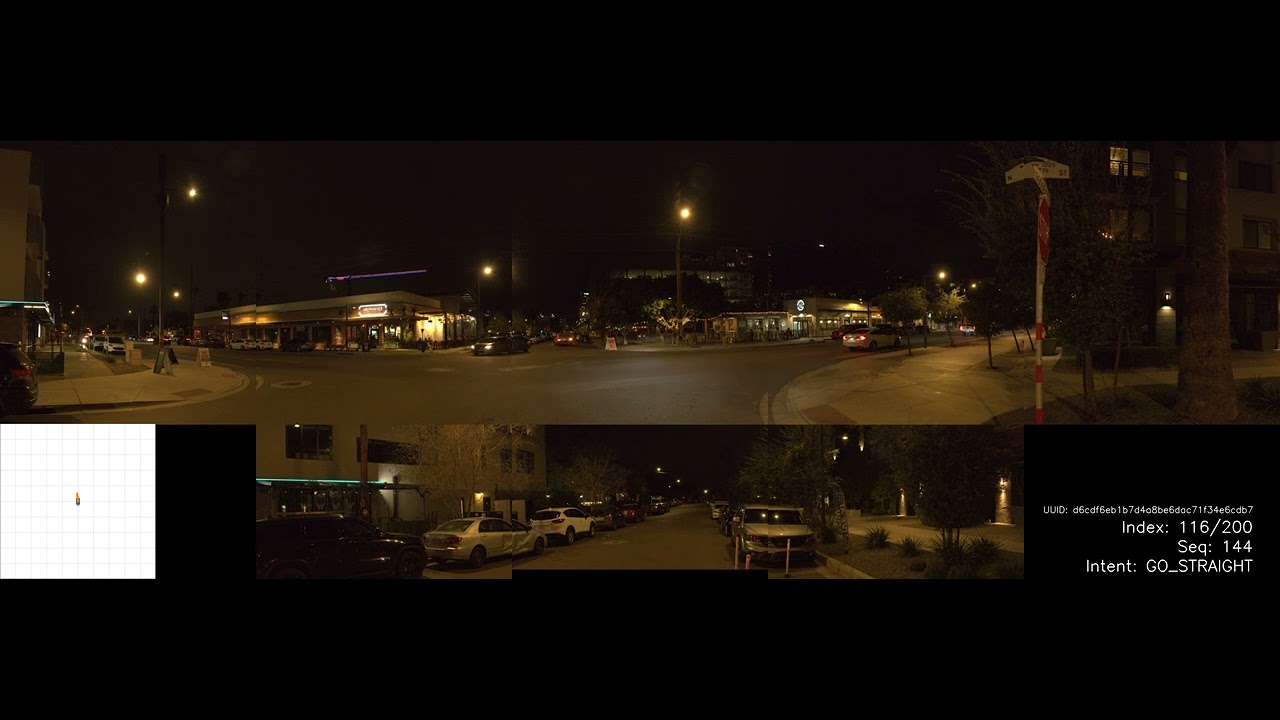
The reason you don't see the points in that frame is because the vehicle is stopped and won't move far enough to be visualized in front cameras in future 5 seconds.
Some facts
- The image you shared is from the first frame of the first tfrecord.
- Its UUID is: d6cdf6eb1b7d4a8be6dac71f34e6cdb7
- SeqNum: 164
- This scene has 200 frames.
- SeqNum doesn't always start from 0 or 1.
- Past states don't contain Z information. I've used Z as zero for visualization. As long as ground is relatively flat, visualization works alright.
- You should visualize the past states in the back cameras (since the vehicle is moving forward).
- The dataset contains 1745 unique scenes. Each scene has a UUID in the name.
- Each frame has a name made of: "UUID-SeqNum"
- The SeqNum tells you the order of the frame in its UUID scene.
- The dataset is provided in 316 tfrecord files. But they contain all frames of all scenes completely randomly scrambled.
- I had to reorder them with custom scripts.
- Not all scenes have equal number of frames.
- I've sorted all the scenes in the waymo e2e dataset by frame counts here.
- About 15 scenes have frame counts < 190. Rest are between 190 and 230.
I hope this answers all the questions within this issue.

Thanks, xmfcx.
I think probably this is the reason why we cannot see the visualization in this scenario.
Thanks @xmfcx for providing this video. Would you be willing to share the code to produce these visualizations?

@xmfcx I've extracted all scenes and frames. I've obtained 1745 scenes, which match what you reported. However, I don't get 200 frames. When I extracted camera (1) images, for example, for scene 00f20fd34a1ffd4ced354f04eea88494, I get 40 images starting with 045 and ending with 221 (not all numbers between are there). Am I missing something here?
This link shows the info for all scenes and camera 1,2, and 3
The screenshot below shows all images for the scene and camera 1

@dukevah What you report above is consistent with what I've observed. Also, they added more training examples bringing the total to 2037
