

 wavebox
Apps launch on startup even though I have the option disabled
Hey! I've read your Knowledge Base and I've searched on the internet, but to no avail. The issue is that Wavebox does not follow my preferences when it comes to when apps should be sleep or awake. For example, I have set an app not to fall asleep after 5 minutes, but I come back to find that it has fallen asleep anyway, with the checkbox unchecked. Also, telling Wavebox not to start apps on startup is useless. It starts the apps I set to start when I first configured them, but ignores the checkbox from then on. I cannot get it to start just the apps I want.
For example, I had a Gmail app that when I added it I wanted it to start up with Wavebox. After a week or two I changed my mind, and I unchecked the checkbox so that it doesn't start with Wavebox anymore. But it will continue to start routinely when I open Wavebox. The opposite is true as well.
I hope you can give me some guidance, and if this is a known issue, I hope it can be resolved soon, because I have a lot of apps and manually having to change their status every time I open Wavebox is a huge pain...
Excellent app, though, and getting better with every update. Keep up the great work!
- Wavebox Version: 10.0.172.2 stable
- Operating System & Version: Windows 10
- Account type (if applicable): All

Hi @lucastraba I think regards the startup app there's a little bit of a misunderstanding here. It indicates which single app should be launched and shown on startup, rather than which set of apps to launch on startup. It's normally the app in the first position (top-left), but this setting allows you to change that. The wording in a recent release was changed on this to better reflect this.
As for apps falling asleep when they shouldn't, would you be able to reach out to support at https://wavebox.io/support with a reference back to this, there are some additional diagnostic steps we can run to find out why this may be.
Thanks!

Hi @Thomas101, thanks for the clarification!
Is there a way to actually set which app sleep on startup and which apps are awake? Because it seems pretty random and tied to how I configured it when I first added the app. It is a bit inconvenient having to either sleep or wake apps every time I open the program. If there's no such configuration, I can make another post with a feature request!
At the moment, whether the app starts sleeping or not, is configured by whether it does have sleep enabled. You can change this through the apps right click menu > Settings. There are also some additional settings (such as the time before sleeping) under App Settings.
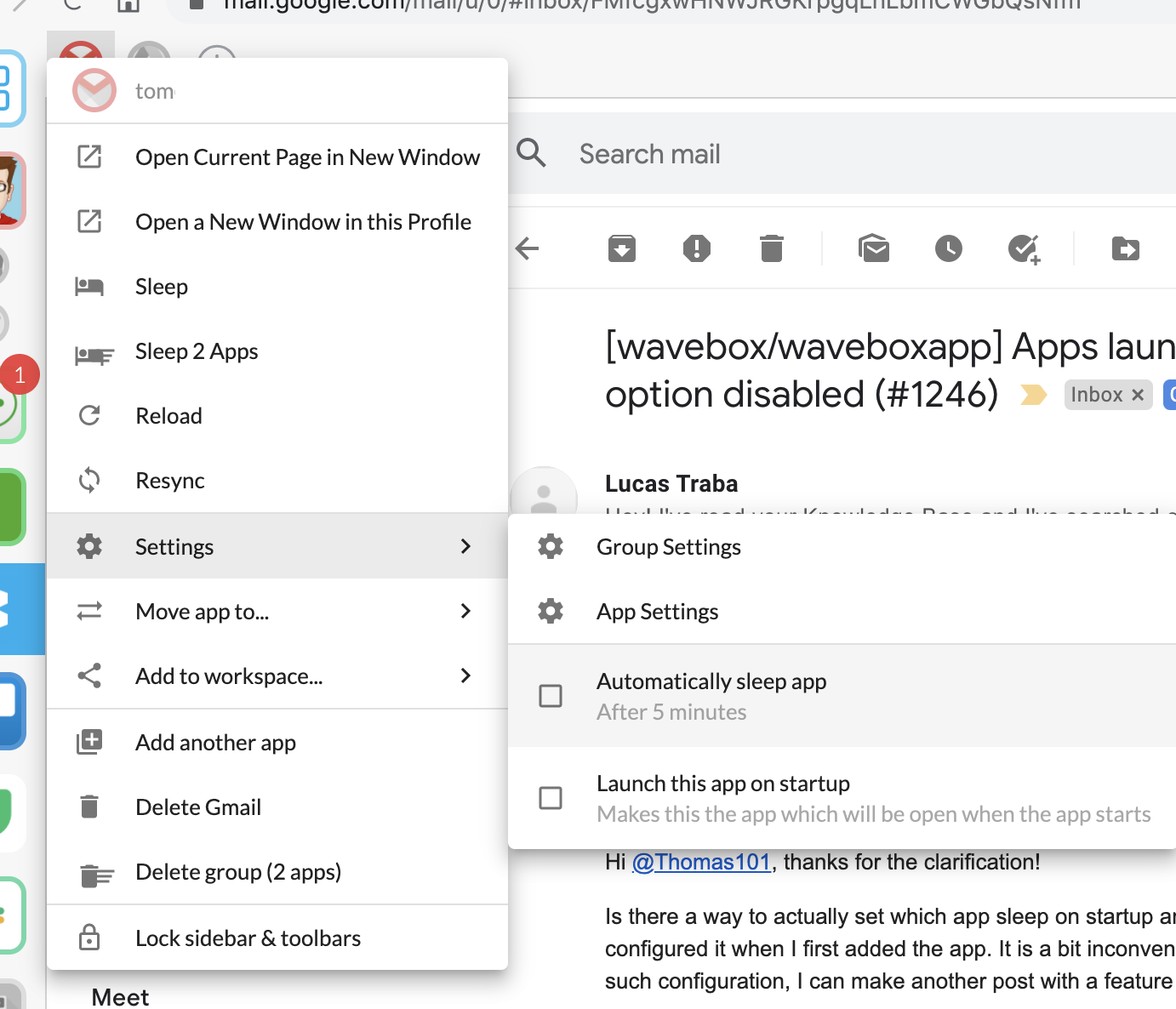
I think having something to set the initial sleep state (i.e. on app launch, wake, then sleep after 5 minutes) should be something we can add in
Oh! Thanks for the clarification. It wasn't apparent to me at the beginning, but it makes sense.
That would be a great addition to Wavebox, actually, to be able to set the initial state of the apps when you open Wavebox, regardless of the timed behavior afterwards. What would also be very convenient is an Awake All feature along with the Sleep All, to be able to awake all apps conveniently from the group options. And if you combine both, you get the perfect workflow! "Awake Initial" or something like that, to reawake only the apps that would awake when launching Wavebox, but all together.
This would be a very convenient way of managing groups instead of having to make more groups to achieve the same functionality.
But those are just suggestions based on my workflow. The app is great. Keep up the great work! And thanks for solving my issue!
On Fri, Jul 17, 2020, 12:04 Thomas Beverley [email protected] wrote:
At the moment, whether the app starts sleeping or not, is configured by whether it does have sleep enabled. You can change this through the apps right click menu > Settings. There are also some additional settings (such as the time before sleeping) under App Settings.
[image: Untitled] https://user-images.githubusercontent.com/103586/87774812-f7c8e880-c81c-11ea-9ef3-d2c10737de9f.png
I think having something to set the initial sleep state (i.e. on app launch, wake, then sleep after 5 minutes) should be something we can add in
— You are receiving this because you were mentioned. Reply to this email directly, view it on GitHub https://github.com/wavebox/waveboxapp/issues/1246#issuecomment-660012484, or unsubscribe https://github.com/notifications/unsubscribe-auth/ADJFZCVAY2Q7IP5TPLQU4OLR4AO25ANCNFSM4NM7TATQ .
I'll add it to our list, we've got a bit of a refresh project for sleep coming soon and this will roll into it nicely :)