

 wavebox
Wavebox consums a lot of RAM
- Wavebox Version: aur/wavebox-bin 4.11.11-2
- Operating System & Version: Arch Linux
- (Linux only) Install method: AUR
- Account type (if applicable): Gmail + Gcalendar (2x), MS Office 365 (Outlook, Teams, Calendar, OndeDrive), Yammer, Jira, Trello, Wunderlist
Although around half of the services are going sleep after 15 minutes, Wavebox consumes around 4-5 GB of RAM? I'm using Firefox with 4-5 windows and around 5-10 tabs in each and it consumes around 4 GB RAM.
# ps_mem
 Private  +   Shared  =  RAM used       Program
~
  2.0 GiB +   2.2 GiB =   4.2 GiB       Wavebox (12)

Can you send a screenshot of Settings > Debug > Task Monitor. It should give an idea of which tabs are using resources

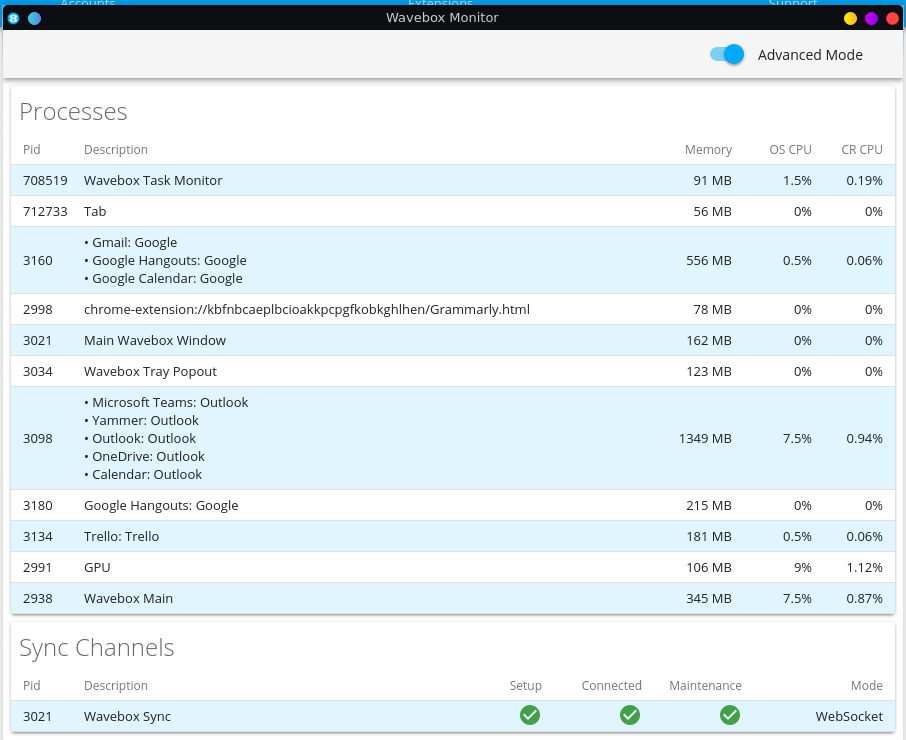
I don't have any answer from you. In fact - if you have 8GB RAM and Wavebox consumes 4.5 GB there isn't too much for other apps. I need to solve this. I have paid version of Wavebox and I don't feel some support from you (also in other tasks).
Updating to Wavebox 10 could be helpful here - being based directly on Chromium rather than Electron allows more efficient use of memory in most instances. There are a few steps to migrate things over on Linux (depending on the current configuration - best to share via email to [email protected]).

@waldauf did you test this in wavebox 10? Just checking if it happens in later version of wavebox.

@nmat I don't see any improvement. I still have the same web services loaded.
# ps_mem
 Private  +   Shared  =  RAM used       Program
  2.5 GiB +   2.8 GiB =   5.3 GiB       wavebox (25)
can you please provide the information from diagnostics to see what is using up memory? In the diagnostics you will see the list of processes and what of the services are using the most of memory.
actually this does not surprise me. Teams and microsoft tabs are using lots of memory in general.
You can compare to have teams in a normal chrome tab and compare it. AFAIK the service is heavy on memory usage.