

 wave-harmonic
[HDRP] Graphics.ExecuteCommandbuffer stalls CPU
we are using crest in a really heavy scene (10.000+ objects). and noticed that OceanRenderer ->LateUpdate -> BuildAndExecute in this scenario may take between 3 - 6ms! i tracked it down and using Graphics.ExecuteCommandbuffer adds some mysterious "Update renderer bounds" which in case of a complex scene just may take a while...
so i changed public void BuildAndExecute() to public void BuildAndExecuteBuf(ScriptableRenderContext context, Camera camera) and register BuildAndExecuteBuf to the RenderPipelineManager in the OnEnable of the OceanRenderer.cs: RenderPipelineManager.beginCameraRendering += _commandbufferBuilder.BuildAndExecuteBuf;
this gets me rid of all "Update renderer bounds" and brings down BuildAndExecute to .2ms i now get a little gap/idle in the camera rendering but this is smaller as it gets overlayed with the culling. so it should be a nice win. however the gpu now goes bonkers and spikes between 2 - 8 sometimes even 12ms while the original version was kind of stable around 6ms - according to unity's profiler in editor.
so i wonder if "context.ExecuteCommandBuffer(_buf);" instead of "Graphics.ExecuteCommandBuffer(_buf);" really may cause theses spikes on the gpu or if i just face a bug in unity's profiler?
i also changed a custom script from "Graphics.ExecuteCommandBuffer(_buf);" to "context.ExecuteCommandBuffer(_buf);" which went down from .3ms on the cpu to 0.01ms. and the gpu is just quiet.
crest "idling" using Graphics.ExecuteCommandBuffer(_buf);

using context.ExecuteCommandBuffer(_buf) instead:
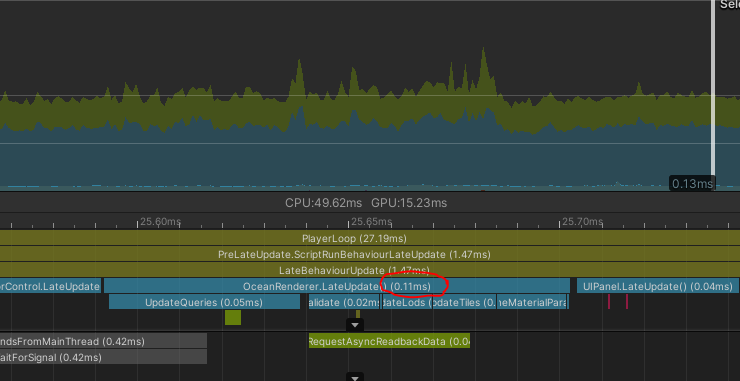

Thanks for the detailed report. We have haven't had the time to look at this yet, but we will get to it :^)

I will note that using the context could be a bad idea since we should reset any changes we make. See SampleShadows.cs for an example of executing using the context. That being said, this might be okay since it is at the beginning of the camera frame.