
maplibre-gl-export
 maplibre-gl-export copied to clipboard
 watergis
The markers should be included in the exported files
I'm struggling to export custom markers.
I would love a simple option to enable/disable the markers on the exported files.
I have no alternatives so far, I've considered modifying the source code myself.
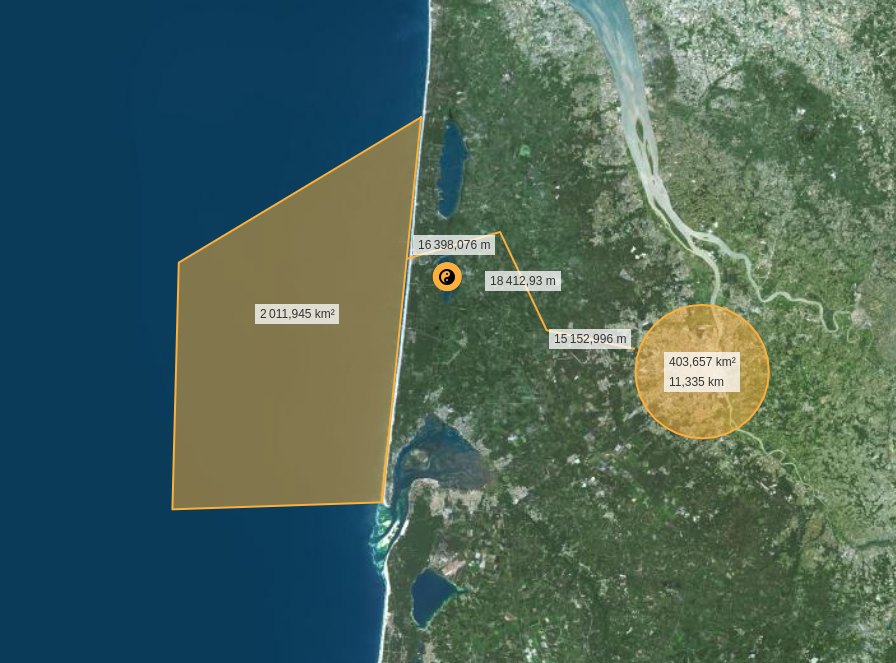 the distances in this image are in fact markers, and they are not shown on the exported file.

@puka-tchou Thank you for the issue. This plugin only can export current style.json in map object. There is no style information about marker, that is why it is not exporting with custom marker. You have to add your own markers after this source code.
https://github.com/watergis/maplibre-gl-export/blob/f1b63702ed14709ce8a5658eb2e56f5ec7b89170/lib/map-generator.ts#L165-L178
Maybe the plugin can have an optional parameter to apply any additional style into exported map. Feel free to make pull request to the repository to add this feature.

https://github.com/watergis/mapbox-gl-export/issues/32 is also the same issue with maplibre version
I'm currently reading the source code, I think that it might be more easily solved on my side. I can see that the generate() method loads the canvas of the map and then prints it:
    const renderMap = new MaplibreMap({
      container,
      style,
      center: this.map.getCenter(),
      zoom: this.map.getZoom(),
      bearing: this.map.getBearing(),
      pitch: this.map.getPitch(),
      interactive: false,
      preserveDrawingBuffer: true,
      fadeDuration: 0,
      attributionControl: false,
      // hack to read transfrom request callback function
      transformRequest: (this.map as any)._requestManager._transformRequestFn,
    });

    renderMap.once('idle', () => {
      const canvas = renderMap.getCanvas();
the solution might be to add the markers on the map using a symbol layer instead of adding them via new maplibregl.Marker({element}).setLngLat(lngLat).addTo(map); when I'm creating the map in my code.
But anyway, it would be nice to have the option right inside of maplibre-gl-export, but I'm not sure that it's feasible.
One solution could be to add an optional property to the constructor that would be an array of markers and then use a similar technique as the one discussed in Markers in the Map are not printed #32
   this.markers.forEach((x, i) => {
        mapRef.current = mapRef.current.addSource(`point${i}`, {
            type: "geojson",
            data: {
                type: "Point",
                coordinates: [x.position.lng, x.position.lat],
            },
        });

        mapRef.current = mapRef.current.addLayer({
            id: `point${i}`,
            source: `point${i}`,
            type: "circle",
            paint: {
                "circle-radius": 8,
                "circle-color": "red",
                "circle-stroke-width": 1,
                "circle-blur": 0.5,
            },
        });
credits to @TARMAH


@PeterPilley, @puka-tchou, @Hags7978 ,@TARMAH
I finally managed this long term issue of exporting marker via PR #122. I used @TARMAH's approarch to export markers as circle layer, but the plugin get marker's coordinates info from DOM element directly. So, you don't need to pass markers additionally.
I added markerCirclePaint option to allow to change circle style flexiblely. You can pass maplibre/mapbox expression to the plugin.
Please try the latest version of plugin.
- maplibre-gl-export: 3.4.0
- mapbox-gl-export: 3.1.0