

 warrensbox
Broken on new M1 Mac
Is your feature request related to a problem? Please describe. I'm running a brand new laptop and installed it via brew.
Describe the solution you'd like tfswitch installs and the commands all work, but the terraform command is never found.
Describe alternatives you've considered The only alternative is to not use tfswitch.
Additional context I'm using standard shell with standard options, so I'm not sure why it's failing out of the box.
If you would like to contribute to the code, see step-by-step instructions here:
Required version
go version 1.13

For the time being, you have to use the -b option on the new M1 macs
Use use the -b option or .tfswitch.toml file
This is similiar to using a .tfswitchrc file, but you can specify a custom binary path for your terraform installation
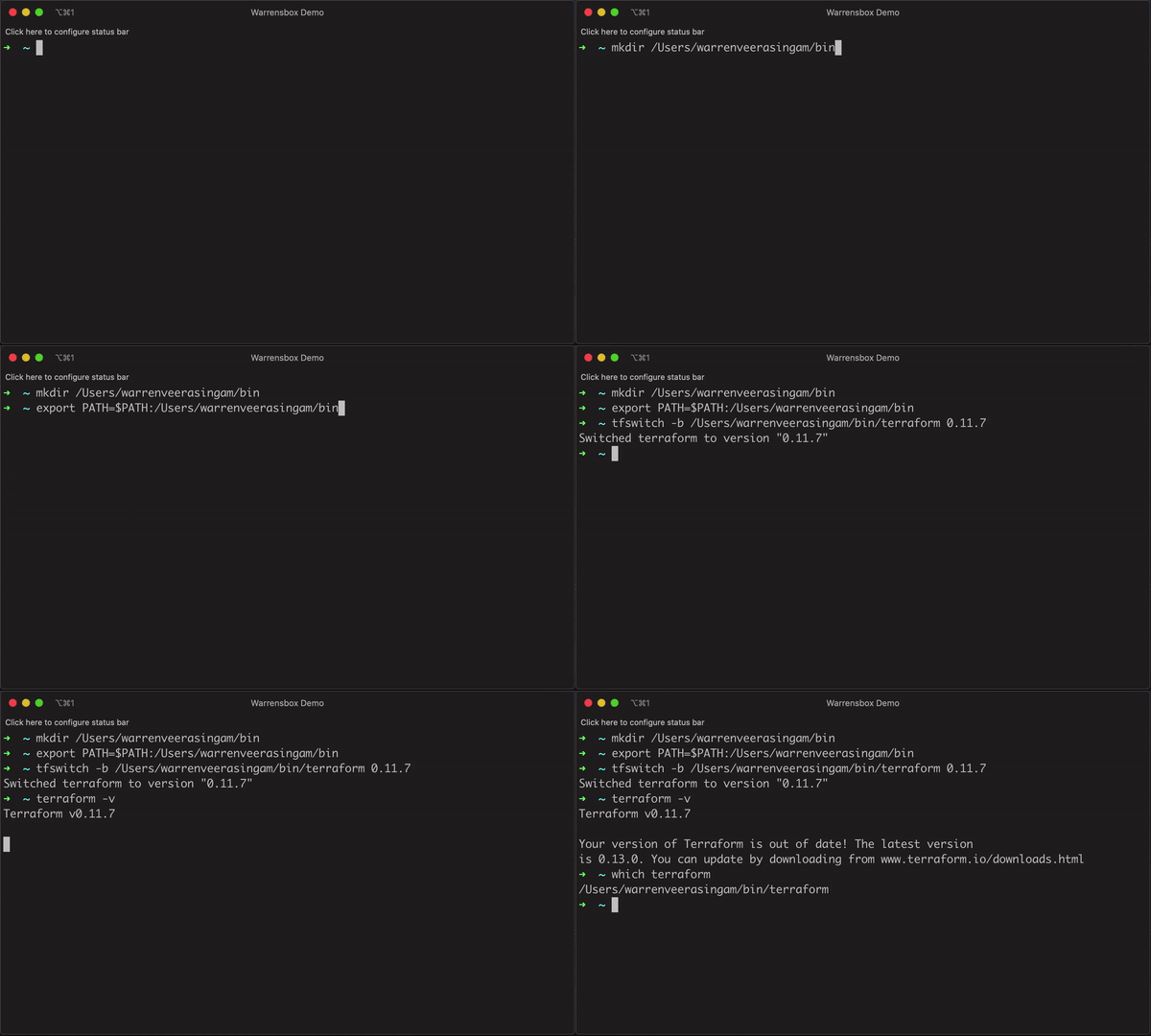
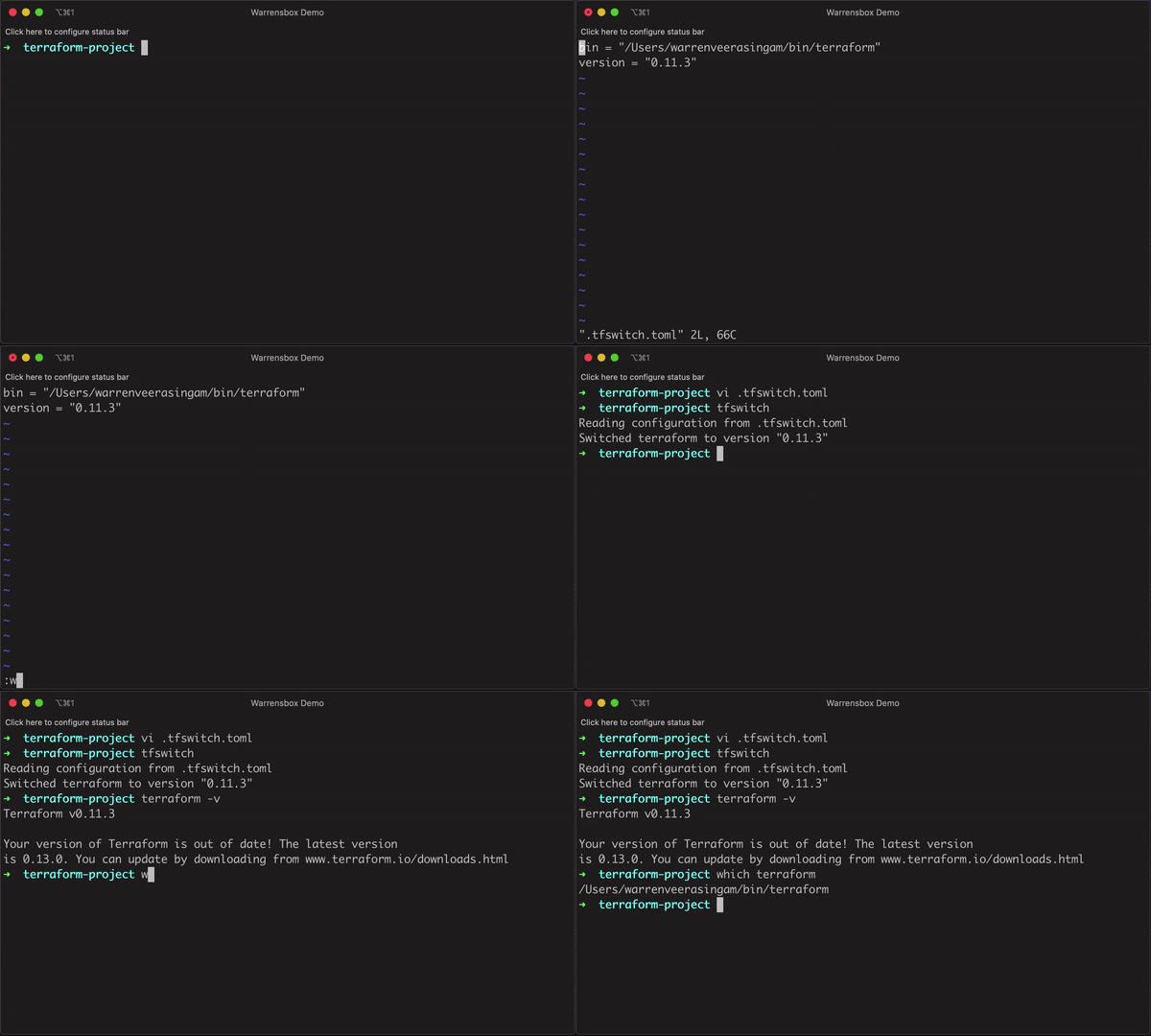
- Create a custom binary path. Ex:
mkdir /Users/warrenveerasingam/bin(replace warrenveerasingam with your username) - Add the path to your PATH. Ex:
export PATH=$PATH:/Users/warrenveerasingam/bin(add this to your bash profile or zsh profile) - Pass -b or --bin parameter with your custom path to install terraform. Ex:
tfswitch -b /Users/warrenveerasingam/bin/terraform 0.10.8 - Optionally, you can create a
.tfswitch.tomlfile in your terraform directory(current directory) OR in your home directory(~/.tfswitch.toml). The toml file in the current directory has a higher precedence than toml file in the home directory - Your
.tfswitch.tomlfile should look like this:
bin = "/Users/warrenveerasingam/bin/terraform"
version = "0.11.3"
NOTE: (replace warrenveerasingam with your username)

I tried creating ~/.tfswitch.toml, as mentioned above (using my own username), and then passing the -b switch in step 3, but this did not work ( I still got the error: "zsh: command not found: terraform )
Ultimately, I ended up creating an alias:
alias tf=~/bin/terraform

Hello,
I'm using tfswitch from a brew installation on mac m1 and it works without ~/.tfswitch.toml file.

I am running on an M1 Mac:
MacBook Pro (16-inch, 2021)
Apple M1 Pro
Monterey 12.6.1
After completing a fresh install of tfswitch via brew, I run the following commands:
~ j.land$ which tfswitch
/opt/homebrew/bin/tfswitch
~ j.land$ terraform version
Terraform v1.0.0
on darwin_amd64

Your version of Terraform is out of date! The latest version
is 1.3.3. You can update by downloading from https://www.terraform.io/downloads.html
It looks like the problem is tfswitch is installing the AMD binary instead of the ARM binary.

If you are using zsh do the following.
Open .zshrc file vi $HOME/.zshrc. ; paste it in the file, export PATH=$PATH:/Users/user/bin
Run the command and replace the user name export PATH=$HOME/bin:/usr/local/bin:/Users/user/bin:$PATH
Activate the change source $HOME/.zshrc
You're done !!!

If you using Ventura it could be that as standard zsh is active. Within the .zshrc file you have the block:
# If you come from bash you might have to change your $PATH. # export PATH=$HOME/bin:/usr/local/bin:$PATH
activate the second line and source the file new ( source $HOME/.zshrc )
that worked for me.

If Nothing is working for you? Then try these steps which I did:
- First I went to the Terraform download archive which can be found here.
- Find your required version according to your mac.
- Download the zip file and unzip it, it will give you the terraform executable.
- Move the executable to the required location using the command
sudo mv ./terraform /usr/local/bin
You're done.
Check the version with
terraform --version

It also depends on version you're trying to use as shown at https://github.com/warrensbox/terraform-switcher/blob/master/lib/install.go#L99-L104 The arm64 binary only exists for >1.0.2

May be related to https://github.com/warrensbox/terraform-switcher/issues/303
Note, that if it cannot install to /usr/local/bin/terraform it falls back to installing to ~/bin/terraform
Make sure that your ~/bin directory is on your PATH.
To be fair, this message is emitted during terraform binary installation:
RUN `export PATH=$PATH:/Users/xxxxxx/bin` to append bin to $PATH
Here xxxxxx stands for your user account

This method from the first suggestion worked for me! Thank you! Note, be careful about the path dir you specify

One can also make use of a symbolic link
sudo ln -s ~/bin/terraform /usr/local/bin/terraform
