
Warp
 Warp copied to clipboard
 warpdotdev
Launch configuration issue
Discord username (optional)
No response
Describe the bug
I have created a launch configuration but when I open launch configuration palette I just see "No matching launch configurations"
To Reproduce
- Setup a launch configuration (I just used the command palette to "Save New Launch Configuration"
- Restart warp
- open the launch configuration palette
Expected behaviour
I would see the available configurations
Screenshots
Results from the launch configuration palette:

The configuration is in the proper directory:

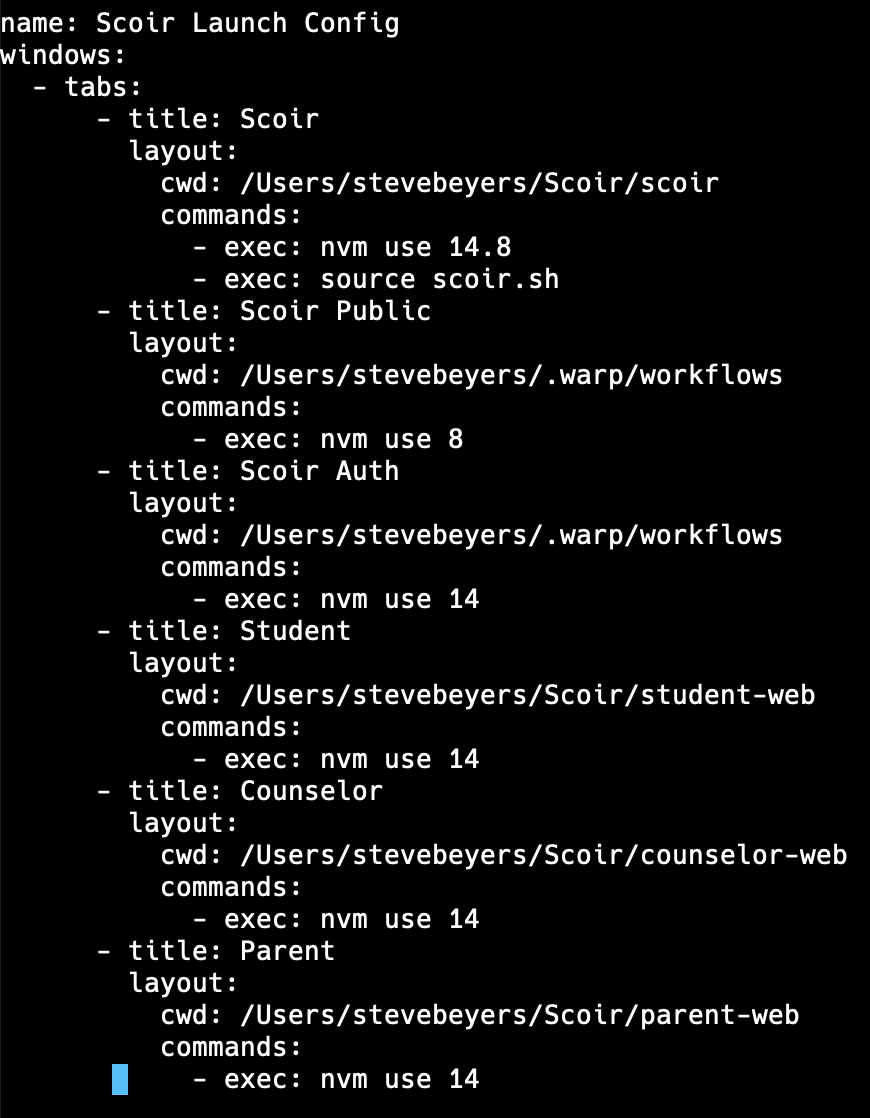
Configuration:
Operating System
MacOS
OS Version
13.0.1
Shell Version
zsh 5.8.1
Warp Version
v0.2022.11.29.08.03.stable_01
Additional context
No response
Does this block you from using Warp daily?
No
Warp Internal (ignore): linear-label:b8107fdf-ba31-488d-b103-d271c89cac3e
None

Hi @beyerss Sorry about this, can you try with the first two commands in double quotes? I'm curious if the . in the commands is preventing the launch config from showing up.


@beyerss Any luck with the above? Can we close this issue out or does the issue persist with the parenthesis?
Running into this same issue. For me, it seems like adding commands is causing the issue. If I create a launch config without commands it shows in the palette. I tried your suggestion, @dannyneira, and wrapped my commands (the ones with . and the ones without) in parenthesis with no luck 😞


Third. This isn't working for me either. I was trying out this feature for the first time.


I'm having the same issue. Trying with exec: "..." and just quotes: "ssh ..." doesn't work
As soon as I make ANY modification to the file that is exported with File > Launch Configurations > Save New, then the menu item disappears. Whenever I use the quotes yamllint complains that The line is too long:
19:81 error line too long (81 > 80 characters) (line-length) 23:81 error line too long (81 > 80 characters) (line-length)
~/.warp/launch_configurations/META.yaml
# Warp Launch Configuration

---
name: META
windows:
  - tabs:
      - title: META
        layout:
          split_direction: horizontal
          panes:
            cwd: /PATH_TO_PROJECT
            commands:
              - ssh -o 'IdentitiesOnly=yes' -i ~/.ssh/KEY.pem SSH_USER@XXXX
              - sudo docker ps
            split_direction: vertical
            panes:
              - cwd: /PATH_TO_PROJECT
              - commands:
                  - ssh -o 'IdentitiesOnly=yes' -i ~/.ssh/KEY.pem SSH_USER@XXXX
                  - htop
              - cwd: /PATH_TO_PROJECT
              - commands:
                  - ssh -o 'IdentitiesOnly=yes' -i ~/.ssh/KEY.pem SSH_USER@XXXX
                  - tail -f logs/output.log
        color: blue

@TLMondo There are a few potential issues with your yaml file. You may need to use double quotes for commands with special characters. The commands section needs to use the exec: prefix for each command and the indentation of your panes structure is incorrect. Note that commands in separate lines are chained together with && when run, as such commands run after ssh commands may not execute. Try this code:
# Warp Launch Configuration

---
name: META
windows:
  - tabs:
      - title: META
        layout:
          split_direction: horizontal
          panes:
            - cwd: /PATH_TO_PROJECT
              commands:
                - exec: ssh -o 'IdentitiesOnly=yes' -i ~/.ssh/KEY.pem SSH_USER@XXXX
                - exec: sudo docker ps
            - split_direction: vertical
              panes:
                - cwd: /PATH_TO_PROJECT
                  commands:
                    - exec: ssh -o 'IdentitiesOnly=yes' -i ~/.ssh/KEY.pem SSH_USER@XXXX
                    - exec: htop
                - cwd: /PATH_TO_PROJECT
                  commands:
                    - exec: ssh -o 'IdentitiesOnly=yes' -i ~/.ssh/KEY.pem SSH_USER@XXXX
                    - exec: tail -f logs/output.log
        color: blue
For anyone else with issues, if you're unsure of the Launch Configuration yaml syntax, refer to the examples in our docs and/or "Ask kapa ai" in our docs, this should help correct your syntax. https://docs.warp.dev/features/sessions/launch-configurations
@dannyneira thanks so much. This did the trick. I guess I never realized yaml was space sensitive.
@beyerss was my earlier comment helpful? have you been able to use the launch configuration with some syntax fixes? if not please post the code here.