

 wanasit
Cannot read property 'parse' of undefined in 2.1.0
Just added chrono-node 2.1.0 to my project and using import chrono from 'chrono-node. VSCode doesn't give me any complaints, however at runtime whenever I try to use chrono.parse it says chrono is undefined, this is pretty confusing behavior.
After reverting to import * as chrono from 'chrono-node', it works okay, but this is inconsistent with the release notes for 2.1.0.

Thank you for letting me know and sorry for the problem.
Could you please let me know about your node-js or project setup?
- What node version do you use? or do you use any pre-processor.
- Do you also use Typescript or Javascript?

Sorry for confusing you. I have found that import chrono from 'chrono-node applies only for Node.js based module I tested. If you use standard ES6 import you probably should use import * as chrono from 'chrono-node as you previously do.
I'm updating the release noe.
Gotcha, thanks for the clarification! I'm using Typescript with Electron, node version 12.18
@cameroncruz This problem might occur if you have allowSyntheticDefaultImports enabled in your tsconfig.json but not esModuleInterop. It's recommended that you enable the latter if you want to use import x from y syntax, since most node modules don't conform to the "correct" ES Module specification. Here's an explanation of the issue.

Thank you for your work on chrono-node!
This same behavior is happening for me in the latest version (2.3.4) -- when I try to call chrono.parseDate() (after importing with either import * as chrono from 'chrono-node'; or import chrono from 'chrono-node';), I get TypeError: Cannot read property 'parseDate' of undefined at Object.parseDate (eval at <anonymous> (app.js:1), <anonymous>:5597:27).
It appears that chrono itself is defined -- running console.log(chrono.parseDate) returns:
ƒ parseDate(text, ref, option) {
    return exports.casual.parseDate(text, ref, option);
}
Thus, it appears that exports.casual is undefined. This can be seen if I run console.log(chrono):
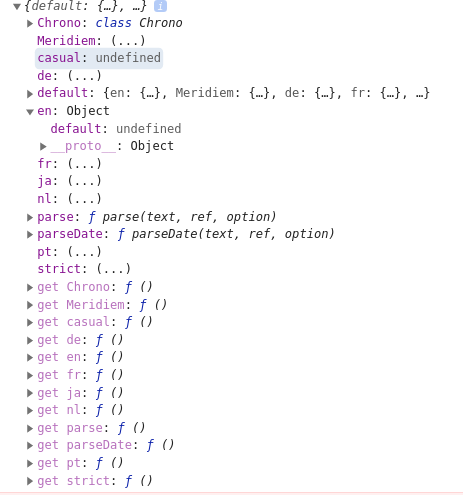
(strict similarly appears undefined.)
The output from console.log(JSON.stringify(chrono)) is in this Gist.
My full tsconfig.json looks like this:
{
  "extends": "@tsconfig/svelte/tsconfig.json",
  "compilerOptions": {
    "allowSyntheticDefaultImports": true,
    "baseUrl": "./src",
    "esModuleInterop": true,
    "sourceMap": true,
    "strict": true,
    "noUnusedLocals": true,
    "noUnusedParameters": true,
    "module": "ESNext",
    "target": "esnext",
    "allowJs": true,
    "noImplicitAny": true,
    "moduleResolution": "node",
    "importHelpers": true,
    "paths": {
      "src": ["src/*", "tests/*"]
    },
    "types": [
      "jest",
      "node",
      "svelte"
    ],
    "lib": [
      "dom",
      "es2020"
    ]
  },
  "include": [
    "src/**/*",
    "tests/**/*"
  ],
  "exclude": [
      "node_modules/*"
  ]
}


Frustrating, I am having the same issue as @jglev ... almost a year later?
I have a stock Svelte installation, not using typescript, just trying to import per the documentation.

This is also frustrating and hard for me to reproduce the error.
I have added an example on how importing the library works normally for me: https://github.com/wanasit/chrono/tree/master/examples/nodejs_minimal
If your project setup is different, could you please submit an example of how do you setup the project including the package.json, where I can install and rerun from the clean state?