

 wagtail
Grey background when editing a short page/snippet and a message is shown
Issue Summary
When editing a page or snippet that has a short content so that the whole form takes less space than the available vertical viewport space, and a message from Django's messages framework is shown on the page, a grey background can be seen at the bottom of the page:
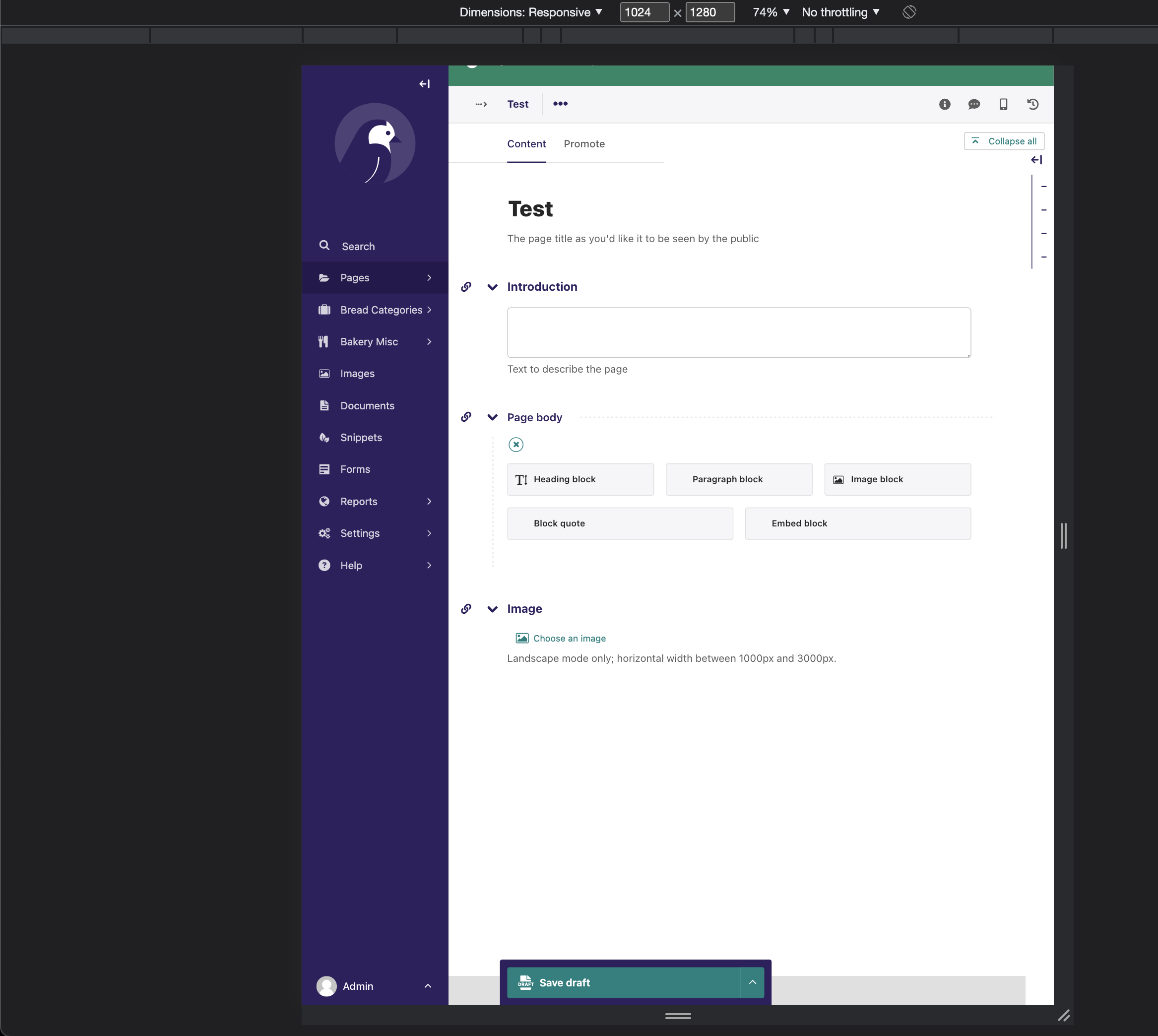
Seems to be caused by leftover styles for .content-wrapper in _grid.legacy.scss:
https://github.com/wagtail/wagtail/blob/1af0815af0baaca801e2a09169d461a259f731ea/client/scss/components/_grid.legacy.scss#L30-L39
Steps to Reproduce
- Make sure your screen height is big enough (you can use DevTools with smaller zoom levels to simulate this)
- Spin up bakerydemo
- Create a Standard page
- Fill the title and hit save
- Scroll to the bottom
Any other relevant information. For example, why do you consider this a bug and what did you expect to happen instead?
The page editor should have a consistent background colour (white).
- I have confirmed that this issue can be reproduced as described on a fresh Wagtail project: Yes

Not sure how necessary this is, but I'm adding this to 4.1.2 milestone anyway.
See also potentially related issues.
https://github.com/wagtail/wagtail/issues/9199 https://github.com/wagtail/wagtail/issues/8664
