
webpack
 webpack copied to clipboard
 vuejs-templates
webpack 4, vue-loader 15, et al
This PR includes the following:
webpackupdated to 4.6.0vue-loaderupdated to 15.0.3- many other packages updated to their most recent versions, including:
karma,mocha,sinon-chai,babel, variouseslintandwebpackplugins and loaders, and others extract-text-webpack-pluginreplaced withmini-css-extract-plugin
When upgrading vue-loader, I followed the migration guide. The notable exception is that I did not add CSS modules because that would require a bit of a rewrite of how the webpack rules are generated in utils, and CSS modules aren't supported yet by the template anyway, as far as I can tell.
Vue is kind of new for me, so I'm not sure how to verify that everything works correctly. Things seem to be working well enough for me :). The options I use are: standalone, with vue-router, eslint, and unit tests, the Standard esline preset, karma and mocha, Nightwatch, and npm. I've run all the npm scripts and they all seem to be doing their jobs.
#1280 #1367


I'm trying to get the build to pass. I noticed that the chromedriver being used for the e2e tests is 2.35, which is apparently installed by the image in /usr/bin/chromedriver. It should be using 2.38, which is specified in package.json and located in node_modules.
The Dockerfile used for the build tries to install the latest chromedriver, which should be 2.38, but either the script isn't working properly, some cache (maybe CircleCI's?) is returning the older version, or the chromedriver is preinstalled and the script is failing to overwrite it.
I'm trying to configure a build that is identical to the current build, except that it does not try to install the global chromedriver, by commenting out just the chromedriver installation command. Turns out it's pretty complicated to get that set up and running. I'm working on it, but if anybody knows a faster way to get CircleCI to use a slightly different Dockerfile, I would be obliged :).
Finally got the build to pass!
This mainly involved replacing the prebuilt CircleCI image with a custom image generated using a fork of CircleCI's dockerfile-wizard.
The custom image is currently necessary because the prebuilt images install chromedriver globally. For some reason, they install 2.35 instead of 2.38 (not sure why...). The global executable takes precedence over node_modules, causing the build to fail. I think my solution is better: I got rid of the global chromedriver installation altogether. package.json is now the single source of truth for the chromedriver version.
I also had to add the --headless arg to the chromeOptions property in nightwatch.json, as well as make a few other tweaks. Took me a while to figure out why the container couldn't launch Chrome, and Chrome's and chromedriver's inane error messages weren't very helpful. It was a combination of the browser, webdriver, selenium, and nightwatch versions, each with their own quirks and breaking changes.
I created a logs folder that the webdrivers write to. CircleCI collects those logs and puts them on the Artifacts tab after a build. Really helps figure out what's going on.
I'm not sure if this was necessary, but I upgraded to the latest Node 6 image that CircleCI explicitly supports - 6.14.1. I'm guessing Node 8 (and maybe even 10) should work, but I'm not sure why it was downgraded to 6 and didn't want to screw things up now that it finally works...
Have you checked that SourceMaps work? (because I think there are issues with mini-css-extract-plugin and sourceMaps)

@ChadTaljaardt, following up on @gkatsanos's review, I noticed that the vendor chunk does not preserve its chunkhash, so the PR probably shouldn't be merged just yet.
I've fixed it and will try to push the update in the next day or two.
This update:
- simplifies the config by resorting to some default and recommended webpack 4 settings
- unifies the file and chunk naming strategies for js and css files for easier debugging and improved long-term caching
- stabilizes the chunk hashes, mainly to prevent generating a new chunk hash for the vendor chunk when only app code is modified, but applied generally
If all is well, this should hopefully remove any remaining obstacles to merging.

I can't wait for this to be merged, also I wonder if I use the old version and then the new version of this comes, will I have to easily upgrade with npm install or something or is it better to wait for this to be released before i start on a new vue project?

@noamkfir I'm sorry to report some issues of the template. This may not connect directly with your template, instead, connect with those plugins, but I'm seeking for your help (and anyone's, of course).
The current template has severe memory leak in dev mode. The memory keeps going up every time the dev server recompiled the files. Since my project is relatively big, the memory quickly exceeds the heap after around 10 compilation and exits with code 134.
I did memory dump with chrome-devtool's node debug feature. Four snapshots are taken after four minimum recompilation (remove a statement/add it back).
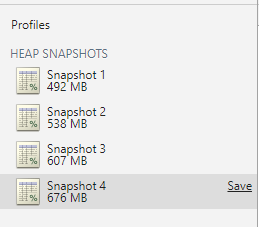 I have saved those snapshots. If you think it necessary and would like to analyze it, you can download it from google drive and load it from chrome-devtool.
snapshot 1
snapshot 2
snapshot 3
snapshot 4
If you need any further information, I'm glad to provide.
I have saved those snapshots. If you think it necessary and would like to analyze it, you can download it from google drive and load it from chrome-devtool.
snapshot 1
snapshot 2
snapshot 3
snapshot 4
If you need any further information, I'm glad to provide.
BTW, I updated the devDependencies to newest:
{
  "devDependencies": {
    "autoprefixer": "^8.5.0",
    "babel-core": "^6.26.3",
    "babel-eslint": "^8.2.3",
    "babel-helper-vue-jsx-merge-props": "^2.0.3",
    "babel-loader": "^7.1.4",
    "babel-plugin-syntax-jsx": "^6.18.0",
    "babel-plugin-transform-runtime": "^6.23.0",
    "babel-plugin-transform-vue-jsx": "^3.7.0",
    "babel-preset-env": "^1.7.0",
    "babel-preset-stage-2": "^6.24.1",
    "chalk": "^2.4.1",
    "copy-webpack-plugin": "^4.5.1",
    "css-loader": "^0.28.11",
    "eslint": "^4.19.1",
    "eslint-config-standard": "^11.0.0",
    "eslint-friendly-formatter": "^4.0.1",
    "eslint-loader": "^2.0.0",
    "eslint-plugin-import": "^2.12.0",
    "eslint-plugin-node": "^6.0.1",
    "eslint-plugin-promise": "^3.7.0",
    "eslint-plugin-standard": "^3.1.0",
    "eslint-plugin-vue": "^4.5.0",
    "file-loader": "^1.1.11",
    "friendly-errors-webpack-plugin": "^1.7.0",
    "html-webpack-plugin": "^3.2.0",
    "mini-css-extract-plugin": "0.4.0",
    "node-notifier": "^5.2.1",
    "optimize-css-assets-webpack-plugin": "^4.0.1",
    "ora": "^2.1.0",
    "portfinder": "^1.0.13",
    "postcss-import": "^11.1.0",
    "postcss-loader": "^2.1.5",
    "postcss-url": "^7.3.2",
    "rimraf": "^2.6.2",
    "semver": "^5.5.0",
    "shelljs": "^0.8.2",
    "uglifyjs-webpack-plugin": "^1.2.5",
    "url-loader": "^1.0.1",
    "vue-loader": "^15.2.0",
    "vue-style-loader": "^4.1.0",
    "vue-template-compiler": "^2.5.16",
    "webpack": "^4.8.3",
    "webpack-bundle-analyzer": "^2.13.1",
    "webpack-cli": "2.1.4",
    "webpack-dev-server": "^3.1.4",
    "webpack-merge": "^4.1.2"
  }
}

@jjyyxx I am getting this too, but I don't think it has to do with this template.
Here is another issue I am following in regards to this. https://github.com/webpack/webpack/issues/6929
Thanks for your reference! Actually I have seen that issue.
What surprised me was that I configured a similar vue-webpack4 project recently and didn't encounter memory leaks (at least, wasn't aware of memory leaks). I switched to this template mainly because my own template has a strange bug when configuring dev-server and copy-webpack-plugin (contentbase to be more specific). This template solved my problem but led to a new one...
The differences between my configuration and this one are quite small. Maybe a specific option triggered the problem.
@jjyyxx If your configuration doesn't leak, and this configuration does, would you be able to share your current config so that we might be able to investigate where it could be? It must be in where there is a difference between the config's which makes it easier to narrow down where the issue is.
@ChadTaljaardt
I investigated the previous configuration, and found that replacing the lines in webpack.dev.conf.js
rules: utils.styleLoaders({ sourceMap: config.dev.cssSourceMap, usePostCSS: true })
to
rules: [
  {
    test: /\.css$/,
    use: [
      'vue-style-loader',
      'css-loader'
    ]
  }
]
significantly eased the leak. I know it isn't a fix as it drops support for css dialects, but it turned out that something went wrong in the styleLoaders function or the relating loaders.
The mem dump:
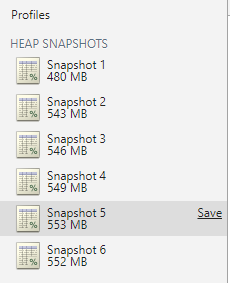
Description: Between Row 1 ~ Row 5, one minimum recompilation each time. Between Row 5 and Row 6, invoke a GC operation. So, it seems that other minor leaks exist, but it isn't so severe.
I would be appreciated if anyone can trace into the styleLoaders and locate the problem.
In complement, the return value of
utils.styleLoaders({ sourceMap: config.dev.cssSourceMap, usePostCSS: true })
is
[
    {
        test: /\.css$/,
        use:
            ['vue-style-loader',
                {loader: 'css-loader', options: {sourceMap: true}},
                {loader: 'postcss-loader', options: {sourceMap: true}}]
    },
    {
        test: /\.postcss$/,
        use:
            ['vue-style-loader',
                {loader: 'css-loader', options: {sourceMap: true}},
                {loader: 'postcss-loader', options: {sourceMap: true}}]
    },
    {
        test: /\.less$/,
        use:
            ['vue-style-loader',
                {loader: 'css-loader', options: {sourceMap: true}},
                {loader: 'postcss-loader', options: {sourceMap: true}},
                {loader: 'less-loader', options: {sourceMap: true}}]
    },
    {
        test: /\.sass$/,
        use:
            ['vue-style-loader',
                {loader: 'css-loader', options: {sourceMap: true}},
                {loader: 'postcss-loader', options: {sourceMap: true}},
                {
                    loader: 'sass-loader',
                    options: {indentedSyntax: true, sourceMap: true}
                }]
    },
    {
        test: /\.scss$/,
        use:
            ['vue-style-loader',
                {loader: 'css-loader', options: {sourceMap: true}},
                {loader: 'postcss-loader', options: {sourceMap: true}},
                {loader: 'sass-loader', options: {sourceMap: true}}]
    },
    {
        test: /\.stylus$/,
        use:
            ['vue-style-loader',
                {loader: 'css-loader', options: {sourceMap: true}},
                {loader: 'postcss-loader', options: {sourceMap: true}},
                {loader: 'stylus-loader', options: {sourceMap: true}}]
    },
    {
        test: /\.styl$/,
        use:
            ['vue-style-loader',
                {loader: 'css-loader', options: {sourceMap: true}},
                {loader: 'postcss-loader', options: {sourceMap: true}},
                {loader: 'stylus-loader', options: {sourceMap: true}}]
    }
]
I did not use any css dialect so maybe it's something related to postcss-loader?
@jjyyxx I was able to reproduce the leak very easily, so I dug into it a bit and I'm pretty sure this isn't related to my changes.
Basically, I discovered that the leak also occurs in the released version of the template. As far as I can tell, it's the exact same leak, almost certainly the one that @ChadTaljaardt referenced: webpack/webpack#6929.
I don't think it's the postcss-loader plugin because removing it does not seem to prevent the leak, but I can't rule it out either yet. It's entirely possible that a number of plugins are incorrectly retaining references to the Compilation and/or CachedSource objects between builds.
I tried to replace module.rules as you suggested and this also didn't seem to prevent the leak. I'm not sure why I'm getting different results than you are but I tried a number of different approaches and still wasn't able to reproduce the improvement.
One thing I found interesting was that there's a difference in the memory profile between webpack-dev-server and webpack. It's not completely deterministic, but webpack seems to leak less and more predictably. This is true for both dev and prod modes.
With so many plugins, tracing the root of the leak is really tricky. Thanks for your efforts anyway @noamkfir. Hope this problem can be solved soon.
Since this is not related to the pull request what's stopping us from merging it?
For anyone who cannot wait and want to try webpack4, use vue init noamkfir/webpack <app name> to bootstrap your app. Not for production

@jamesjieye ,
I tried your command :
vue init noamkfir/webpack copy_of_my_old_application
on my old application copy and I get this error message :
Module build failed: @import './style.scss"' in myvuefile.vue
This problem can be solved by setting a sccs filter after js one in webpack.base.conf.js
include: [resolve('src'), resolve('test'), resolve('node_modules/webpack-dev-server/client')]
},
{
+        test: /\.scss$/,
+        include: [resolve('src')],
+        use: [
+          'vue-style-loader',
+          'css-loader',
+          'scss-loader',
+          'sass-loader'
+        ]
+      },
+      {
test: /\.(png|jpe?g|gif|svg)(\?.*)?$/,
I also tried to set the include: resolve('src') in utils.js but it didn't worked ...
 exports.styleLoaders = function (options) {
     const loader = loaders[extension]
     output.push({
       test: new RegExp('\\.' + extension + '$'),
+      include: path.join(__dirname, '..', 'src'),
       use: loader
     })
   }
Now, it seems I have a problem with components called by vue-rooting or with props ... ?
These relative modules were not found:
- ./Checkbox.vue?vue&type=style&index=0&id=1f980e0b&scoped=true&lang=scss in ./src/components/formElements/checkbox/Checkbox.vue
the Checkbox.vue :
<style scoped  lang="scss">
@import '../../../assets/vars/colors.scss';
@import '../../../assets/mixins/checkbox.scss';
</style>
<template>
    <label
        class="b-checkbox checkbox"
        :class="[size, { 'is-disabled': disabled }]"
        ref="label"
        :disabled="disabled"
        :tabindex="disabled ? false : 0"
        @keydown.prevent.enter.space="$refs.label.click()">
        <input
            v-model="value"
            :id="id"
            type="checkbox"
            :disabled="disabled"
            :name="name"
            :value="nativeValue"
            :true-value="trueValue"
            :false-value="falseValue">
        <span :class="checkClass"/>
        <span class="control-label"><slot/></span>
    </label>
</template>

<script>
export default {
  name: 'Checkbox',
  props: {
    id: [String, Number],
    nativeValue: [String, Number, Boolean, Function, Object, Array, Symbol],
    disabled: Boolean,
    name: String,
    size: String,
    trueValue: {
      type: [String, Number, Boolean, Function, Object, Array, Symbol],
      default: true
    },
    falseValue: {
      type: [String, Number, Boolean, Function, Object, Array, Symbol],
      default: false
    },
    type: {
      type: String,
      default: 'is-primary'
    }
  },
  data () {
    return {
      newValue: this.nativeValue,
      value: this.nativeValue,
      checkClass: this.initClass()
    }
  },
  methods: {
    initClass: function () {
      // console.log('initClass native val: ' + this.nativeValue + ', true val : ' + this.trueValue)
      if (this.nativeValue === this.trueValue) {
        return this.type + ' check checked'
      } else {
        return this.type + ' check unchecked'
      }
    },
    check: function () {
      this.checkClass = this.type + ' check checked'
    },
    uncheck: function () {
      this.checkClass = this.type + ' check unchecked'
    }
  },
  watch: {
    /**
     * When v-model change, set internal value.
     */
    value (value) {
      this.newValue = value
    },
    /**
     * Emit input event to update the user v-model.
     */
    newValue (value) {
      // console.log('newValue val: ' + value + ', true val : ' + this.trueValue)
      this.$emit('input', {id: this.id, name: this.name, checked: value})
      if (value === this.trueValue) {
        this.check()
      } else {
        this.uncheck()
      }
      // this.$parent.changeValue(this.id, value)
    }
  }
}
</script>

Hi @lucileFievet,
I'm able to create a brand new application with vue init noamkfir/webpack <app name>. I didn't try it on existing application.
Hy @jamesjieye ,
Yes and it does work with default application. My code works with webpack 3.9... Finaly I don't think it is the router or props ...
I think it is the way I import external sccs in scoped style. It doesn't like the @import in style tag. (It is worse with vue-cli :/) I 'll try a work arround. Thanks anyway
I update this pr to vue-cli 3, babel 7: https://github.com/miaulightouch/webpack
and I post the pr here: https://github.com/noamkfir/webpack/pull/1
try it now: vue init miaulightouch/webpack#develop <project name>


Hello, can someone check tests of project? I've some error when try run npm test in clean @miaulightouch template
debug.log
console.log
Error:
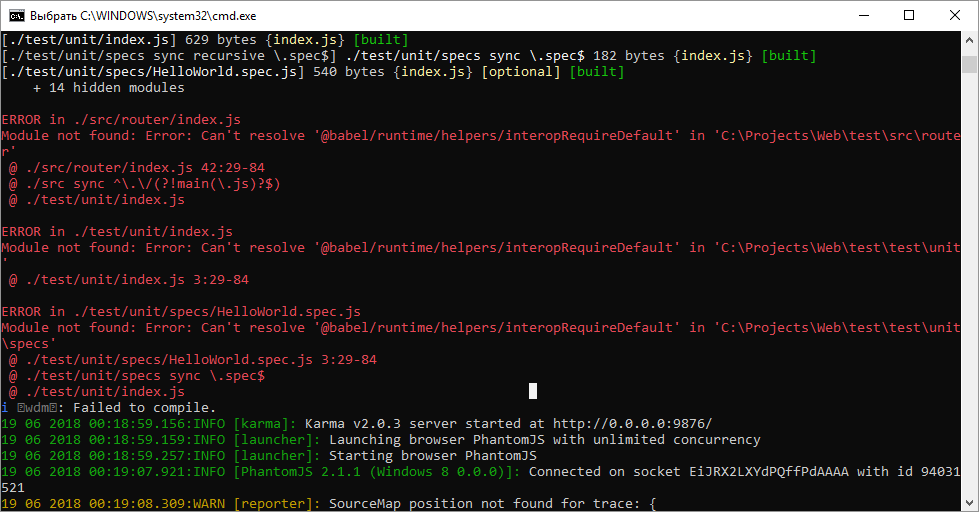

@aksenovdev I tested this with the pr version and it seems to be working fine.
vue init noamkfir/webpack test
then ran
cd test
then ran
npm test
Encountered the same issue as @aksenovdev with two test runners:
Jest:
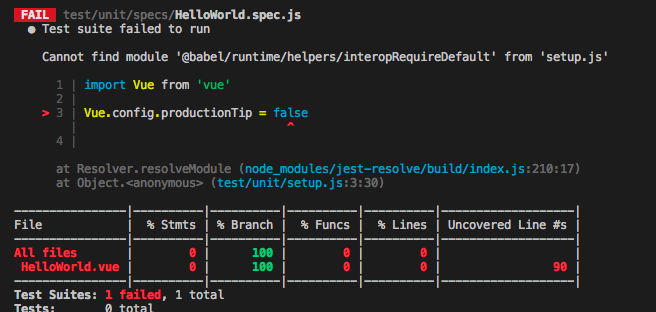
Karma + Mocha:
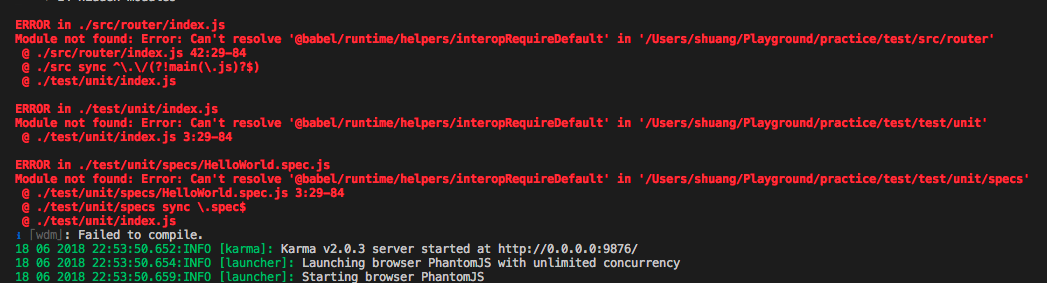
Errors were the same regardless of running npm run test or yarn run test.
Note: I ran vue init noamkfir/webpack test to initialize the project, once for each of the test runners I described above. This was run on a Macbook Pro 2017 with Node 10.4.1 installed via Homebrew.

@babel/runtime is missing for now. please install @babel/runtime to resolve this issue, I'm inspecting the problem, maybe this is from upstream changes.