
flexmark-java

flexmark-java copied to clipboard
 vsch
vsch
Is there an easy way to disable ordered lists?
Or do I need to write a custom renderer?
Example:
2. hello
some text
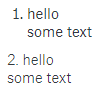
results in this output:
<ol>
<li>hello<br/>some text</li>
</ol>
but I would like it to give the same output as this input does:
2\. hello
some text
->
<p>2. hello<br/>some text</p>
Rendered in browser:
Example code:
import com.vladsch.flexmark.html.HtmlRenderer;
import com.vladsch.flexmark.parser.Parser;
import com.vladsch.flexmark.profile.pegdown.Extensions;
import com.vladsch.flexmark.profile.pegdown.PegdownOptionsAdapter;
import com.vladsch.flexmark.util.data.DataHolder;

public class MarkdownParserBase {
    private final static int PEGDOWN_EXTENSIONS =  Extensions.AUTOLINKS;

    private static final DataHolder OPTIONS = PegdownOptionsAdapter.flexmarkOptions(
        PEGDOWN_EXTENSIONS
    ).toMutable()
        .set(HtmlRenderer.SOFT_BREAK, "<br/>");

    public static Parser PARSER = Parser.builder(OPTIONS).build();
    public static HtmlRenderer htmlRenderer = HtmlRenderer.builder(OPTIONS).build();

    public static String getHtml(String markdownString) {
        return htmlRenderer.render(PARSER.parse(markdownString));
    }

    public static void main(String[] args) {
        String input = "2. hello\nsome text";
        System.out.println(MarkdownParserBase.getHtml(input));
        // Prints:
        // <ol>
        // <li>hello<br/>some text</li>
        // </ol>

        // I would like it to give the same output as this does:
        String input2 = "2\\. hello\nsome text";
        System.out.println(MarkdownParserBase.getHtml(input2));
        // Prints:
        // <p>2. hello<br/>some text</p>
    }
}
