

 vsch
vsch
-mmcu not set properly when using Arduino Nano
I created a new project for the Nano. It seems like some variable was not initialized properly, as -mmcu= didn't receive a value. To resolve the issue, I quickly patched two places in Arduino.cmake as follows:
- set(COMPILE_FLAGS "${COMPILE_FLAGS} -DARDUINO=${ARDUINO_VERSION_DEFINE} -DARDUINO_${${BOARD_ID}.build.board} -DARDUINO_ARCH_AVR -mmcu=${${BOARD_ID}${ARDUINO_CPUMENU}.build.mcu}")
+ set(COMPILE_FLAGS "${COMPILE_FLAGS} -DARDUINO=${ARDUINO_VERSION_DEFINE} -DARDUINO_${${BOARD_ID}.build.board} -DARDUINO_ARCH_AVR -mmcu=atmega328p")
- set(LINK_FLAGS "-mmcu=${${BOARD_ID}${ARDUINO_CPUMENU}.build.mcu}")
+ set(LINK_FLAGS "-mmcu=atmega328p")
Not sure if it's an issue in your plugin (as in, doesn't set the right variable, e.g., due a typo), or rather Arduino.cmake.

I think this is related to #7 I will revisit the code to validate initialization.

Still hit by this issue.
CLion CMake log ends in:
Problems were encountered while collecting compiler information:
	avr-g++: error: missing device or architecture after '-mmcu='
	avr-gcc: error: missing device or architecture after '-mmcu='
	avr-g++: error: missing device or architecture after '-mmcu='
Build log aborts due to:
avr-g++: error: missing device or architecture after '-mmcu='
Did you select cpu when create project?
In CMakeLists.txt file you must have for example:
set(${PROJECT_NAME}_BOARD nano) set(ARDUINO_CPU atmega328)
and all working OK.
Most of adrunio boards can use more than one cpu type, usually ATmega328, ATMega168, etc.

Yep, chose (well, not really, it's the default) ATmega328 (old bootloader).
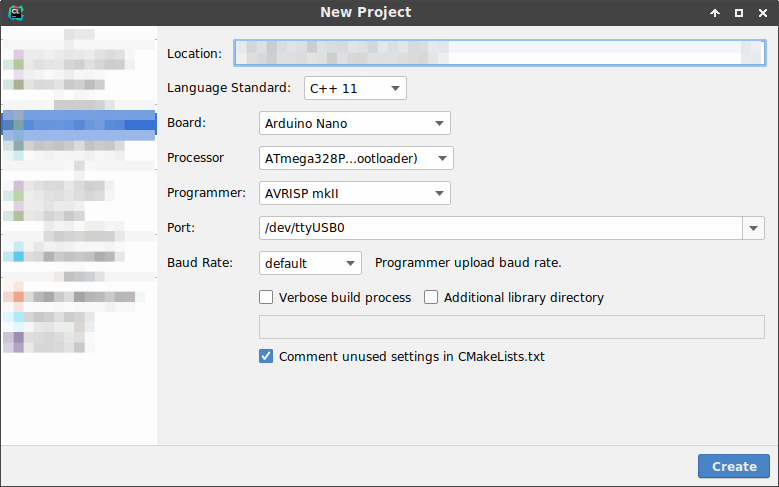
I have such errors only if I don't choose CPU. Please check your CMakeLists.txt for:
set(${PROJECT_NAME}_BOARD nano) set(ARDUINO_CPU atmega328old) project(${PROJECT_NAME})
I use Win 10 + Arduino 1.8.10 + Clion 2019.3 + Arduino Plugin 1.5.2
@TheAssassin
Receipt for ubuntu below.
In my case IDE stuck with 2 versions of arduino.
I installed old one via apt-get and got error with 'mmcu' as above. I uninstalled it and removed folder /usr/shared/andruino at all.
After removing, I got errors about ARDUINO_SDK_PATH and Board Id (nano). After long Investigation both errors disappeared if ARDUINO_SDK_PATH sets as absolute path set(ARDUINO_SDK_PATH "/home/some/path/adruino/ide") in ArduinoToolchain.cmake. Here folder '/ide' contains files downloaded from https://arduino.cc. If something goes wrong clear CMakeCache.txt until Cmake builds successful.
And after all above, select YOUR_PROJECT-upload setting from menu and build it.
ps: also, all paths to arduino in CMakeCache.txt stated as not found and I don't know why:
ARDUINO_BOOTLOADERS_PATH:FILEPATH=ARDUINO_BOOTLOADERS_PATH-NOTFOUND
Hope this helps.
