

 vrtmrz
Plugin Sync - "something went wrong on reading chunks of [file]"
Cheers, Thanks again for such an awesome plugin! Having an issue that sppears more common since the update: problems with plugin syncing, and more general instances of corrupted files. I am frequently getting an error, "something went wrong on reading chunks of _____" and though I've gotten all of the notes to decrypt correctly, the plugin setting window is repeatedly struggling to display available plugins from other devices. Could it have somethign to do with the chunk size? I haven't messed with any of those settings at all.

Note, I also ran the "Check database configuration" check and had "Ok" check marks on every line.
One thing I did note is that the error reads "something went wrong on reading chunks of ____ from database:" but doesn't indicate a database after the colon. I don't know if that's particularly helpful or not.
Still working on this issue, having applied the update to 0.11.1 across the devices and not noticed a change. Trying to sync between three devices (PC, iphone, ipad) but often getting issues where chunks can't be read - and syncing just seems really slow or unreliable - when it used to just work. Can I/should I change something in the chunk size?
@SONDLecT Thank you for your report and sorry for your inconvenience.
"something went wrong on reading chunks of ____ from database:" but doesn't indicate a database after the colon. I don't know if that's particularly helpful or not.
So unfriendly message… You get the real error on the next if you are enabled verbose log. I fixed this at v0.11.2.
You don’t have to change the chunk size. Actually, it had some bugs while synchronizing non-note entries. (But I don’t think it is the real reason) I fixed some bugs in v0.11.2 and v0.11.3. Could you please try v0.11.3 once and give me an error message?
Or, perhaps changing some configuration of the plug-in that makes errors will overwrite corrupted chunks and getting better. What plug-in makes error has been shown from v0.11.2.

Ah Verbose mode! Of course! Okay so it looks like a timeout error. "6/14/2022, 1:51:14 PM->Something went wrong on reading chunks of ps:phone-obsidian-excalidraw-plugin from database: 6/14/2022, 1:51:14 PM->Error:Chunk reading timed out:h:+5c83d276/14/2022, 1:51:52 PM->Something went wrong on reading chunks of ps:ipad--obsidian-livesync from database: 6/14/2022, 1:51:52 PM->Error:Chunk reading timed out:h:+-322194cd0 6/14/2022, 1:51:52 PM->Something went wrong on reading chunks of ps:ipad--obsidian-timelines from database:10"
I'll run the update though and check, thanks!!
@SONDLecT Thank you for your report and sorry for your inconvenience.
"something went wrong on reading chunks of ____ from database:" but doesn't indicate a database after the colon. I don't know if that's particularly helpful or not.
So unfriendly message… You get the real error on the next if you are enabled verbose log. I fixed this at v0.11.2.
You don’t have to change the chunk size. Actually, it had some bugs while synchronizing non-note entries. (But I don’t think it is the real reason) I fixed some bugs in v0.11.2 and v0.11.3. Could you please try v0.11.3 once and give me an error message?
Or, perhaps changing some configuration of the plug-in that makes errors will overwrite corrupted chunks and getting better. What plug-in makes error has been shown from v0.11.2.
Okay, I've updated across all the devices. Unfortunately the problem persists. You mentioned changing the configuration of THE plugin that makes errors - unfortunately the errors always pop up for all/most of the plugins. An example of the logs:
6/14/2022, 8:15:46 PM->Reading plugin:TTRPG Statblocks(obsidian-5e-statblocks) 6/14/2022, 8:15:48 PM->check diff:TTRPG Statblocks(obsidian-5e-statblocks) 6/14/2022, 8:15:48 PM->Something went wrong on reading chunks of ps:desktop_sync-obsidian-5e-statblocks from database, see verbose info for detail. 6/14/2022, 8:15:48 PM->Error:Chunk was not found: h:+1f626e3e0 6/14/2022, 8:15:52 PM->Chunk saved:128 chunks 6/14/2022, 8:15:52 PM->note content saven, pieces:128 new:128, skip:0, cache:0 6/14/2022, 8:15:52 PM->note saved:ps:desktop_sync-obsidian-5e-statblocks:10-6526171f29a84967980cf7cf42b8903c 6/14/2022, 8:15:52 PM->Plugin saved:TTRPG Statblocks 6/14/2022, 8:15:52 PM->Reading plugin:Admonition(obsidian-admonition) 6/14/2022, 8:15:52 PM->check diff:Admonition(obsidian-admonition) 6/14/2022, 8:15:52 PM->Something went wrong on reading chunks of ps:desktop_sync-obsidian-admonition from database, see verbose info for detail. 6/14/2022, 8:15:52 PM->Error:Chunk was not found: h:+-716573ab0 6/14/2022, 8:15:53 PM->Chunk saved:14 chunks 6/14/2022, 8:15:53 PM->note content saven, pieces:14 new:14, skip:0, cache:0 6/14/2022, 8:15:53 PM->note saved:ps:desktop_sync-obsidian-admonition:10-3f8f878be3624bbf81cc75105e0860a3 6/14/2022, 8:15:53 PM->Plugin saved:Admonition 6/14/2022, 8:15:53 PM->Reading plugin:Bartender(obsidian-bartender) 6/14/2022, 8:15:53 PM->check diff:Bartender(obsidian-bartender) 6/14/2022, 8:15:53 PM->Something went wrong on reading chunks of ps:desktop_sync-obsidian-bartender from database, see verbose info for detail. 6/14/2022, 8:15:53 PM->Error:Chunk was not found: h:+-1fdb0e310 6/14/2022, 8:15:53 PM->Chunk saved:1 chunks 6/14/2022, 8:15:53 PM->note content saven, pieces:1 new:1, skip:0, cache:0 6/14/2022, 8:15:53 PM->note saved:ps:desktop_sync-obsidian-bartender:10-33ea73dc32464b8ca4d2afdb939d9821
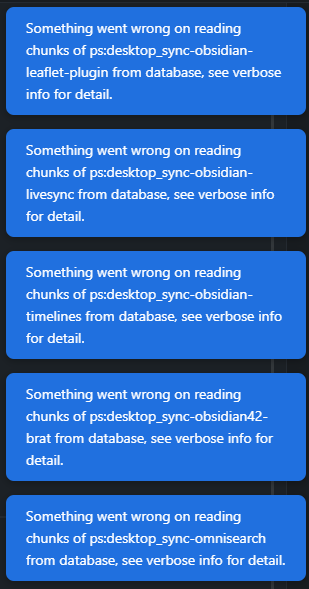
And it goes on like this for all the plugins.
One thing that I noticed was that I found that even if I uinstalled the self-hosted plugin and reinstalled it, even if I deleted the vault and reopened it - the errors that would pop up referencing misread chunks would reference a device/vault name (the name that you enter in the plugin sync settings tab in the plugin options) from before I deleted/uninstalled the plugin. I found that if I uninstalled Obsidian entirely - or deleted the Cache folder - I was able to get the plugins to sync across all the devices ONCE before those same errors started to reappear.
@SONDLecT
Thank you for the detailed log!
It looks like it had failed to save the chunks. If you still having this problem, could you check Check integrity on saving on the Miscellaneous pane? You'll get the result that the note(or plugin setting) had been surely saved or not. And if the log says note save failed! instead of note has been surely saved, please send me the plugin dir if you can.
One thing that I noticed was that I found that even if I uinstalled the self-hosted plugin and reinstalled it, even if I deleted the vault and reopened it - the errors that would pop up referencing misread chunks would reference a device/vault name (the name that you enter in the plugin sync settings tab in the plugin options) from before I deleted/uninstalled the plugin. I found that if I uninstalled Obsidian entirely - or deleted the Cache folder - I was able to get the plugins to sync across all the devices ONCE before those same errors started to reappear.
I am really sorry to let you do this. I think reinstalling is so terrible workaround. I have to write some quick ref at least, not only docs. Of course, docs need to be refined... We can reset and rebuild only databases keeping all of the files by Drop history feature.
Thank you for your help so far, and I appreciate seeing that since I opened this issue THREE updates have been pushed! Unfortunately the issue persists. I’ve fully deleted and rebuilt the database in as clean a manner as I can, across the three devices. Right now it seems like notes and even plugins can sync across ONCE but then the problems come back with reading chunks. According to the log when I enabled check integrity the notes ARE syncing - but what’s worse is that that doesn’t seem to actually be the case. Certainly not “live” syncing at least. I will make a change on my daily note for example and it just won’t be reflected over on the other devices, even though I will force replication and it will say everything is complete.
on the phone right now though the log says “invalid state error: failed to execute ‘transaction’ on IDBDatabase (for the record I haven’t named that, so I don’t know what database thay refers to)
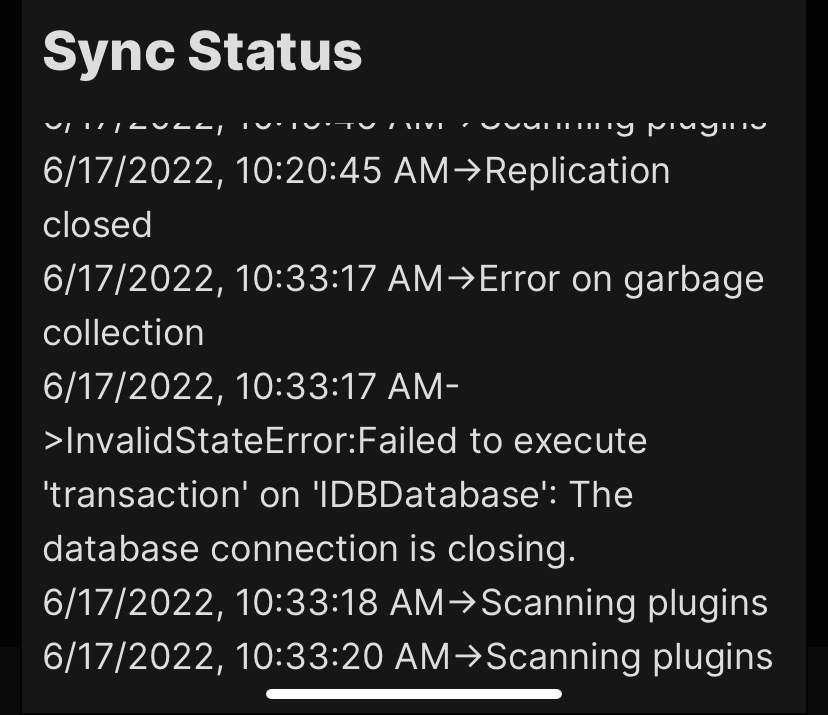
Oh, so thank you for this log!! I caught the tail with your kindness and patience! Please disable automatic garbage collection as a temporary workaround. looks like the garbage collector making missing chunks. You can stop automatic GC by setting 0 to its delay in the local database pane in the setting dialog.
I will fix the GC soon.
FYI. You can use the Show history feature when you disable garbage collection.
Ahhah! Amazing, it appears to be working, livesync included! Thank you for restoring this functionality! Is there something I should be doing regarding manual garbage collection?
I’m very relieved to hear that! You’re welcome and I’m so thank you for your patience too. No, you don’t have to run the garbage collector now. The storage will be spent a bit more, but almost harmless.