

 vrtmrz
Setup Difficulties - Remote database is newer or corrupted make sure to latest version of self-hosted-livesync installed
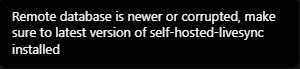
Hi, I recently found this project and would like to try it out, but sadly I can't connect a second instance to it. I get the following error message: Remote database is newer or corrupted make sure to latest version of self-hosted-livesync installed
This is my local.ini file.
[cors]
credentials=true
headers=accept, authorization, content-type, origin, referer
max_age=3600
methods=GET, PUT, POST, HEAD, DELETE
origins=app://obsidian.md,capacitor://localhost,http://localhost,http://192.168.68.110,http://192.168.68.110:5984

[chttpd]
bind_address=any
max_http_request_size=4294967296
port=5984
require_valid_user=true

[admins]
admin=<you probably don't need this>

[vendor]
name=The Apache Software Foundation

[feature_flags]
partitioned||*=true

[chttpd_auth]
authentication_redirect=/_utils/session.html
hash_algorithms=sha256, sha
require_valid_user=true

[indexers]
couch_mrview=true

[prometheus]
additional_port=false
bind_address=127.0.0.1
port=17986

[httpd]
WWW-Authenticate="\"Basic realm=\\\"couchdb\\\"\""
bind_address=127.0.0.1
enable_cors=true
port=5986

[smoosh]
state_dir=./data

[couch_httpd_auth]
authentication_db=_users

[couchdb_engines]
couch=couch_bt_engine

[couchdb]
database_dir=./data
max_document_size=50000000
single_node=true
uuid=3370b91172243a8b62491ed619898d0d
view_index_dir=./data
I installed it via docker and I am using the following compose:
version: '3.3'
services:
    couchdb:
        environment:
            - COUCHDB_USER=admin
            - COUCHDB_PASSWORD=password
        volumes:
            - './local.ini:/opt/couchdb/etc/local.ini'
        ports:
            - '5984:5984'
        image: couchdb
I hope you can help, I would love to try this project!

Thank you for your interest and for not giving up! It seems that you have not made a mistake. Have you run 'Test connection' and 'Check database settings'?

yes, both without any issues. The only thing I was asked to do was to update the .ini file because I run in docker. (Which I did as you can see in the file I attached to the issue)
@LaserKaspar
Thank you for responding!
Does this happen on PC or Android? If so, May I ask to capture the network pane which can be shown on the DevTools?
It might happen at requesting obsydian_livesync_version (Yes, there is a spelling error.).
Thanks again for your answer. I'm on PC / Windows. Here are some screenshots of the DevTools.
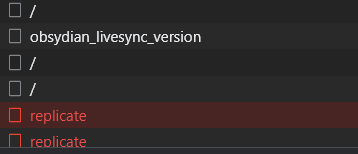
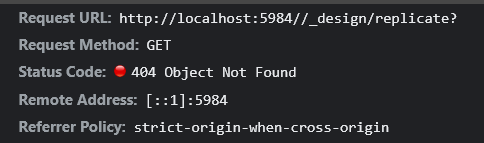
{"error":"not_found","reason":"Database does not exist."}
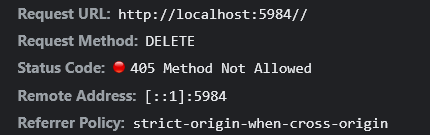
{"error":"method_not_allowed","reason":"Only GET,HEAD allowed"}
How do I reset the remote database? And where is it stored? Can I mount it via docker-compose? Otherwise, it is hidden inside the container.
I appreciate your hassle! The logs were very helpful.
The logs show that the database name seems to have reverted to empty. May I ask what was actually set? If you have left it as it is, would you mind setting something up and trying again, please?
Ok, so I set it up on a vps with a reverse proxy to get a certificate, and I don't get any errors now. Maybe there are issues if it is setup without a cert? But syncing still does not work completely. Changes from my phone sync normally to my PC but changes made on pc don't sync back to my phone. File deletion and creation syncs normally
Database name is set main (now).
What should I try again? I just reset everything and setup from scratch so there are hopefully no issues with conflicts from previous setups.
EDIT: I set up another device to sync (ipad) and it works flawlessly with my pc. Syncing changes to my phone is the problem. If I force the fetch it gets the changes but it won't do so automatically. LiveSync is enabled and the sync-status in the top right seems to get changes because it changes when I type on another device.
Sorry for being late!
EDIT: I set up another device to sync (ipad) and it works flawlessly with my pc. Syncing changes to my phone is the problem. If I force the fetch it gets the changes but it won't do so automatically. LiveSync is enabled and the sync-status in the top right seems to get changes because it changes when I type on another device.
Possibly, there are some conflicted files left on the phone. Till v0.17.26, the plug-in had a merging problem.
Could you please try installing the latest version and do Fetch rebuilt DB on the phone?
I had this too. To me problem was that in the lifesync plugin there was not database specified. This did not lead lead to any error message. This is something that looks like can be improved.

Sorry for the delay! And, thank you for the beneficial information! For historical reasons, we can leave the Database field empty if the URI contains that. However, it is indeed an outdated method.
Therefore, in the next version, we will see the warning message if the Database field has been left empty!