

 vozlt
vozlt
Uncaught SyntaxError - HTML does not display
I'm able to view JSON data, but when trying to view the HTML version the console log is scrolling with this error.
VM428:1 Uncaught SyntaxError: Unexpected token in JSON at position 327
at JSON.parse (
It appears to be an issue in the server zone name.
"serverZones":{"NOwww.example.com"
I'm not sure where the "NO" part is is coming from.

Here is a screenshot of the invalid character(s). It should only be "www.example.com".
Does anyone know what that "NOUS" means?
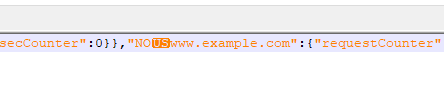
Just would like to add that the server names are messed up in the following URL's : /status/format/json /status/format/jsonp
However, the server names show up correctly using this URL: /status/format/prometheus
I'm not sure if that helps or not to solve the issue.
Hi, @qcybb Thanks reporting. Can I see your nginx.conf especially server_name? also tell me vts versions to reproduce the issue? I might have been blended something control character is in the server_name, because my experiment indicates similar result(it starts NO...) but the latest is different a bit that US isn't seen. BTW What is US? it may stand for the UNIT SEPARATOR?(\x1f)?
nginx.conf
http {
    include       mime.types;
    default_type  application/octet-stream;

    sendfile        on;
    keepalive_timeout  65;

    vhost_traffic_status_zone;
    server {
        listen       80;
        server_name  ^_foo.bar.net;

        location / {
            root   html;
            index  index.html index.htm;
        }

        location /status {
            vhost_traffic_status_display;
            vhost_traffic_status_display_format json;
        }

        error_page   500 502 503 504  /50x.html;
        location = /50x.html {
            root   html;
        }
    }
}
result
% curl localhost/status | jq .serverZones
  % Total    % Received % Xferd  Average Speed   Time    Time     Time  Current
                                 Dload  Upload   Total   Spent    Left  Speed
100  2219  100  2219    0     0  73966      0 --:--:-- --:--:-- --:--:-- 73966
{
  "NO\u001f\u001ffoo.bar.net": {
    "requestCounter": 8,
    "inBytes": 4378,
    "outBytes": 17281,
    "responses": {
      "1xx": 0,
      "2xx": 8,
      "3xx": 0,
      "4xx": 0,
      "5xx": 0,
      "miss": 0,
      "bypass": 0,
      "expired": 0,
      "stale": 0,
      "updating": 0,
      "revalidated": 0,
      "hit": 0,
      "scarce": 0
    },
...

Mine is showing the NO now, not US.
"serverZones":{"NOwww.example.com":
When I visit the URL, I do not see any dashboard.

The browser console is showing this every second:
Uncaught SyntaxError: Bad control character in string literal in JSON at position 328
My vhost.conf :
server {
        listen          11.22.33.44:80;
        server_name     example.com;
        return 301      https://example.com$request_uri;
}

server {
        listen          11.22.33.44:443 ssl http2;

        ssl_certificate /etc/ssl/cert/example.com/example.crt;
        ssl_certificate_key /etc/ssl/cert/example.com/example.key;

        server_name     www.example.com;

        root            /usr/opt/www/example.com/httpdocs;
        index           index.php;

        access_log      off;
        error_log       /var/log/nginx/example_error.log error;

        error_page      404     /404.html;

        charset UTF-8;

        location / {
                 try_files $uri $uri/ =404;
        }

        # Disable cache so users always get fresh content
        location ~* \.(?:htm|html|xhtml|txt|exe|css|js) {
                include         /usr/local/etc/nginx/nocache.conf;
	}

        location ~* /status/ {
                vhost_traffic_status_display;
                vhost_traffic_status_display_format html;

                allow           1.2.3.4;
                include         /usr/local/etc/nginx/allowmyip.conf;
        }

	# Disable access to .htaccess or any other hidden file
        location ~ /\.ht  {
                deny all;
        }
}
curl https://www.example.com/status/ | jq .serverZones

  % Total    % Received % Xferd  Average Speed   Time    Time     Time  Current
                                 Dload  Upload   Total   Spent    Left  Speed
  0     0    0     0    0     0      0      0 --:--:-- --:--:-- --:--:--     0parse error: Invalid numeric literal at line 1, column 10
 56  125k   56 73439    0     0  4120k      0 --:--:-- --:--:-- --:--:-- 4218k
curl: (23) Failure writing output to destination
@qcybb
How about curl https://www.example.com/status/format/json ?
and Could you tell me the module's version?
curl https://www.example.com/status/format/json | jq .serverZones
  "NO\u001fwww.example.com": {
    "requestCounter": 24032,
    "inBytes": 7939268,
    "outBytes": 274855264,
    "responses": {
      "1xx": 0,
      "2xx": 23424,
      "3xx": 415,
      "4xx": 193,
      "5xx": 0
    },
--add-module=/construction/xports/www/nginx-devel/work/nginx-module-vts-0.1.18
Nginx is installed from FreeBSD's port system, so I have no control over module version.
@qcybb Thanks additional info. Actually, it seems that the server_name on vhost.conf might include the control character (\ u001f) which stands for Unit separator, but we've nerver found your present vhost.conf on your comment. Although I tried to reproduce simply including this charater, it could not reproduce the behavior. I don't know why but it had seen the two this characters on server zones. You should be check one more your server_name on vhost.conf whether the character has never found. That is troublesome but this character is not printable ascii character.
I'm not sure what the issue could be. In my config's, I always do server_name +
I removed the tabs and converted them to spaces and still have the same result.
@qcybb It cannot be helped but it is necessary raw vhost.conf which can be reproduced minimally that excludes your business logics non related vts feature (e.g. ssl_certificate, noncache.conf, and allowmyip.conf etc...) as can as possible to dive this issue furthermore. Could you share(upload) such a conf file?
I trimmed the config file as much as I could, and still have the issue. I've attached the file.
"NOexample.com":{"requestCounter":4
@qcybb Thanks! unfortunately I cannot reproduce on your trimmed config. It might have been affected by OS or Nginx version, other Nginx modules.
% curl localhost/status/format/json | jq .serverZones
  % Total    % Received % Xferd  Average Speed   Time    Time     Time  Current
                                 Dload  Upload   Total   Spent    Left  Speed
100  3514  100  3514    0     0  1715k      0 --:--:-- --:--:-- --:--:-- 1715k

{
  "example.com": {
    "requestCounter": 149,
    "inBytes": 57291,
    "outBytes": 493810,
    "responses": {
      "1xx": 0,
      "2xx": 148,
      "3xx": 0,
      "4xx": 1,
      "5xx": 0,
      "miss": 0,
      "bypass": 0,
      "expired": 0,
      "stale": 0,
      "updating": 0,
      "revalidated": 0,
      "hit": 0,
      "scarce": 0
    },
    "requestMsecCounter": 0,
    "requestMsec": 0,
    "requestMsecs": {
      "times": [
        1662862017948,
        1662862018948,
        1662862019952,
        1662862020948,
        1662862021949,
        1662862022957,
        1662862023955,
        1662862024960,
        1662862025964,
        1662862026966,
        1662862027972,
        1662862028972,
        1662862029977,
        1662862030976,
        1662862031985,
        1662862032978,
        1662862033982,
        1662862034983,
        1662862035989,
        1662862036990,
        1662862037994,
        1662862038995,
        1662862039997,
        1662862041000,
        1662862042004,
        1662862043003,
        1662862044007,
        1662862045008,
        1662862046009,
        1662862047012,
        1662862048015,
        1662862049017,
        1662862050022,
        1662862051023,
        1662862052025,
        1662862053024,
        1662862054031,
        1662862055030,
        1662862056034,
        1662862057034,
        1662862058036,
        1662862059036,
        1662862060040,
        1662862061044,
        1662862062045,
        1662862063047,
        1662862064050,
        1662862065050,
        1662862066050,
        1662862067052,
        1662862068053,
        1662862069053,
        1662862070058,
        1662862071059,
        1662862072063,
        1662862073065,
        1662862074070,
        1662862075071,
        1662862076074,
        1662862077076,
        1662862078076,
        1662862079076,
        1662862080078
      ],
      "msecs": [
        0,
        0,
        0,
        0,
        0,
        0,
        0,
        0,
        0,
        0,
        0,
        0,
        0,
        0,
        0,
        0,
        0,
        0,
        0,
        0,
        0,
        0,
        0,
        0,
        0,
        0,
        0,
        0,
        0,
        0,
        0,
        0,
        0,
        0,
        0,
        0,
        0,
        0,
        0,
        0,
        0,
        0,
        0,
        0,
        0,
        0,
        0,
        0,
        0,
        0,
        0,
        0,
        0,
        0,
        0,
        0,
        0,
        0,
        0,
        0,
        0,
        0,
        0
      ]
    },
    "requestBuckets": {
      "msecs": [],
      "counters": []
    },
    "overCounts": {
      "maxIntegerSize": 18446744073709552000,
      "requestCounter": 0,
      "inBytes": 0,
      "outBytes": 0,
      "1xx": 0,
      "2xx": 0,
      "3xx": 0,
      "4xx": 0,
      "5xx": 0,
      "miss": 0,
      "bypass": 0,
      "expired": 0,
      "stale": 0,
      "updating": 0,
      "revalidated": 0,
      "hit": 0,
      "scarce": 0,
      "requestMsecCounter": 0
    }
  },
  "*": {
    "requestCounter": 149,
    "inBytes": 57291,
    "outBytes": 493810,
    "responses": {
      "1xx": 0,
      "2xx": 148,
      "3xx": 0,
      "4xx": 1,
      "5xx": 0,
      "miss": 0,
      "bypass": 0,
      "expired": 0,
      "stale": 0,
      "updating": 0,
      "revalidated": 0,
      "hit": 0,
      "scarce": 0
    },
    "requestMsecCounter": 0,
    "requestMsec": 0,
    "requestMsecs": {
      "times": [
        1662862061044,
        1662862062045,
        1662862063047,
        1662862064050,
        1662862065050,
        1662862066050,
        1662862067052,
        1662862068053,
        1662862069053,
        1662862070058,
        1662862071059,
        1662862072063,
        1662862073065,
        1662862074070,
        1662862075071,
        1662862076074,
        1662862077076,
        1662862078076,
        1662862079076,
        1662862080078,
        1662862016947,
        1662862017948,
        1662862018948,
        1662862019952,
        1662862020948,
        1662862021949,
        1662862022957,
        1662862023955,
        1662862024960,
        1662862025964,
        1662862026966,
        1662862027972,
        1662862028972,
        1662862029977,
        1662862030976,
        1662862031985,
        1662862032978,
        1662862033982,
        1662862034983,
        1662862035989,
        1662862036990,
        1662862037994,
        1662862038995,
        1662862039997,
        1662862041000,
        1662862042004,
        1662862043003,
        1662862044007,
        1662862045008,
        1662862046009,
        1662862047012,
        1662862048015,
        1662862049017,
        1662862050022,
        1662862051023,
        1662862052025,
        1662862053024,
        1662862054031,
        1662862055030,
        1662862056034,
        1662862057034,
        1662862058036,
        1662862059036
      ],
      "msecs": [
        0,
        0,
        0,
        0,
        0,
        0,
        0,
        0,
        0,
        0,
        0,
        0,
        0,
        0,
        0,
        0,
        0,
        0,
        0,
        0,
        0,
        0,
        0,
        0,
        0,
        0,
        0,
        0,
        0,
        0,
        0,
        0,
        0,
        0,
        0,
        0,
        0,
        0,
        0,
        0,
        0,
        0,
        0,
        0,
        0,
        0,
        0,
        0,
        0,
        0,
        0,
        0,
        0,
        0,
        0,
        0,
        0,
        0,
        0,
        0,
        0,
        0,
        0
      ]
    },
    "requestBuckets": {
      "msecs": [],
      "counters": []
    },
    "overCounts": {
      "maxIntegerSize": 18446744073709552000,
      "requestCounter": 0,
      "inBytes": 0,
      "outBytes": 0,
      "1xx": 0,
      "2xx": 0,
      "3xx": 0,
      "4xx": 0,
      "5xx": 0,
      "miss": 0,
      "bypass": 0,
      "expired": 0,
      "stale": 0,
      "updating": 0,
      "revalidated": 0,
      "hit": 0,
      "scarce": 0,
      "requestMsecCounter": 0
    }
  }
}
BTW, I found the similar issue below. https://github.com/vozlt/nginx-module-vts/issues/149
This issue said that
I could "fix" by changing definition of NGX_HTTP_VHOST_TRAFFIC_STATUS_KEY_SEPARATOR from 0x1f to 0x20, but I'm not sure if this will break anything else.
So I would like to apply this patch but I'm also not sure this is a breaking changes. To make sure clearly, It is necessary to establish reproduce procedure.
Finally, I assume that I can find the one of the factor in case of server_name ^_xxxxxx;
Here is the part of the ngx_http_vhost_traffic_status_display_set_server_node. https://github.com/vozlt/nginx-module-vts/blob/e4da6dcfeb22a28ab3433c541c7c02e181d9d9ef/src/ngx_http_vhost_traffic_status_display_json.c#L68-L70
The return value of ngx_http_vhost_traffic_status_node_position_key ignored here, and then ngx_http_vhost_traffic_status_escape_json_pool is called just next.
The debugger said that after calling ngx_http_vhost_traffic_status_node_position_key, abnormal case has never
trimmed such the separator(\u001f ).
normal case:
68          (void) ngx_http_vhost_traffic_status_node_position_key(&tmp, 1);
(gdb) p tmp
$3 = {len = 12, data = 0x7fa385c8edb2 "NO\037localhost"}
(gdb) n
70          rc = ngx_http_vhost_traffic_status_escape_json_pool(r->pool, &dst, &tmp);
(gdb) p tmp
$4 = {len = 9, data = 0x7fa385c8edb5 "localhost"}
(gdb)
abnormal case:
68          (void) ngx_http_vhost_traffic_status_node_position_key(&tmp, 1);
(gdb) p tmp
$5 = {len = 13, data = 0x7f3cbce56db2 "NO\037\037localhost"}
(gdb) n
70          rc = ngx_http_vhost_traffic_status_escape_json_pool(r->pool, &dst, &tmp);
(gdb) p tmp
$6 = {len = 13, data = 0x7f3cbce56db2 "NO\037\037localhost"}
In short, ngx_http_vhost_traffic_status_node_position_key seems not to work fine.
ngx_http_vhost_traffic_status_node_position_key is manipulate its first argument buf below, it divides the buf every the NGX_HTTP_VHOST_TRAFFIC_STATUS_KEY_SEPARATOR which is \u001f and trimmed that to reassign the specified position with pos into buf.
https://github.com/vozlt/nginx-module-vts/blob/e4da6dcfeb22a28ab3433c541c7c02e181d9d9ef/src/ngx_http_vhost_traffic_status_node.c#L40-L69
In case of the string including consecutive the separator, it does the procedure in this function below
- When
preaches second separator, it breaks the loop in line 52. - Then the
lenis 0 because it is differential between the first separator and second. - And this function returns
NGX_ERRORin line 62(this result ignored on purpose?), it cannot trimmed at all in line 65-66.
@qcybb I added debug information to help determine the cause of this problem. You should compile with the last commit. Please check if the following log is displayed in the nginx error log. If the following log is displayed, please let me know the contents.
2022/09/15 01:01:01 [error] ... display_set_server_node::node_position_key() key[...:14], tmp[:...:11] failed, ...
Commit: https://github.com/vozlt/nginx-module-vts/commit/8520fde130d21e023a27075bfa05fe442198b133
@u5surf It looks like there is only one NGX_HTTP_VHOST_TRAFFIC_STATUS_KEY_SEPARATOR(0x1f) in the above. Do you have a setup that reproduces this issue?

I can't test the commit. I use the FreeBSD port system to install all applications on my server (I do not compile from source).
@qcybb We eager to find the reproduce procedure truly. I could not find anything factor nevertheless I tried to apply with your supplied config.
Does it also occur with this config(nginx.txt)? https://github.com/vozlt/nginx-module-vts/issues/212#issuecomment-1242852041
@vozlt In case of there is only one NGX_HTTP_VHOST_TRAFFIC_STATUS_KEY_SEPARATOR(0x1f), it could not reproduce completely...
Yes, the nginx.txt file is working fine on home backup server (not the live production server).
@qcybb
Is there any difference between my nginx.txt's server directive and your vhost.txt (especially server_name)?
I'm sorry, your nginx.txt does not work. It still shows serverZones":{"NOexample.com"
This was tested on my home backup machine - with only your nginx.txt loaded - and nothing else.
$ nginx -V nginx version: nginx/1.23.1 built with OpenSSL 1.1.1o-freebsd 3 May 2022 TLS SNI support enabled configure arguments: --prefix=/usr/local/etc/nginx --with-cc-opt='-I /usr/local/include' --with-ld-opt='-L /usr/local/lib' --conf-path=/usr/local/etc/nginx/nginx.conf --sbin-path=/usr/local/sbin/nginx --pid-path=/var/run/nginx.pid --error-log-path=/var/log/nginx/error.log --user=www --group=www --with-compat --with-pcre --http-client-body-temp-path=/var/tmp/nginx/client_body_temp --http-fastcgi-temp-path=/var/tmp/nginx/fastcgi_temp --http-proxy-temp-path=/var/tmp/nginx/proxy_temp --http-scgi-temp-path=/var/tmp/nginx/scgi_temp --http-uwsgi-temp-path=/var/tmp/nginx/uwsgi_temp --http-log-path=/var/log/nginx/access.log --with-http_v2_module --without-http-cache --with-http_ssl_module --without-mail_imap_module --without-mail_pop3_module --without-mail_smtp_module --without-pcre2 --add-module=/construction/xports/www/nginx-devel/work/nginx-module-vts-0.1.18
@qcybb Finally, I changed some build configure arguments and also changed into the ubuntu latest into the freebsd on VirtualBox, I could reproduced it for the binary which was built from the source! I'm planning to investigate deeply what difference truly.
[vagrant@freebsd12 ~/nginx]$ curl http://localhost/status/format/json | jq .serverZones
  % Total    % Received % Xferd  Average Speed   Time    Time     Time  Current
                                 Dload  Upload   Total   Spent    Left  Speed
100  1659  100  1659    0     0  36607      0 --:--:-- --:--:-- --:--:-- 36866
{
  "NO\u001fexample.com": {
...
nginx -v
[vagrant@freebsd12 ~/nginx]$ /usr/local/nginx/sbin/nginx -V
nginx version: nginx/1.23.2
built by clang 10.0.1 ([email protected]:llvm/llvm-project.git llvmorg-10.0.1-0-gef32c611aa2)
built with OpenSSL 1.1.1l-freebsd  24 Aug 2021
TLS SNI support enabled
configure arguments: --with-http_v2_module --without-http-cache --with-http_ssl_module --without-mail_imap_module --without-mail_pop3_module --without-mail_smtp_module --add-module=/home/vagrant/nginx-module-vts
I consider that --without-http-cache seems to be the root cause,
Once it removed, it became to work fine.
[vagrant@freebsd12 ~/nginx]$ /usr/local/nginx/sbin/nginx -V
nginx version: nginx/1.23.2
built by clang 10.0.1 ([email protected]:llvm/llvm-project.git llvmorg-10.0.1-0-gef32c611aa2)
built with OpenSSL 1.1.1l-freebsd  24 Aug 2021
TLS SNI support enabled
configure arguments: --with-http_v2_module --with-http_ssl_module --without-mail_imap_module --without-mail_pop3_module --without-mail_smtp_module --add-module=/home/vagrant/nginx-module-vts
[vagrant@freebsd12 ~/nginx]$ curl http://localhost/status/format/json | jq .serverZones
  % Total    % Received % Xferd  Average Speed   Time    Time     Time  Current
                                 Dload  Upload   Total   Spent    Left  Speed
100  1990  100  1990    0     0  39547      0 --:--:-- --:--:-- --:--:-- 40612
{
  "example.com": {
...
@qcybb The bug seems to be fixed, but I don’t see when the next BSD ports nginx will release. Can you close the issue if the issue fix completely when you’ll get the new BSD ports nginx binary? Thank you so much!
Any idea when you will release version 0.2.1?
I don't think the port will get updated until that happens.
Any idea when you will release version 0.2.1?
I don't think the port will get updated until that happens.
How about @vozlt @SuperQ ?

@qcybb The release has done. https://github.com/vozlt/nginx-module-vts/releases/tag/v0.2.1 Could you tell the author of this Nginx ports to update its?
@u5surf The update is now on the FreeBSD ports system and it's working great.
No more issues. Feel free to close this issue.