

 vmware
RHEL-9 with open-vm-tools 12.0 reports guestFamily "otherGuestFamily"
Describe the bug
RHEL-9 with open-vm-tools 12.0 reports guestFamily "otherGuestFamily"
ESXi 7.0.3 Build 19193900 VM version 19
This can be seen in Powercli and in ansible.
Reproduction steps
- Install RHEL-9 x64_86 on vSphere 7
- $RH9 = Get-VM My-RH9
- $RH9.ExtensionData.Guest yields:
ToolsStatus                     : toolsOk
ToolsVersionStatus              : guestToolsUnmanaged
ToolsVersionStatus2             : guestToolsUnmanaged
ToolsRunningStatus              : guestToolsRunning
ToolsVersion                    : 12293
ToolsInstallType                : guestToolsTypeOpenVMTools
GuestId                         : rhel9_64Guest
GuestFamily : otherGuestFamily
GuestFullName                   : Red Hat Enterprise Linux 9 (64-bit)
HostName                        : My-RH9.mylab
IpAddress                       : 10.11.12.13
Net                             : {4000}
IpStack                         : {VMware.Vim.GuestStackInfo}
Disk                            : {VMware.Vim.GuestDiskInfo, VMware.Vim.GuestDiskInfo}
Screen                          : VMware.Vim.GuestScreenInfo
GuestState                      : running
AppHeartbeatStatus              : appStatusGray
GuestKernelCrashed              : False
AppState                        : none
GuestOperationsReady            : True
InteractiveGuestOperationsReady : False
GuestStateChangeSupported       : True
GenerationInfo                  :
HwVersion                       : vmx-19
CustomizationInfo               : VMware.Vim.GuestInfoCustomizationInfo
Expected behavior
GuestFamily : linuxGuest
like in:
- $RH8 = Get-VM My-RH8
- $RH8.ExtensionData.Guest yields:
ToolsStatus                     : toolsOk
ToolsVersionStatus              : guestToolsUnmanaged
ToolsVersionStatus2             : guestToolsUnmanaged
ToolsRunningStatus              : guestToolsRunning
ToolsVersion                    : 12293
ToolsInstallType                : guestToolsTypeOpenVMTools
GuestId                         : rhel8_64Guest
GuestFamily : linuxGuest
GuestFullName                   : Red Hat Enterprise Linux 8 (64-bit)
HostName                        : My-RH8.mylab
IpAddress                       : 10.11.12.10
Net                             : {4000}
IpStack                         : {VMware.Vim.GuestStackInfo}
Disk                            : {VMware.Vim.GuestDiskInfo, VMware.Vim.GuestDiskInfo}
Screen                          : VMware.Vim.GuestScreenInfo
GuestState                      : running
AppHeartbeatStatus              : appStatusGray
GuestKernelCrashed              : False
AppState                        : none
GuestOperationsReady            : True
InteractiveGuestOperationsReady : False
GuestStateChangeSupported       : True
GenerationInfo                  :
HwVersion                       : vmx-19
CustomizationInfo               : VMware.Vim.GuestInfoCustomizationInfo
Additional context
No response

It appears that the RHEL 9 system may have been set up hastily (incorrectly).
From the
GuestFamily : otherGuestFamily
The VM was setup as an "Other" OS and not a "Linux OS.
When the VM is powered on and vmtoolsd is running, the host is informed of the information in "uname -a" and /etc/os-release. In this case the host can clearly see that the guest OS is "claiming" to be a RHEL 9 system and it sets "Guest ID" to show rhel9_64Guest. BUT, it does not update the "guestOS" setting in the VM's .vmx file.
With the VM shutdown, Edit Settings --> VM Options --> General Options
- change the Guest OS Family to "Linux"
- select "Red Hat Enterprise Linux 9 (64-bit)"
Let us know if you notice any other confusing information about the guest.

Thanks for the reply, @johnwvmw
Obviously, I did check the guest properties in the vCenter console prior to opening the ticket.
It was configured as expected, as you can see in the attached screenshot.
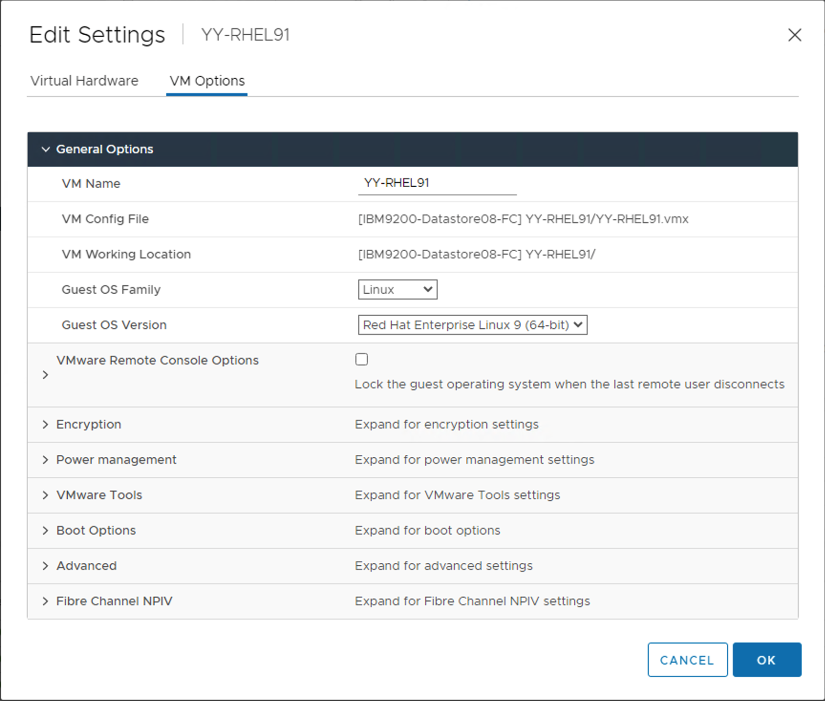 By the way, "Red Hat Enterprise Linux 9 (64-bit)" cannot be selected if the Guest Family is "Other", and yet I get -
GuestId : rhel9_64Guest GuestFamily : otherGuestFamily GuestFullName : Red Hat Enterprise Linux 9 (64-bit)
Any way, I did powered off the guest and changed these settings back and forth and back to 'Linux' and 'Red Hat Enterprise Linux 9 (64-bit)', but it did not solve the problem.
P.S. We encountered this issue with Ansible, then checked with PowerCLI. Same situation with Ansible here (Linux section): https://github.com/vmware/ansible-vsphere-gos-validation/pull/417
The ESX 7.0.3 supports RHEL9 guest os id. The 12293(12.0.5) open-vm-tools you are using has the commit John fixed for rhel9 guestFamily commit 342fd81a270bf36c79baec5bb928a9a979e95af2 Author: John Wolfe [email protected] Date: Fri Nov 19 11:40:50 2021 -0800
Correct the guestFamily reported for RHEL 9.

RHEL 9 had not been added to the ALLLINUX macro.  This has been
corrected.
Let me do further check

OK. I could reproduce your issue with my own setup. Checked our internal bug records and there is a bug to detect RHEL9 guest correctly in ESX side rather than tools side. It is in ESX 7.0u3c(build 19193900) you are using. This not only causes this issue but also the EFI firmware boot issue for RHEL9 guest(https://kb.vmware.com/s/article/88255).
To fix the issue, you need to upgrade the ESX host to 7.0u3d build.(ESXi 7.0 Update 3d | 29 MAR 2022 | ISO Build 19482537)
Thank you very much @pengzhencao,
I will take it to our vSphere admin, we will check it and I will post here the outcomes.