

 vmware
What kind of credential is needed for infrastructure faults?
What kind of credential and permission is required by mangle to run injections on remote endpoints to execute infrastructure faults? Im testing in our environment and using a credential with local admin rights but still facing permission denied issues.
./infra_submit --operation inject --faultname cpuFault --load 85 --timeout 3 --faultId cpuFault errorCode 126 output: bash: ./infra_submit: Permission denied

Hi @carlaabanes , mangle needs to a user which has sufficient permissions like a root or admin so the user can execute such commands. A low privileged user might not have such permissions which can effect the system. Thanks, -Avinash

Hi @carlaabanes , mangle needs to a user which has sufficient permissions like a root or admin so the user can execute such commands. A low privileged user might not have such permissions which can effect the system. Thanks, -Avinash
thanks! need to change our mangle account and do another test.
Hi @carlaabanes , mangle needs to a user which has sufficient permissions like a root or admin so the user can execute such commands. A low privileged user might not have such permissions which can effect the system. Thanks, -Avinash
Hi ashrimalivmware , we already updated our credential that mangle is using to root. when we try to execute manually the mangle commands, the error is the same even after doing it with sudo. Even tried to change the default directory of /tmp to another directory but still facing the same issue.
all our fault testing is failed and we are facing blank wall.
anyone had the same issue?
Hi @carlaabanes ,
To assist you further I need a few more details about the failure.
- Can you please share screenshot of the failure,
- mangle logs,
- what command you executed manually which failed &
- which mangle version you are using?
Thanks, -Avinash
Hi @carlaabanes ,
To assist you further I need a few more details about the failure.
- Can you please share screenshot of the failure,
- mangle logs,
- what command you executed manually which failed &
- which mangle version you are using?
Thanks, -Avinash ashrimalivmware
Hello, please see my screenshot below.
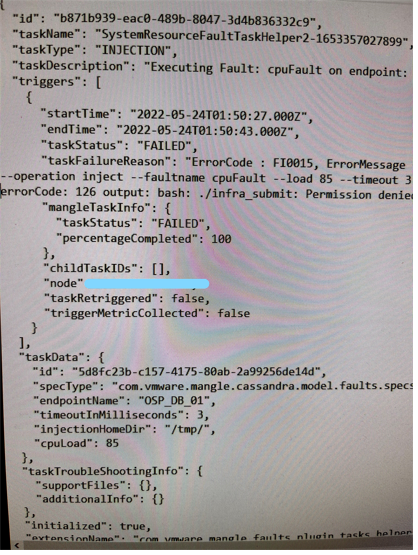
Hi @carlaabanes , To assist you further I need a few more details about the failure.
- Can you please share screenshot of the failure,
- mangle logs,
- what command you executed manually which failed &
- which mangle version you are using?
Thanks, -Avinash ashrimalivmware
Hello, please see my screenshot below.
Mangle version is 3.5.0
Hi @carlaabanes, This looks like the issue with the exec permission on the /tmp directory. Can you try remounting the /tmp directory by giving the volume permission to execute. command to try: sudo mount /tmp -o remount,exec
After that you should be able to inject Infra faults. Let us know. cc: @ashrimalivmware

Hi @carlaabanes, This looks like the issue with the exec permission on the /tmp directory. Can you try remounting the /tmp directory by giving the volume permission to execute. command to try: sudo mount /tmp -o remount,exec
After that you should be able to inject Infra faults. Let us know. cc: @ashrimalivmware
Thank you for your reply, however, our application team informed me that /tmp already have 777 permission.
Hi @carlaabanes ,
I think it's best to have a zoom call to debug it further. Please help me with the suitable time and also provide me your email id so I can schedule a call.
Thanks, -Avinash
Hi @carlaabanes ,
I think it's best to have a zoom call to debug it further. Please help me with the suitable time and also provide me your email id so I can schedule a call.
Thanks, -Avinash HI Avinash, @ashrimalivmware We do not have internet access from our VMs. I also added here the mangle application log file, hope its useful. mangle-logfile.txt Thank you so much.
Hi @carlaabanes Checked that this log file doesn't contain the Infrastructure fault logs. can you execute some of Infra faults and get the logs.
Hi @carlaabanes Checked that this log file doesn't contain the Infrastructure fault logs. can you execute some of Infra faults and get the logs. @rpraveen-vmware mangle-logfile-2.txt Hello, thank you for your reply. Attached here is the infra logs. Please help me fix the issue.
Hi @carlaabanes ,
I think it's best to have a zoom call to debug it further. Please help me with the suitable time and also provide me your email id so I can schedule a call.
Thanks, -Avinash Hi @ashrimalivmware my email address is [email protected]. I work in SGT time zone.
Hi @carlaabanes As I see in the recent log file you sent,
cd /tmp//infra_agent;./infra_submit --operation inject --faultname cpuFault --load 75 --timeout 10 --faultId cpuFault failed. errorCode: 126 output: bash: ./infra_submit: Permission denied
We had seen the similar issue with one of the internal team and had solved it by remounting the temp directory. (Command in one of the previous comments above..).
The directory of /tmp was: root@nsx-manager:~# ls -ltrd /tmp drwxrwxrwt 25 root root 4096 Jun 9 11:59 /tmp
The permission still remained same after remounting the directory. But it helped in resolving the exec permission issue.
Can you try that. (Assuming its not done). Then try injecting fault.
If this not resolving, please send us the infra_agent.log on the Endpoint location: This will be generated at : /tmp/infra_agent/infra_agent.log