

 vmiklos
Sleep logging start and stop triggers are unclear and confusing
I cannot figure out how exactly Plees tracker behaves and this leads to inaccurate logs.
Sometimes when I want to review recent sleeps log I launch Plees tracker and notice that is started sleep logging upon launch. But this is not what I wanted. And this does not happen every time and only occasionally. i cannot figure out why.
Sometimes i wake up brifly during the night and go back to sleep. In the morning I may find that sleep stopped when I woke up. Does it stop when I unlock the phone? Does not seem to happen every time I unlock the phone. And this is again confusing. Sleep logging stop on device unlock is never mentioned, cannot be configured and therefore is mysterious to the user until he guesses.
Expected behavior Sleep logging starts and stops only upon explicit command by a user.

Yes, this is the intended behavior. Tracking only starts when you tap on the start button and stops only when you tap on the stop button. Of course, Android may decide to kill the sleep service, which means that the indicator of the tracking is lost, but I fear an app can't do much about that.
And yes, if you reboot the phone, then plees-tracker stores the start time in a setting, so can re-start the tracking service, but only if you manually launch the app.
Do you know any other open source app that has a more reliable way to launch a background service with a notification icon? IIRC what plees-tracker currently does is more or less the same as the built-in Android clock app, which is considered reasonably reliable.

It is hard to pinpoint exact circumstances when toggling does not work.
First of all there are at least two different ways to toggle tracking
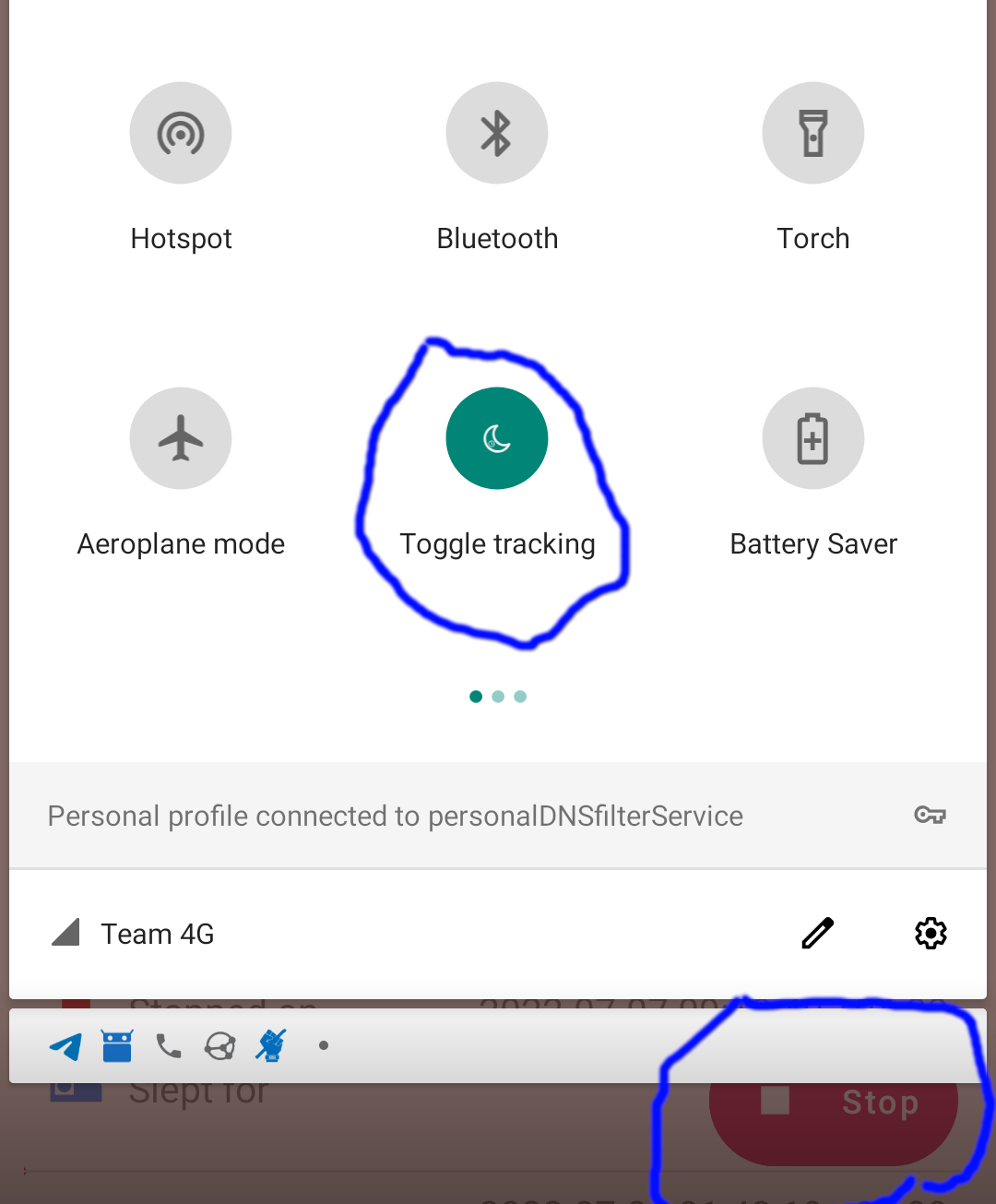
I used to toggle tracking with a button in notification drawer. It does not work reliably for me now. Most of the times it just brings up plees activity to the foreground but does not toggle actual tracking state. It seems this button works reliably before plees tracker is started but if is already running then toggle does not happen.
Also a couple of days ago I have unlocked my phone with fingerprint and the first thing I saw was plees tracker activity. Tracking stopped and at the sleep end time current second is shown. I had not interacted with my phone in any way besides of scanning fingertip. Why did is stop? It happens rather frequently, so when I absent mindedly tap button attempting to stop tracking (that is already stopped) I start another one instead.
Aha yes, if the app is already running, then the toggle widget is indeed broken.
Sorry, I wrote too soon. I could reproduce this on my phone with a slightly older version, but not on the emulator. And now that my phone runs v7.3.5 (latest release), I can't reproduce it there, either.
Could you confirm this "no start/stop when plees-tracker is already the top activity" bug with v7.3.5?
Yes I can still reproduce widget bug with Plees tracker v7.3.5, Android 9 on Xiaomi Mi A1.
It seems I have sequence that reliably reproduces this bug. Try this one:
- Kill Plees tracker ("force stop")
- Open notification drawer, tap "Toggle tracking" widget
- Observe that Plees tracker pops to foreground, tracking started
- Immediately open notification drawer again and tap "Toggle tracking" widget
- Plees tracker comes to foreground but tracking continues
There are other issues but they seem random so lets stick to this one for now.
I believe I have found a sequence that reproduces undesired tracking stop, that is not triggered by intentional user interaction.
- Make sure the device enables dark theme at night and light theme at day time
- In plees tracker settings enable "Follow System Theme"
- Kill Plees tracker
- Wait till device theme changes to dark
- Start Plees tracking from widget in notification drawer.
- Don't touch the device anymore. Let it lock screen after timeout
- Wait until system switches to light theme
- Unlock the device. Observe Plees in dark theme for a fraction of second
- Plees tracker restarts to switch to light theme and stops tracking
I am not sure as this sequence is hard to test because it requires waiting for a long time and I therefore cannot freely test for several times.
Apparently there are 3 different issues:
- Plees tracker does not stop tracking when it should. See above how to reproduce
- Plees tracker stops tracking when it should not See above how to reproduce
- Plees tracker starts tracking when it should not. This I don't know how to reproduce, yet occasionally it happens. I just launch plees tracker from launcher and find that it is already tracking.
Thanks, I'll try to find motivation to finally get to the bottom of these. Quite possible that these are independent from each other, we'll see.
1. Kill Plees tracker ("force stop")

2. Open notification drawer, tap "Toggle tracking" widget

3. Observe that Plees tracker pops to foreground, tracking started

4. Immediately open notification drawer again and tap "Toggle tracking" widget

5. Plees tracker comes to foreground but tracking continues
I can still repro this, the above PR is meant to fix this.
There are other issues but they seem random so lets stick to this one for now.
Fine. Also, I like to have 1 fix for 1 issue, so in case there is anything still reproducible after this fix, please open a follow-up issue. Thanks!
You can either build from source or I'll cut a new release early Jan and then you can test this.