

 vletoux
PingCastle shows Azure AD Kerberos server as inactive
I'm just trying to figure out if this is expected behavior:
All our real domain controllers are not detected by the "check if all DC are active" rule. We have one object, though, that is used as our Azure AD Kerberos server, and it's being detected by the "check if all DC are active" rule.
Should it be expected that this object would be detected by PingCastle as being inactive? For reference, the following documentation is why we created this object: https://docs.microsoft.com/en-us/azure/active-directory/authentication/howto-authentication-passwordless-security-key-on-premises
Is there a way to make PingCastle make an exception for this object? Or, could the verbiage in the message be changed so that people are made aware that they need to ignore Azure AD Kerberos server objects?

Apparently the rule triggers in your case because the computer account is in the DC group. It should not be the case because only the password of this account is used, it is not suppose to perform DC activities

If you mean the "Domain Controllers" security group, it actually is not in that security group. Only our real domain controllers are in that security group.
However, it is in the "Read-only Domain Controllers" security group. I didn't put it there, though. Microsoft's setup utility did that. Is that unexpected?
That wasn't my experience. During the install, it asked me what I wanted to name it, IIRC.
Ours is named AzureADKerberos. I believe I chose that name during setup.
What attribute(s) is PingCastle looking at to determine if a domain controller is active or inactive? pwdLastSet is set to today's date on the AzureADKerberos object, and PingCastle still flags it as "inactive."
It looks like the AzureADKerberos object never gets a lastlogonTimeStamp:
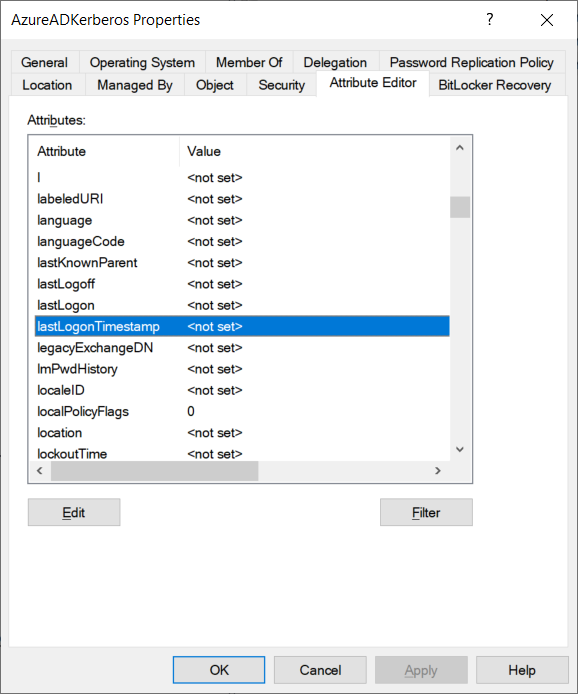
FWIW, Steve Syfuhs at Microsoft has confirmed that lastLogonTimestamp will not ever have a set value on an Azure AD Kerberos server object:
https://twitter.com/SteveSyfuhs/status/1420127267527614466
Is there a way to adjust the logic of PingCastle to look for this?
Would this be a reliable way to detect that a domain controller can be ignored (since it's almost certainly not a normal domain controller)?
operatingSystemVersion = <not set> AND
logonCount = <not set> AND
lastLogon = <not set> AND
primaryGroupID = 521 AND
description contains "Azure AD Kerberos Server"
ok, it's not a DC but the special account AzureADKerberos There is already logic to exclude this account. Which rules are triggered in your case ?
br v
Le mar. 27 juil. 2021 à 23:30, Jason Freeman @.***> a écrit :
Would this be a reliable way to detect that a domain controller can be ignored (since it's almost certainly not a normal domain controller)?
operatingSystemVersion =
logonCount = lastLogon = primaryGroupID = 521 description contains "Azure AD Kerberos Server" — You are receiving this because you commented. Reply to this email directly, view it on GitHub https://github.com/vletoux/pingcastle/issues/90#issuecomment-887847900, or unsubscribe https://github.com/notifications/unsubscribe-auth/ACRDZBU4CDH6UGN5C6P54TLTZ4QODANCNFSM5ALMPPAA .
--
Vincent
Do you know off the top of your head how PingCastle is determining what the domain controllers are?
maybe i can help to answer some questions in this situation. I don't know any reliable onprem solution to check if it is "active" as the activity is primary in cloud and onprem it is just to "validate" the key, so that the onprem server knows the ticket (generated through cloud) is valid.
"However, it is in the "Read-only Domain Controllers" security group.[...] Is that unexpected?" The computer object has to be in "Read-only Domain Controllers" group. It is just as it is designed to be.
"Note: the azureAD SSO account is named AZUREADSSOACC" It has nothing to do with "AZUREADSSOACC" The name "AzureADKerberos" is ok, and it comes bundled with the also unique kerberos user named "krbtgt_AzureAD"
@vletoux the objects are generated for fido2 authentication to be able to do kerberos authentication through azure ad with fido2 tokens. so, it is correctly detected as a ADDC, but it is just a "container" wich has no real server or virtual machine! There won't be logon activities onprem. The two objects are just to be able to validate that kind of "trust" as classic onprem resources do not and cannot talk to the cloud for kerberos authentication. They validate the ticket with that copy of the "active" cloud components.
@loosus as you already linked to "https://twitter.com/SteveSyfuhs/status/1420127267527614466" i see the solution for this problem there. "PwdLastSet should be updated whenever the key rolls" - so the value of PwdLastSet is the one to check for if that object is secure/updated. This is also mentioned in the Microsoft article you linked in your first post: "The Azure AD Kerberos Server encryption krbtgt keys should be rotated on a regular basis".
my summary: So as the "real activity" happens in the cloud. That object does not and cannot do anything (it has no server/agent/... onprem) so you cannot check it as "active". Ignore it for activity check but add a check if "Rotate the Azure AD Kerberos Server key" happened as it is mentioned in the MS article. @vletoux you may want to use the official module https://www.powershellgallery.com/packages/AzureADHybridAuthenticationManagement to do the checks. By the way... does the exisiting rule for Kerberos user also find the "krbtgt_AzureAD" to check if it has changed password within xx days? I guess it should do that like it does for RODC krbtgt users but did not validate that.

@An-dir is there a good way to programmatically differentiate between these "fake" domain controllers and real domain controllers so that they can be checked separately?
@loosus it is just one "fake domain controller" - no need for redundancy and you can only have one per domain (multiple per forest), as far as i know. Read more about it there: https://docs.microsoft.com/en-us/azure/active-directory/authentication/howto-authentication-passwordless-faqs#how-is-azure-ad-kerberos-linked-to-my-on-premises-active-directory-domain-services-environment
Really just use the name to detect this special domaincontroller. should always work (except someone created a DC with that name) but to be sure validate it like that:
- take a look at CN=900274c4-b7d2-43c8-90ee-00a9f650e335,CN=AzureAD,CN=System,<domain-DN>
- open attribute "keywords"
- copy value of "ComputerAccountSid"
- search computer with the sid you just copied -> now you got the "fake domain controller"
@An-dir I know which one in my own environment, but PingCastle needs a reliable way to check programmatically so that it doesn't flag them as inactive.
I'm still wondering of this would work:
operatingSystemVersion =
- take a look at CN=900274c4-b7d2-43c8-90ee-00a9f650e335,CN=AzureAD,CN=System,
- open attribute "keywords"
- copy value of "ComputerAccountSid"
- search computer with the sid you just copied -> now you got the "fake domain controller"
That will only work as long as nobody changes description, and might result in finding other objects.
take a look at CN=900274c4-b7d2-43c8-90ee-00a9f650e335,CN=AzureAD,CN=System,
open attribute "keywords"
copy value of "ComputerAccountSid"
search computer with the sid you just copied
-> now you got the "fake domain controller"
That will work as long as you have a working configuration and works for every environment with hybrid fido2 authentication configuration. This is what you can combine together when reading the documentations and trying it out in production.
If that GUID/SID is always the same, I guess PingCastle could use that to identify it?
The "900274c4-b7d2-43c8-90ee-00a9f650e335" is a guid and according to microsofts documentation it is always the same. So it can be used to identify this unique "domain controller"
Busy implementing this
I'm in travel and don't have access to an AD connected to AzureAD the way described here. I need a screenshot of the properties of one of the object: CN=900274c4-b7d2-43c8-90ee-00a9f650e335,CN=AzureAD,CN=System to retrieve the account SID.
I need to pinpoint the property where is stored the computer SID and the way it is stored it. More speficially the class of the this object, and if the computerSID is stored on a SID attribute (like objectSID) or if it is a generic attribute which needs more processing logic. Also a volonter to test the added code.
Private data can be shared with [email protected]
Thanks for your help
I need to have this screenshot: my test AD is connected in Hybrid mode and thus, this is another object this is used (CN=62a0ff2e-97b9-4513-943f-0d221bd30080,CN=Device Registration Configuration,CN=Services,CN=Configuration) see https://docs.microsoft.com/en-us/azure/active-directory/devices/hybrid-azuread-join-manual for more info

Found some image here:
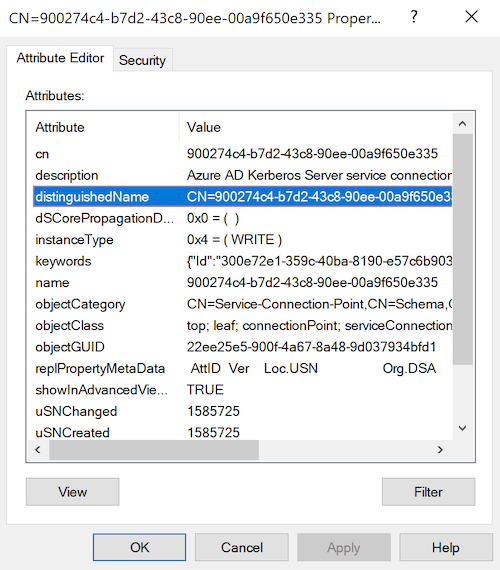 https://www.cloud-architekt.net/hybrid-fido2-keys-part1/
It is stored in the keywords property (directorystring) as json.
fixed (but not tested) for the next version => you should test the beta when it'll be out to make sure the fix is working
Hello, this issue should be re-opened as it seems that the GUID is not static anymore, thus listing the AzureADKerberos computer object as a DC that is not updated (= false positive 15 pts issue).
I took 2 screenshots from 2 different AD Forests:
This "fake light RODC-like" object is used to allow Azure to be able to deliver TGTs for FIDO2 Security Keys and Windows Hello for Business sign-in on Hybrid-Joined devices.
This object is created using the following documentation: https://learn.microsoft.com/en-us/entra/identity/authentication/howto-authentication-passwordless-security-key-on-premises#create-a-kerberos-server-object
Thanks in advance for the help.

Can you check that:
take a look at CN=900274c4-b7d2-43c8-90ee-00a9f650e335,CN=AzureAD,CN=System,
open attribute "keywords"
copy value of "ComputerAccountSid"
search computer with the sid you just copied
-> now you got the "fake domain controller"
already mentioned here: https://github.com/vletoux/pingcastle/issues/90#issuecomment-994153200
