

 vklachkov
Crashes within 10 seconds.
Works fine for about 10 seconds, then the icon doesn't update and when I hover it, it disappears.

Hello, @Sachawech!
Please show the backtrace that occurs after crash What version of Windows? Please send a screenshot of WinVer

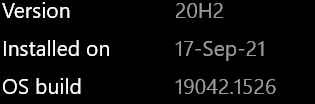
The backtrace?
You wrote "crash" in the title, so a dialog box should appear with a backtrace of the error. Like here: #15
Perhaps we have a misunderstanding and there is no crash, the indicator just freezes
I'm on version
Thank you, I'll try to reproduce it in the next few days
Ah ok, I understand what you mean.
There's no error message. Like I described in the first message, it first hangs / freezes, meaning the icon stops updating when I switch virtual desktops. If I then hover the cursor over the indicator icon in the taskbar, it disappears.
Thank you so much for developing this and for looking into the issue!
Cheers Sacha
@Sachawech Can you please do the following:
- Reproduce the error (aka. just start it and wait until it crashes)
- Open the Event Viewer (Search for "Event Viewer" in your taskbar)
- Open the "adminstrative events" filter
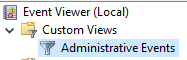
- Search for an entry that contains the word .NET (Should be right on top) (EventId: 1023)

- Make a screenshot or copy the content of the log entry into here

Also @zgdump I think this has something to do with #10
The native mouse hook is a DIY thingy I made and maybe we should consider removing the feature (😢) or try using a third-party library for global mouse hooking.
@Flaflo
Thanks for explaining how to get backtrace. I didn't even know there was something like that in Windows. For good, we need to wrap the entire Main() in a try catch block to show errors to the user
Mouse hook is a really cool feature! I just connected a mouse today, it turned out to be very convenient. But no matter how I tried, the falls are not reproduced. We need to look at other people's implementations. Perhaps we will find answers to both the non-working touchpad and magical falls. I don't want to delete it(
I'm downloading Windows 10. I will test it on it
@zgdump @Flaflo I have the following details after the crash in the event log:
Faulting application name: VirtualDesktopIndicator.exe, version: 1.0.0.0, time stamp: 0x61735063
Faulting module name: coreclr.dll, version: 6.0.322.12309, time stamp: 0x6216cac2
Exception code: 0xc0000409
Fault offset: 0x000000000015c39d
Faulting process id: 0xbd80
Faulting application start time: 0x01d837834c641a06
Faulting application path: .......\VirtualDesktopIndicator.exe
Faulting module path: C:\Program Files\dotnet\shared\Microsoft.NETCore.App\6.0.3\coreclr.dll
Report Id: cc06c004-d03e-4770-8849-d63fcb75fc45
Faulting package full name:
Faulting package-relative application ID:
The previous version doesn't crash that frequently

@zgdump @Flaflo I have the following details after the crash in the event log:
Faulting application name: VirtualDesktopIndicator.exe, version: 1.0.0.0, time stamp: 0x61735063
Faulting module name: coreclr.dll, version: 6.0.322.12309, time stamp: 0x6216cac2
Exception code: 0xc0000409
Fault offset: 0x000000000015c39d
Faulting process id: 0xbd80
Faulting application start time: 0x01d837834c641a06
Faulting application path: .......\VirtualDesktopIndicator.exe
Faulting module path: C:\Program Files\dotnet\shared\Microsoft.NETCore.App\6.0.3\coreclr.dll
Report Id: cc06c004-d03e-4770-8849-d63fcb75fc45
Faulting package full name:
Faulting package-relative application ID:
The previous version doesn't crash that frequently
There should be a more detailed StackTrace in the Event Log entry Details, can you try to get it?
@Flaflo no, there is no stack trace in event details. The event source is "Application Error" 1000 (100), not the ".NET Runtime"
I am not 100% sure, but it seem that it often dies during Zoom calls for me.
@zgdump ok, it is not Zoom. It crashes upon receiving a notification into the notification center.
@Flaflo well, maybe there are different cases? or do you think, that the mouse scroll hook can have something to do with the notification case too?
@Flaflo well, maybe there are different cases? or do you think, that the mouse scroll hook can have something to do with the notification case too?
I am not 100% sure, could you reproduce that behavior multiple times?
@Flaflo yes. I've checked - it crashes as soon as notification arrives. I am on Windows 11 21H2 build 22000.588 Windows Feature Experience Pack 1000.22000.588.0 (It is latest build from the beta channel).
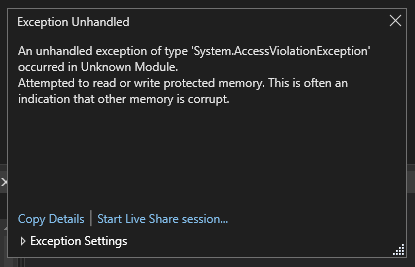
While debugging i saw two strange things:
- Very strange beep signals
- No WM_MOUSEWHEEL on scroll over taskbar icon. No events at all. Although it's caught if scrolled in another program
I do not rule out that we have two issues in one. I caught one with a debugger, screenshot it, but nothing else. Another issue, program crash silently, not even caught by the debugger
Hi, I am also observing the same issue. Not sure if this is tied to an incoming notification:
- <Event xmlns="http://schemas.microsoft.com/win/2004/08/events/event">
  - <System>
    <Provider Name="Application Error" />
    <EventID Qualifiers="0">1000</EventID>
    <Version>0</Version>
    <Level>2</Level>
    <Task>100</Task>
    <Opcode>0</Opcode>
    <Keywords>0x80000000000000</Keywords>
    <TimeCreated SystemTime="2022-03-21T15:11:44.8783410Z" />
    <EventRecordID>39366</EventRecordID>
    <Correlation />
    <Execution ProcessID="32568" ThreadID="0" />
    <Channel>Application</Channel>
    <Computer>DESKTOP-KLDMP0F</Computer>
    <Security />
    </System>
  - <EventData>
    <Data>VirtualDesktopIndicator.exe</Data>
    <Data>1.0.0.0</Data>
    <Data>61735063</Data>
    <Data>coreclr.dll</Data>
    <Data>6.0.322.12309</Data>
    <Data>6216cac2</Data>
    <Data>c0000409</Data>
    <Data>000000000015c39d</Data>
    <Data>880c</Data>
    <Data>01d83d35e1efd7dc</Data>
    <Data>C:\VirtualDesktopIndicator\VirtualDesktopIndicator.exe</Data>
    <Data>C:\Program Files\dotnet\shared\Microsoft.NETCore.App\6.0.3\coreclr.dll</Data>
    <Data>fee8305d-3f75-4c4c-98bd-b83535c54ce3</Data>
    <Data />
    <Data />
    </EventData>
  </Event>
Windows details: Edition Windows 11 Education Version 21H2 Installed on 12/7/2021 OS build 22000.556 Experience Windows Feature Experience Pack 1000.22000.556.0

This also happens to me:
Faulting application name: VirtualDesktopIndicator.exe, version: 1.0.0.0, time stamp: 0x61735063
Faulting module name: coreclr.dll, version: 6.0.222.6406, time stamp: 0x61e1d09e
Exception code: 0xc0000409
Fault offset: 0x000000000015c37d
Faulting process id: 0x44c0
Faulting application start time: 0x01d83e09e6bfa5d0
Faulting application path: C:\Users\DuncanLock\bin\VirtualDesktopIndicator\VirtualDesktopIndicator.exe
Faulting module path: C:\Program Files\dotnet\shared\Microsoft.NETCore.App\6.0.2\coreclr.dll
Report Id: ab96aeb0-1c31-49bb-837a-56dce45e5015
Faulting package full name:
Faulting package-relative application ID:
<Event xmlns="http://schemas.microsoft.com/win/2004/08/events/event">
    <System>
        <Provider Name="Application Error" />
        <EventID Qualifiers="0">1000</EventID>
        <Version>0</Version>
        <Level>2</Level>
        <Task>100</Task>
        <Opcode>0</Opcode>
        <Keywords>0x80000000000000</Keywords>
        <TimeCreated SystemTime="2022[-](https://github.com/zgdump/windows-virtualdesktopindicator/issues/16#)03-22T16:28:51.2473457Z" />
        <EventRecordID>10561</EventRecordID>
        <Correlation />
        <Execution ProcessID="0" ThreadID="0" />
        <Channel>Application</Channel>
        <Computer>X1-MJ0GAQN2</Computer>
        <Security />
    </System>
    <EventData>
        <Data>VirtualDesktopIndicator.exe</Data>
        <Data>1.0.0.0</Data>
        <Data>61735063</Data>
        <Data>coreclr.dll</Data>
        <Data>6.0.222.6406</Data>
        <Data>61e1d09e</Data>
        <Data>c0000409</Data>
        <Data>000000000015c37d</Data>
        <Data>44c0</Data>
        <Data>01d83e09e6bfa5d0</Data>
        <Data>C:\Users\DuncanLock\bin\VirtualDesktopIndicator\VirtualDesktopIndicator.exe</Data>
        <Data>C:\Program Files\dotnet\shared\Microsoft.NETCore.App\6.0.2\coreclr.dll</Data>
        <Data>ab96aeb0-1c31-49bb-837a-56dce45e5015</Data>
        <Data />
        <Data />
    </EventData>
</Event>

I've just updated to the latest Beta build (Windows 11 Pro 22H2 22581.1 Windows Feature Experience Pack 1000.22581.1.0) and now both versions are crashing on launch.
Error message from the latest app version:
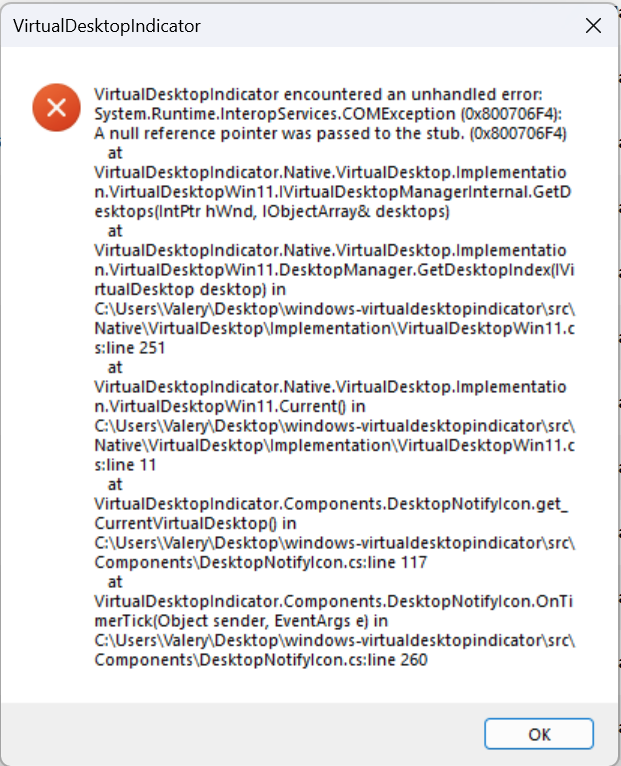
I've just updated to the latest Beta build (Windows 11 Pro 22H2 22581.1 Windows Feature Experience Pack 1000.22581.1.0) and now both versions are crashing on launch
May be API was broken on the latest insider build. It's another issue...
I'm afraid we need to remove the code for the mouse. I didn’t manage to fix it. And it will create a lot of problems
I've just updated to the latest Beta build (Windows 11 Pro 22H2 22581.1 Windows Feature Experience Pack 1000.22581.1.0) and now both versions are crashing on launch
May be API was broken on the latest insider build. It's another issue...
I'm afraid we need to remove the code for the mouse. I didn’t manage to fix it. And it will create a lot of problems
Maybe replacing it with a proper library?
Same issue for me as, silent crash after couple of minutes max with this in the eventlog:
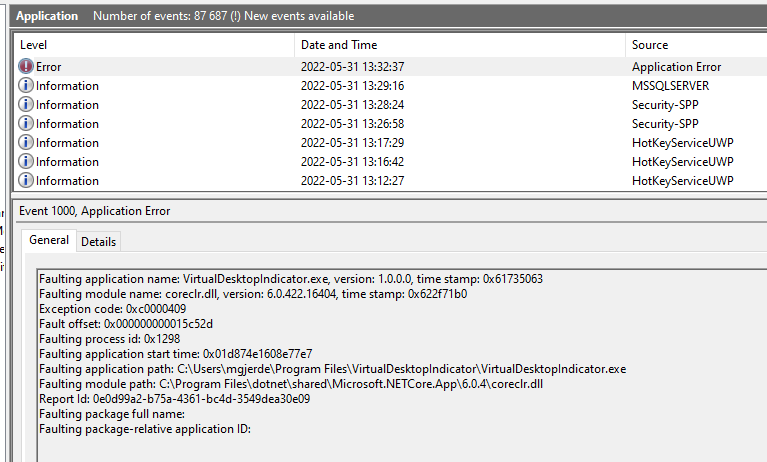

Hello guys, I'm having the same unexpected closing behaviour, however the error event is quite different:
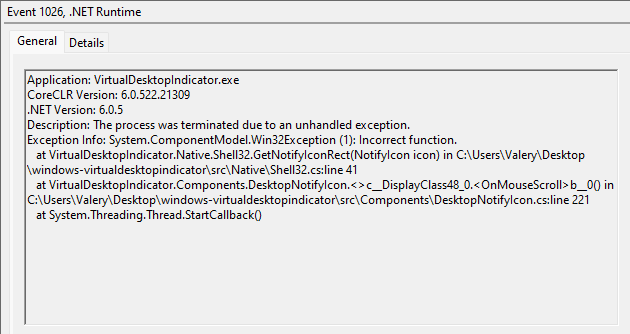 Side note: I don't have any idea who's the C:\Users\Valery refereced in the error:
Exception Info: System.ComponentModel.Win32Exception (1): Incorrect function at VirtualDesktopIndicator.Native.Shell32.GetNotifyIconRect(NotifyIcon icon) in **C:\Users\Valery**Desktop\windows-virtualdesktopindicator\src\Native\Shell32.cs:line 41...
Side note: I don't have any idea who's the C:\Users\Valery refereced in the error:
Exception Info: System.ComponentModel.Win32Exception (1): Incorrect function at VirtualDesktopIndicator.Native.Shell32.GetNotifyIconRect(NotifyIcon icon) in **C:\Users\Valery**Desktop\windows-virtualdesktopindicator\src\Native\Shell32.cs:line 41...
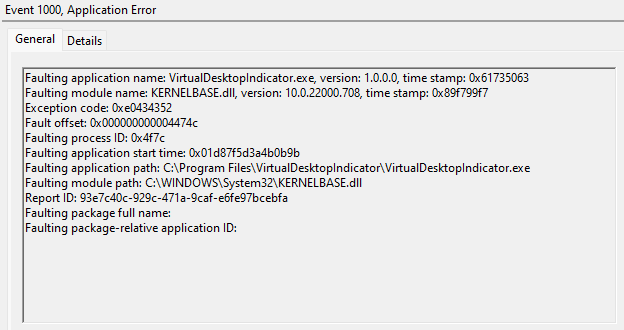
And just after:

Greeting , there is this line and _foregroundWindowTextBuffer is used here with hard coded maxCount 256 when default .Capacity is 16.
my guess is that it should by initialize to bigger size -> private readonly StringBuilder _foregroundWindowTextBuffer = new(256); and then use .Capacity instead of hard coded 256
User32.GetWindowText(User32.GetForegroundWindow(), _foregroundWindowTextBuffer, _foregroundWindowTextBuffer.Capacity);
this fixed crashing for me but I'm not C# dev so ... , maybe i just got lucky with memory :D and should it really be readonly ?
