

 vitotai
Remote logins of pressure reading
I’m using Brewfather am trying to get the pressure transmitter reading transmitted in the log.
I have tried adding and removing both hardware and software setups to try and get the logging to pick up the pressure reading with no success.
any help would be appreciated.

It should be on the latest release. However, there is framework related issues I haven't resolved. You can try upload the file htmljs/dist/english/logging.htm.gz
By http://brewpiless.local:8008/filemanager
Reload the Logging page, change setting, and save again. The pressure should be included.

Thank you so much for the response.
I spent most of last night attempting to get the Pressure relayed to brewfather without success. I followed the steps you gave but noticed no difference.
Not giving up easily I tried standard config on the remote logging and played around with the format string..... "pressure":%P & "pressure_unit":"PSI". All of these failed to upload the data that made me think was it brewfather's side? To confirm this I tried "pressure":10 that should remove the variable from BPL and simply upload the string to brewfather with the value 10. this also failed but I managed to demonstrate this successfully with other parameters.
The reason I question brewfather side is in my format string that works the beer temp is "beertemp" but on the website it states it should be "temp" (which does not work). If the parameter is incorrect the data is not displayed (brewfather does not know what to do with it). I have email the team and asked them to clarify what the pressure tag is so I can rule this out.
On a side note I downloaded the latest version (4 days old) and after being flashed it kept causing the Wemos to restart every 15 seconds so I have reverted to my copy from 11th Dec.
again thanks for the input. I will report back once I hear from brewfather.
The request directly from Brewfather.app: https://github.com/vitotai/BrewPiLess/issues/277
It will be available in "next release" of Brewfather.app.
I tested with "curl" command line. I can confirm that pressure is not yet displayed for now.
Thank you for helping with the issue. I will await the app update 👍
Brewfather is already updated. its BPL that's behind I think. If you add the string as shown in #277 manually it should work. I have had people PM me screens of it working correctly. I was the original person asking Brewfather to add support.
{"id":"FERMENTER1","tempUnit":"C","beerTemp":%b,"beerSet":%B,"fridgeTemp":%f,"fridgeSet":%F,"roomTemp":%r,"gravity":%g,"tiltValue":%t,"auxTemp":%a,"extVolt":%v,"timestamp":%u,"pressure":%P}
Add the above to your remote log, instead of using the stored profile. Follow brewfather instructions for more info.
EDIT: As mentioned just now. Here is a screenshot sent to me 11 Dec 2020. Showing the feature already implemented on brewfather after the update. BPL remote logging profile for Brewfather is the issue right now (only for pressure). Pending any changes to BPL. Just manually add the remote logging as I mentioned.
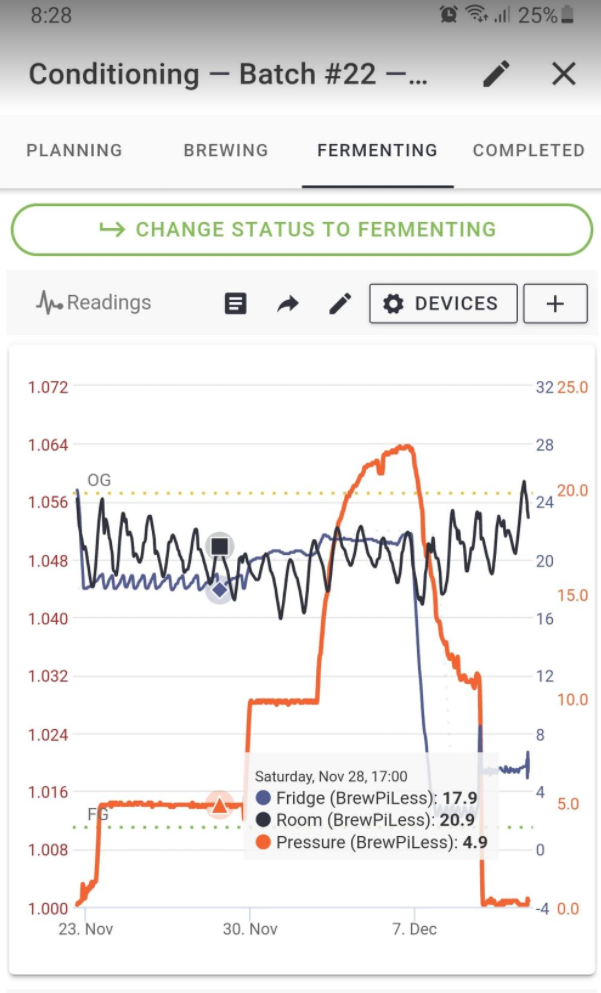

Thank you Scales82 for the response.
In my previous comment I had already tried this method including the "pressure_unit": "PSI" but with no luck. After your post I have just downloaded the lasted copy (6 days old that successfully flashed to my Wemos) but again playing around with the setting uploads the temps but not the pressure. I have the check box ticked for pressure but looking at my online BPL(that does not have pressure transmitter.....yet) it also give the pressure option so this is simply an option and not specific to data packets that have been sent and logged.


Just tried replacing %p with "10" to remove the possibility of BPL sending duff data but again I have tried this before (see previous post) with no resolution. Yup still did'nt work :(
will have another go tomorrow.
So.........
just posted my last message and had another look at brewfather. The graph is now showing a pressure reading for both the %p and the "10" readings I sent but...........when looking at the data readings the pressure measurement's do not show up! This now confirms the data is being sent from BPL to Brewfather. I will forward my findings to the brewfather team so they can make a couple of adjustments to there options keeping it inline with the rest of the data from a user pont of view (I'm sure they are already on it but feedback is good).
Thanks for all your help getting this issue sorted 👍