
vite
 vite copied to clipboard
 vitejs
library mode can't extract static assets
Describe the bug
while in library mode, exec yarn build, the static assets is inline into css file, but what i want is to remain assets alone.
Reproduction
- yarn create @vitejs/app vite-demo --template react
- replace
imgwithdivinApp.tsx, and removesrcattribute
<div className="App-logo" />
- add
background-image: url(facivon.svg)for.App-logoclassname inApp.css
.App-logo {
	height: 40vmin;
	pointer-events: none;
	background-image: url(t.jpeg);
}
- edit
vite.config.json
import { defineConfig } from 'vite';
import path from 'path';
import reactRefresh from '@vitejs/plugin-react-refresh';

// https://vitejs.dev/config/
export default defineConfig({
	plugins: [reactRefresh()],
	build: {
		assetsInlineLimit: 0,
		lib: {
			entry: path.resolve(__dirname, './src/main.tsx'),
			name: 'demo',
		},
	},
});
-
exec
yarn build -
output
dist
├── style.css
├── vite-demo.es.js
└── vite-demo.umd.js
what i expect is that there is a favicon.svg file in dist directory

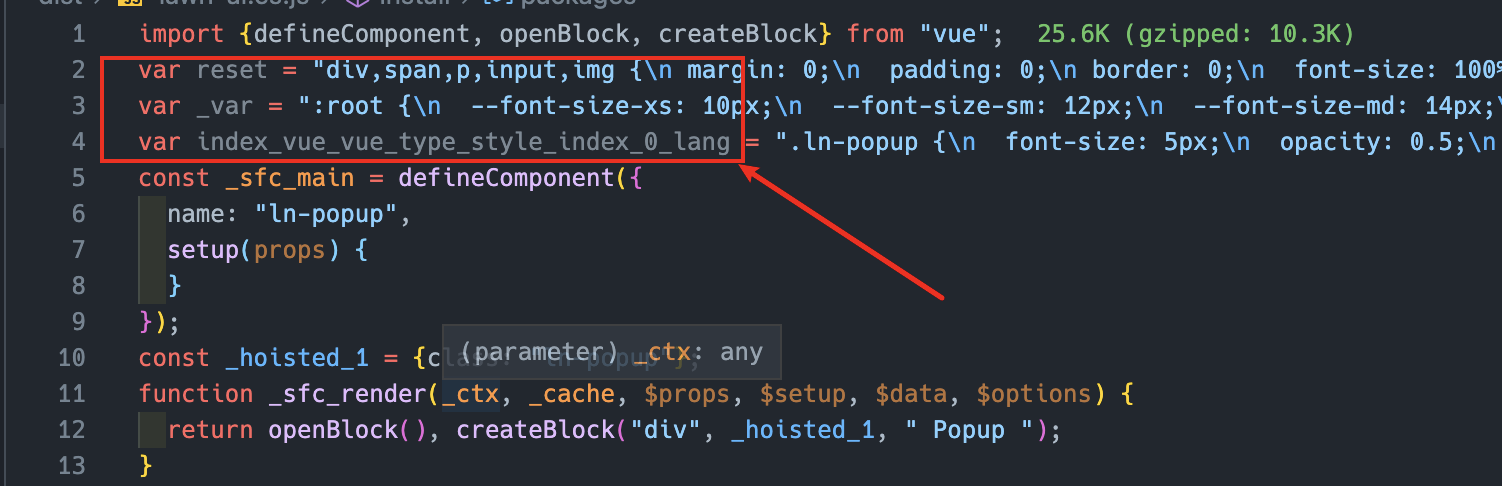
I have the same confusion. css was introduced many times when I used lib packaging mode. This is my entry file, and this is the packaged output. I can only use rollup to tree shaking the packaged file again to delete the invalid code. Does vite have mini-css-extract-plugin plugin similar to webpack, which can package css and js separately. thanks

The current documentation has changed and describes this behavior:
"Assets will always be inlined, regardless of file size, and build.assetsInlineLimit will be ignored if you specify build.lib"
We have a use case which depends on assets not being included in the library build. Could this be supported?

Any updates?
Can we have an option that enables emitting assets separately in lib mode?

+1 for that
https://github.com/vitejs/vite/issues/4454#issuecomment-904552027


Im using this for myself
vite/src/node/plugins/asset.ts line 289:
if (
    (config.build.lib && !config.build.lib.emitAssets) ||
    (!file.endsWith('.svg') &&
      content.length < Number(config.build.assetsInlineLimit))
  )
vite/src/node/build.ts line 210:
export interface LibraryOptions {
  entry: string
  name?: string
  formats?: LibraryFormats[]
  fileName?: string | ((format: ModuleFormat) => string)
  emitAssets?: boolean // <-- New option
}
With this you can set emitAssets:true in build.lib config
Ill make a PR as soon as possible




I think the suggestion from the Vite team would be to use a public directory.
Say you have the file /public/cool-font.woff that was included in your Vue component library:
<template><span class="cool-text"><slot></slot></span></template>

<script lang="ts" setup>
// ...
</script>

<style lang="scss">

@font-face {
    font-family: 'CoolFont';
    font-style: normal;
    font-weight: 400;
    font-display: swap;
    src: url('/cool-font.woff') format('woff');
}

.cool-text {
    font-family: 'CoolFont';
}

</style>
Configured like this, the file will not be inline, but there's one other catch. The public directory needs to be published with the package. So the package.json would be updated:
{
  "name": "cool-package",
  "exports": {
    ".": "./dist/lib.js",
+   "./cool-font.woff": "/public/cool-font.woff"
  },
  "files": [
    "/dist",
+   "/public"
  ]
}
Now whatever environment the cool-package is included in can handle packing/vite/rollup of the static assets however it needs too.

I have a solution: move assets to another package
// @libname/core
import ttf from '@libname/icons/fonts/iconfont.ttf'
// @libname/core vite.config.ts
// ......
    build: {
       // ...
      rollupOptions: {
        external: [/\@libname\/icons/],
      },
    },
I would really like this as well. Curious, why is this not supported in "lib" mode? Must be a reason.


I suggest you to put your t.jpeg into the /public folder (or any subfolder inside public directory, such as /public/assets/images/t.jpeg). This solution helped me with missing background image.
Thanks for the answer by roydukkey,

I would really like this as well. Curious, why is this not supported in "lib" mode? Must be a reason.
Anyone? Why is there a difference from standard, when using lib mode?
We also have a use case for this.
This comment still works to hack it in: https://github.com/vitejs/vite/issues/3295#issuecomment-924063684
However, we also had to tweak the assetFileNames option in this location: https://github.com/vitejs/vite/blob/8f109a67bd54b0eb7679fe1fafc56e03a247b768/packages/vite/src/node/build.ts#L619
To make it respect the assetsDir option properly:
assetFileNames: libOptions
                    ? ({ name }) => ((name.endsWith('.css') ||  !config.build.lib.emitAssets) ? `[name].[ext]` : path$o.posix.join(options.assetsDir, `[name]-[hash].[ext]`))
                    : path$o.posix.join(options.assetsDir, `[name]-[hash].[ext]`),
Would love to see this officially added. Massively helpful.

I wrote a plugin to extract static assets in library mode: vite-plugin-lib-assets
usage:
import libAssetsPlugin from '@laynezh/vite-plugin-lib-assets'

export default defineConfig({
  plugins: [
    libAssetsPlugin({
      limit: 1024 * 8,
      extensions: ['.jpg', '.png', '.otf', '.ttf', '.woff'],
    }),
  ],
})

I wrote a plugin to extract static assets in library mode: vite-plugin-lib-assets
usage:
import libAssetsPlugin from '@laynezh/vite-plugin-lib-assets'

export default defineConfig({
  plugins: [
    libAssetsPlugin({
      limit: 1024 * 8,
      extensions: ['.jpg', '.png', '.otf', '.ttf', '.woff'],
    }),
  ],
})
Nice! Static resources will not be converted to BASE64, but converted to require relative path reference, the problem is perfectly solved.
It should be noted that when using the package by @laynezh/vite-plugin-lib-assets, your app needs to support the related loaders or plugins about the used static resources.

I was using library mode so I could get iife and umd builds, but I still wanted the static assets to be separate from the bundle.
I ended up digging into the rollupOptions instead, my vite.config.js is similar to this:
export default {
  build: {
    assetsInlineLimit: 0,
    cssCodeSplit: false,
    rollupOptions: {
      input: 'src/index.ts',
      output: {
        dir: 'dist/',
        format: 'iife',
        name: 'exportsFromEntryPoint',
      },
      preserveEntrySignatures: 'strict',
    },
  },
};

"./cool-font.woff": "/public/cool-font.woff"
Thanks. I guess it could be documented in general way in the documentation in the library mode section


This might not be related to this, but what about web workers? I'm unable to use web workers in library mode as well. It builds fine, but doesn't bundle the worker with it.


Please, allow this for 'es' libs. Thanks :) . Bundle with svg files inlined , why?

In a node lib, I just had vite transpile
fileURLToPath(new URL("file.ts", import.meta.url))
into
fileURLToPath(new URL("data:video/mp2t;base64,aW1w...", import.meta.url)),
Obviously, this breaks the lib. There needs to be some opt-out to this.

I was using library mode so I could get
iifeandumdbuilds, but I still wanted the static assets to be separate from the bundle.I ended up digging into the
rollupOptionsinstead, myvite.config.jsis similar to this:export default { build: { assetsInlineLimit: 0, cssCodeSplit: false, rollupOptions: { input: 'src/index.ts', output: { dir: 'dist/', format: 'iife', name: 'exportsFromEntryPoint', }, preserveEntrySignatures: 'strict', }, }, };
Initially i "downvoted" this answer since i could not get it to work ATT. Since there seem to be no interest to look into the "main topic", i gave this a try again. Could have been some old version i was using that caused it to not work then. Seem to be working now and i will test it some more :D
Big thanks for the suggestion!!!!
Has there been any discussion on this or any solution for this. I still ask the question, why is this still a thing?
This plugin works well for me: https://github.com/laynezh/vite-plugin-lib-assets
