

 visualapproach
Support for 2021 units
Hi,
It seems that many of the new 2021 models Lay-Z spa come with a new heating/pumping unit.
I don't know what its internals look like, but it looks like this on the outside.

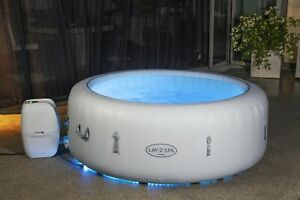
Has anyone already experience with these? I'd love to have a look inside, and know whether they are easily compatible.

A Look inside the 2021 pump
So Remember, this is the 2021 pump that's boxier in shape compared to the egg pump.

Things seem a lot more compact inside compared to the egg shape pump.

The 6 pin contacts

Coloured cables are display side, white with red are pump side.

I opened up the touch display and checked the connections, and it seems like my 5v and GND should match up (my red and orange in the next pic.


[Following on from Discussion/Chat - EDITED]
Getting so close with my 2021 "Cube" pump.
I am currently using this LLC - https://amzn.to/3sNUL8S

I have connected VA and OE on the LLC to 3.3v on the NodeMCU and after a short while (I imagine the NodeMCU boot time?) now have display (which scrolls "hello") and functionality of the buttons via the pump control panel!
The function of the pump control panel buttons works as intended. - although slightly delayed Bubbles = Bubbles Heater = Heater Pump = Pump C/F = Unit Toggle switches back and forth (can we make C the default?) Etc....
When using the control panel buttons on the pump, the web interface reacts accordingly. PUMP buttons >>> Web Interface actions Bubbles = Bubble toggle switches on and turns green Heater = Heater toggle turns on C/F = Unit (c/f) toggle switches accordingly
However, manually changing the toggles from the web interface causes some unusual effects.
WEB Interface control >>> PUMP actions Unit (F/C) = Toggles the heater Bubbles = Toggles the timer button Pump = Toggles the pump/filter (yay!) Heater = Toggles the bubbles
Again, any helpful hints would be most welcomed.
Do you have latest version on both the code AND the webpages uploaded to the ESP?

As far as I'm aware (n00b here).
I copied the BWC_v2.0.0 folder into my Arduino/libraries folder. I'm then using the MQTT image to flash.
Just to be sure, with the example .ino open, upload the data also:

If it is still the same, do this in Chrome browser:
go to page YOUR_ESP_IP/WebSocket.js Copy the page and paste in a new comment in this issue.
I remember doing the first part as the website was just giving me a 404 when I tried before doing that.
//
var connection;
connect();

function connect(){
	connection = new WebSocket('ws://'+location.hostname+':81/', ['arduino']);
	connection.onopen = function () {
		document.getElementById('header').style = "background-color: #00508F";
	};
	connection.onerror = function (error) {
		console.log('WebSocket Error ', error);
		document.getElementById('header').style = "background-color: #FF0000";
		connection.close();
	};
	connection.onclose = function(){
		console.log('WebSocket connection closed, reconnecting in 5 s');
		document.getElementById('header').style = "background-color: #FF0000";
		setTimeout(function() {
			connect();}, 5000);
	};
	connection.onmessage = function(e){
		handlemsg(e);}
}


String.prototype.pad = function(String, len) {
                var str = this;
                while (str.length < len)
                    str = String + str;
                return str;
            }

function handlemsg(e) {
	var msgobj = JSON.parse(e.data);
	var mycolor;
	console.log(msgobj);

/*
	doc["LCK"] = _cio.states[LOCKEDSTATE];
    doc["PWR"] = _cio.states[POWERSTATE];
    doc["UNT"] = _cio.states[UNITSTATE];
    doc["AIR"] = _cio.states[BUBBLESSTATE];
    doc["GRN"] = _cio.states[HEATGRNSTATE];
    doc["RED"] = _cio.states[HEATREDSTATE];
    doc["FLT"] = _cio.states[PUMPSTATE];
    doc["TGT"] = _cio.states[TARGET];
    doc["TMP"] = _cio.states[TEMPERATURE];
    doc["CH1"] = _cio.states[CHAR1];
    doc["CH2"] = _cio.states[CHAR2];
    doc["CH3"] = _cio.states[CHAR3]; */
	if(msgobj.CONTENT == "OTHER"){
		//if(msgobj.MQTT){
			document.getElementById('mqtt').innerHTML = "MQTT:" + msgobj.MQTT.toString();
		//}
	}
	if(msgobj.CONTENT == "STATES"){
		document.getElementById('atlabel').innerHTML = msgobj.TMP.toString();
		document.getElementById('ttlabel').innerHTML = msgobj.TGT.toString();
		var element = document.getElementById('temp');
		if (element.value == 0) element.value = msgobj.TGT;
		document.getElementById('sliderlabel').innerHTML = element.value.toString();
		document.getElementById('AIR').checked = msgobj.AIR;
		document.getElementById('UNT').checked = msgobj.UNT;
		if(msgobj.RED) {
			mycolor = "background-color: #FF0000";
			}
		else {
			mycolor = "background-color: #00FF00";
		}
		if(!(msgobj.RED || msgobj.GRN)) mycolor = "background-color: #CCC";

		document.getElementById('HTR').checked = msgobj.RED || msgobj.GRN;
		document.getElementById('htrspan').style = mycolor;
		document.getElementById('FLT').checked = msgobj.FLT;
		if(document.getElementById('UNT').checked){
			document.getElementById('temp').min = 20;
			document.getElementById('temp').max = 40;
		} else {
			document.getElementById('temp').min = 68;
			document.getElementById('temp').max = 104;
		}
		document.getElementById('dsp').innerHTML = "[" + String.fromCharCode(msgobj.CH1,msgobj.CH2,msgobj.CH3)+ "]";
	}
	if(msgobj.CONTENT == "TIMES"){
		var date = new Date(msgobj.TIME * 1000);
		document.getElementById('time').innerHTML = date.toLocaleString();

		var d = (Date.now()/1000-msgobj.CLTIME)/(24*3600.0);
		if(d > msgobj.CLINT) {
			mycolor = "background-color:#"+"900";
		} else {
			mycolor = "background-color:#"+"999";
		}
		document.getElementById('cltimer').innerHTML = d.toFixed(2);
		document.getElementById('cltimerbtn').style = mycolor;

		var df = (Date.now()/1000-msgobj.FTIME)/(24*3600.0);
		if(df > msgobj.FINT) {
			mycolor = "background-color:#"+"900";
		} else {
			mycolor = "background-color:#"+"999";
		}
		document.getElementById('ftimer').innerHTML = df.toFixed(2);
		document.getElementById('ftimerbtn').style = mycolor;

		document.getElementById('heatingtime').innerHTML = s2dhms(msgobj.HEATINGTIME);
		document.getElementById('uptime').innerHTML = s2dhms(msgobj.UPTIME);
		document.getElementById('airtime').innerHTML = s2dhms(msgobj.AIRTIME);
		document.getElementById('filtertime').innerHTML = s2dhms(msgobj.PUMPTIME);
		document.getElementById('cost').innerHTML = (msgobj.COST).toFixed(2);
	}

};


function s2dhms(val) {
	var day = 3600*24;
	var hour = 3600;
	var minute = 60;
	var rem;
	var days = Math.floor(val/day);
	rem = val % day;
	var hours = Math.floor(rem/hour);
	rem = val % hour;
	var minutes = Math.floor(rem/minute);
	rem = val % minute;
	var seconds = Math.floor(rem);
	return days + "d " + hours.toString().pad("0", 2) + ":" + minutes.toString().pad("0", 2) + ":" + seconds.toString().pad("0", 2);
}

const settarget = 0;
const setunit = 1;
const setbubbles = 2;
const setheat = 3;
const setpump = 4;
const resetq = 5;
const rebootesp = 6;
const gettarget = 7;
const resettimes = 8;
const resetcltimer = 9;
const resetftimer = 10;


function air() {
	var sendobj = {};
	sendobj["CMD"] = setbubbles;
	sendobj["VALUE"] = document.getElementById('AIR').checked;
	sendobj["XTIME"] = Math.floor(Date.now()/1000);
	sendobj["INTERVAL"] = 0;
	connection.send(JSON.stringify(sendobj));
	console.log(JSON.stringify(sendobj));
}
function unt() {
	var sendobj = {};
	sendobj["CMD"] = setunit;
	sendobj["VALUE"] = document.getElementById('UNT').checked;
	sendobj["XTIME"] = Math.floor(Date.now()/1000);
	sendobj["INTERVAL"] = 0;
	connection.send(JSON.stringify(sendobj));
	console.log(JSON.stringify(sendobj));
}
function htr() {
	var sendobj = {};
	sendobj["CMD"] = setheat;
	sendobj["VALUE"] = document.getElementById('HTR').checked;
	sendobj["XTIME"] = Math.floor(Date.now()/1000);
	sendobj["INTERVAL"] = 0;
	connection.send(JSON.stringify(sendobj));
	console.log(JSON.stringify(sendobj));
}
function flt() {
	var sendobj = {};
	sendobj["CMD"] = setpump;
	sendobj["VALUE"] = document.getElementById('FLT').checked;
	sendobj["XTIME"] = Math.floor(Date.now()/1000);
	sendobj["INTERVAL"] = 0;
	connection.send(JSON.stringify(sendobj));
	console.log(JSON.stringify(sendobj));
}

function tempchange() {
	var sendobj = {};
	sendobj["CMD"] = settarget;
	sendobj["VALUE"] = parseInt(document.getElementById('temp').value);
	sendobj["XTIME"] = Math.floor(Date.now()/1000);
	sendobj["INTERVAL"] = 0;
	connection.send(JSON.stringify(sendobj));
	console.log(JSON.stringify(sendobj));
}

function sliderchange(){
	document.getElementById("sliderlabel").innerHTML = document.getElementById('temp').value.toString();
}

function clTimer() {
	var sendobj = {};
	sendobj["CMD"] = resetcltimer;
	sendobj["VALUE"] = 0;
	sendobj["XTIME"] = 0;
	sendobj["INTERVAL"] = 0;
	connection.send(JSON.stringify(sendobj));
	console.log(JSON.stringify(sendobj));
}

function fTimer() {
	var sendobj = {};
	sendobj["CMD"] = resetftimer;
	sendobj["VALUE"] = 0;
	sendobj["XTIME"] = 0;
	sendobj["INTERVAL"] = 0;
	connection.send(JSON.stringify(sendobj));
	console.log(JSON.stringify(sendobj));
}
function reboot() {
	var sendobj = {};
	sendobj["CMD"] = rebootesp;
	sendobj["VALUE"] = 0;
	sendobj["XTIME"] = 0;
	sendobj["INTERVAL"] = 0;
	connection.send(JSON.stringify(sendobj));
	console.log(JSON.stringify(sendobj));
}

function zero() {
	var sendobj = {};
	sendobj["CMD"] = resettimes;
	sendobj["VALUE"] = 0;
	sendobj["XTIME"] = 0;
	sendobj["INTERVAL"] = 0;
	connection.send(JSON.stringify(sendobj));
	console.log(JSON.stringify(sendobj));
}
How bizarre. In chrome again - shift+ctrl I (right click/inspect) and click the tab "console". Press UNIT on webpage and there should be a message in the console "CMD:1, VALUE:1, XTIME:0, INTERVAL:0" Can you confirm that please. CMD should be "1".
When you press buttons on the pump with the ESP connected, does the pump behave as expected? (Bubbles = bubbles and so on)
It's cold out, so I've closed the pump back up and I'm just powering the NodeMCU via MicroUSB on my desk now, so this might affect readings.
But, as requested....
Unit:
{"CMD":1,"VALUE":true,"XTIME":1617474336,"INTERVAL":0}
Bubbles:
{"CMD":2,"VALUE":true,"XTIME":1617474371,"INTERVAL":0}
Pump:
{"CMD":4,"VALUE":true,"XTIME":1617474403,"INTERVAL":0}
Heater:
{"CMD":3,"VALUE":true,"XTIME":1617474423,"INTERVAL":0}
When using the buttons on the pump, they work as expected. And, the strange thing is, the related items on the web interface change to match.
eg.
- Press bubbles button on pump
- Bubble motor comes on
- Web interface changes to show bubbles are on.
If I then click the bubbles toggle on the web interface, the bubble motor stays on and the display/control panels acts as though I've pressed the timer button.
Okay, replace your files in the library/BWC... with attached files. (Unzip to the library/BWC... directory) Recompile and upload. Then with everything connected, go to chrome console as above. Press a button on the web interface, like UNIT. Note what it says in console "OTHER.....lastButton:" Press UNIT on the pump and look if it is the same. You can copy the console and post here if you want, but try to mark where you press different buttons.
This is a difficult task. Being bombarded every second with information in that console window, along with some delays on button presses from the web interface side, and confusion when pressing web interface buttons in anger. but hopefully this makes some sense to you.
control panel:
lock: LastButton: "10"
timer: LastButton: "30"
unit: LastButton: "89"
heat (turns on heat and pump): LastButton: "1012"
bubbles: LastButton: "1212"
pump: LastButton: "1112"
down: LastButton: "1312"
up: LastButton: "20"
power: LastButton: "00"
web interface
unit: LastButton: "00" ----> doesn't change at all, though pressing in anger resulted in a "1112"?
pump: LastButton: "1112"
bubbles: LastButton: "1012" x2 LastButton: "30"
heater: LastButton: "1212"
There was some weird goings on with the temperature slider, different outputs that seemed to be where i put the slider along the bar Set target temperature down: LastButton: "1312"
set target temperature up: LastButton: "89"
LOL, I wonder how the controller can tell the difference between an ordinary press and a press in anger! It appears they (Bestway) has changed some button codes on this model, but it's not 100% consistent. Maybe has to do with it beeing a difficult task to read the info scrolling by. I think I'll do another version for you to run. Call you back but maybe not today.
A press in anger is more me just pressing the same button multiple times just to get it to do what it's meant to rather than something else. Haha.
I wish I had the skillset to check this all myself. I do appreciate your time and effort, as I'm sure will the others that get this pump that are looking into making it smart. Cheers.
Hi again @dwoosnam replace your files with this version. Connect it to the pump and go to webinterface. There is a new row at the top that reports a special code for every button you press on the display control panel. Note the corresponding code for all the following:
NOBTN LOCK TIMER BUBBLES UNIT HEAT PUMP DOWN UP POWER
dwoosnam2.zip (Use the mqtt with gpio example)
Nothing obvious of note shows in the GUI, but in Inspect/Console I can see the PressedButton: codes, which differ to the LastButton: codes I previously sent, I hope this is what you want.
NOBTN - This seems to remember the last button press from before a reboot. But after a while has changed to "ffff" LOCK 0100 TIMER 0300 BUBBLES 1212 UNIT 0809 HEAT 1012 PUMP 1112 DOWN 1312 UP 0200 POWER 0000
If you also upload LittleFS files, the webinterface will be updated :-)
Or you can go to YOUR_IP/upload.html and browse for the new index.html-file in the data-folder and upload to the ESP.
Not important, but it makes it easier. When testing buttons you will have to keep them pressed e few seconds so you catch the button when the page is updating.
There should be a code like 1B1B when no button is pressed.

Updated and now see the button press option in the GUI. They match all the previous codes I got from the console.
There isn't a 1B1B as such. The no-button FFFF only seems to show when turning on for the first time. Each command is repeated contstantly in the console until the next button is pressed as per screenshot. (excuse the touchpad writing!)

NOBTN ffff LOCK 0100 TIMER 0300 BUBBLES 1212 UNIT 0809 HEAT 1012 PUMP 1112 DOWN 1312 UP 0200 POWER 0000
hm, No button is not shown here either. I'll see if I can get it to display correct
Stupid cut&paste error Here, replace with this file, and recompile+upload. No need to update LittleFS data files this time. BWC_8266.zip
When we establish NOBTN code, I'll update another file for you to test, and hopefully everything will work fine
After recompiling and uploading, it's still not giving me a direct no button code. (I hope i'm right in assuming NOBTN translates as "no button")
On a fresh power on from the mains, it's showing me code 0809, even without pressing anything and the console keeps giving the same output every 2 seconds.
EDIT: After going out for a few hours and leaving the pump on with the NodeMCU connected, I've come bak and the pump is reporting FFFF again which i can only assume is the NOBTN code.
You are assuming correct. Maybe I should explain exactly what happens, so we talk about the same thing.
Every 2 seconds or so the ESP sends a request to the control panel. The control panel answers with 16 bits (two bytes, or one word if you like). Depending on what buttons are pressed that exact moment, the answer will be some particular value. So in my case, when I don't press any button the answer will always be 1B1B (Hexadecimal representation of the bits 0001 1011 1011). The FFFF at startup can be disregarded since that is likely because all pins are high (1) before data communication has started properly. 16 bits of 1's is hex FFFF. So, after startup sequence is finished (give it a minute or two, to establish wifi, time etc) you SHOULD se a constant value like 1b1b or whatever they decided in your model. And pressing a button while the request is being done, should change the value to 1212 or whatever. And after releasing the button you should see the same value again, like 1b1b.
When you press LOCK button on the control panel I guess it says code:0100. What happens when you release that button? Still 0100 or switching to 0809 or anything else?
Thank you for your explaination.
It seems that the answer to your last question is that on the press of a control panel button, the command changes. But it continues to return that same code of the last button press until the next button press. The following example shows a long pres on UNLOCK, UNIT, HEATER and then UP.

For example. I turned bubbles on and then bubbles off, then disconnectecd the power, and reconnected the power. This shows that on boot up (after the websocket disconnection) the first command is 0809.

When the unit was set to C, it seemed that on a power cycle, it reverted to F. But when on F, it doesn't revert back to C. despite the 0809 code appearing to be the first button press after the reboot.
a reboot of the ESP from the web interface seems to keep the last button press in memory.

And then another power cycle at the mains thows 0000 into the story to mix it up....

You make a great job logging your testing! Appreciate that. It appears that the new BWC_8266.zip is not in play. I can be wrong, but to be absolutely sure I give you another file with a unique text so we can tell what version is actually running. I think you know what you are doing but sometimes the IDE is playing tricks on you, an sometimes other things go wrong. Recompile and upload with this file in the library: BWC_8266.zip Then in console there should be a (v3) suffix to the codes
Thank you for your kind words, I'm glad it looks like I know what I'm doing! :D It's my first ESP project. It's in my interest to give you as much information as possible. I don't want to waste your time, which I am very thankful for!
Just to be clear;
- I re-downloaded the dwoosnam2.zip and extracted it to a dwoosnam3 folder
- I downloaded the last v3 BWC_8266.zip and extracted that.
- I copied the new BWC_8266.cpp to the dwoosnam3 folder
- I moved the dwoosnam3 folder to Arduino/libraries
- I restarted Arduino IDE
- Open > Libraries > dwoosnam3 > Basic_MQTT_with_GPIO
- Updated MQTT credentials
- Verify > Upload
So I should be ready to test again tomorrow, too dark now. I hope I'm not going to wear the screws out on this new pump!
Oh, yes - Make sure you only have one copy of the files in library folder or arduino IDE will choose the wrong version! Move every copy of BWC... out of library except the one you want to use. Annoying as f but that's the way it is.
Got rid of all the other versions in my Arduino/library folder and re-uploaded last night. I am back in work this week, but have managed to get the ESP all connected into the pump this morning and it seems to be happily spitting out 1b1b(v3) in the console and on the web interface. I hope that this is a good thing.
Great! That's good. I'm also at work this week but I'll adjust the program to the new codes. Call you back :)
@dwoosnam -> Updated with 2021 codes. Crossing fingers. BWC_8266.zip Check if this works as expected. Replace old files and compile, upload and upload LittleFS! Did you know you can upload over the air so you don't have to use the screwdriver every time?
I've seen there's an OTA update available.... But I can't find the instructions. Why did I wait this long to check about it?! 🤣