

 visualapproach
Ambient Temperature operates in Celsius, even when the unit is set to Fahrenheit
If I set the unit to F, the unit changes in the web interface, mqtt and on the hot tub display.
However, the unit for the ambient temperature still seems to operate in C. This seems to result in inaccurate virtual temperature readings, as well as heating time estimates.

There is two ways to set ambient temperature via MQTT: 14 - SETAMBIENTF 15 - SETAMBIENTC You need to use the proper one. Changing from the web UI should take care of that automatically.
If above is not working it's a bug, but I guess you just flipped the unit via MQTT and expected the AMB to change unit too? That would be understandable.

Thank you for that tip on the different MQTT settings - I will definitely keep that in mind when setting up MQTT.
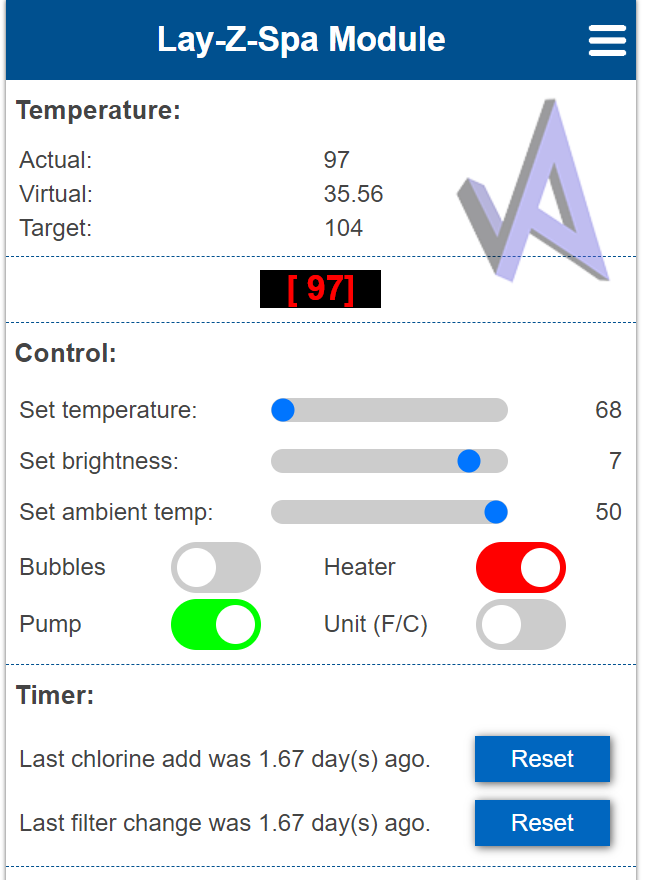
However, when setting the temperature on the web UI, the scale for ambient temperature remains on a Celsius scale, even when the spa is set to Fahrenheit. Pictured above, I have the spa set to F, but the highest ambient temperature I can set is 50. The current ambient temperature is 20C/68F.
That is what lead me to believe the spa was still using C values for the ambient temperature, however maybe it's just a HTML display issue and if I set it via MQTT it would function properly.
Ah I see! Well, there is two solutions: you can move closer to the pole, or I can fix the html.
Thank you for clarifying!
@rosetown-kelly Hi again. I was checking the ambient slider and it does change unit already. However it didn't update the sliders properly. It is now fixed. Easiest way to update is to klick on the hamburger menu in top right corner and go to file upload. Choose the new websockets.js file. Done. (First ofc download that file from github)