

 visual-framework
HTML5 datalist (autocomplete in vf-form)
Add a one sentence summary of what it is you need it to do. Datalist (a.k.a combo box) form component specifies a list of pre-defined options for an element while allowing the user to type in new values.
Not sure? Confused?
Chat with us and consult our governance approach.
Standard questions
-
In a few words, what does this component look like? This form component looks like a mix between a select and an input component.
-
In a few words, what does this component do? Allows users to select a value from a dropdown of pre-defined values or type a new value not listed. For example in a web form with an option for e-value, the user could select from any of the provided e-values, or type a new one.
-
Would a rebrand change the structure or layout of this component? Not sure.
-
Can other websites use this component? Or is it only useful in your organisation or website? Others could use it.
-
Do you have any designs or concepts? I have two examples: https://www.w3schools.com/tags/tryit.asp?filename=tryhtml5_datalist and http://indrimuska.github.io/jquery-editable-select/
-
Have you done any user testing already? No
-
How often do you expect to make use of this component? In most if not all of our web form pages. We expect other EMBL teams providing forms to use this as well.
-
Can you list out major elements in this component? No
-
Will all elements of this component be used every time? Yes
-
Does this component contain other components? Possibly, but not sure.
-
Do you already have a component? No
Any further thoughts?
I would be happy with helping develop this form component, but need to get a bit more familiar with VF.

Thank you @biomadeira for suggesting this.
@MGS-sails has added an autocomplete feature to the drop-down of vf-form for the Registration page of the EMBL-EBI Training site:
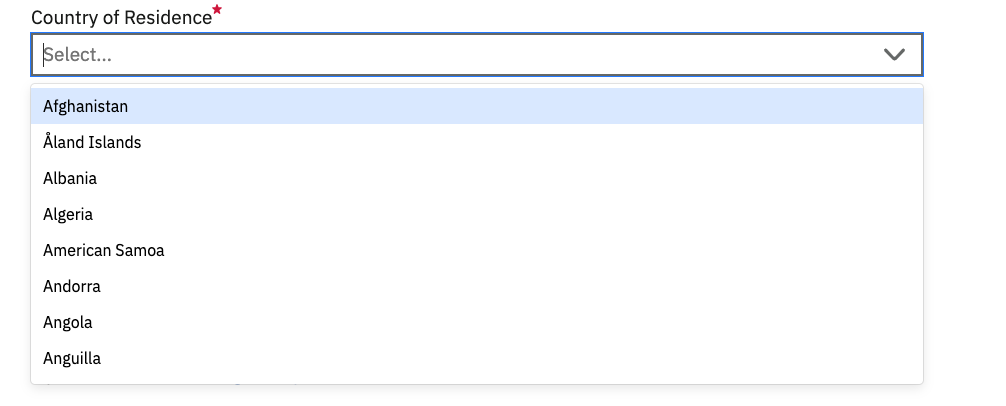
This is currently custom code but we'd like to add it to the actual vf-form component at some point.
We were inspired by the autocomplete of the GDS which is meant to help users select an option from a fairly long drop-down (such as a list of countries). Sometimes you need to provide support for synonyms in a controlled vocabulary (e.g. when people type "Holland", suggest "Netherlands" which is the actual name of the country).
I haven't come across a situation where you'd use this input field to also add items to a predefined list. Perhaps you can share an example from a live site?
Development work on the visual framework is on hold for the time being but we'll get back to you to check whether you can assist us when we start working on this.
Thank you again!

Hi @nikiforosk!
Thanks for looking into this! Your example is very similar to what I was looking for, with the difference that you could submit your own value if not provided in the list. I don't have an example form from EMBL-EBI for this, but the closest I could find is this https://www.w3schools.com/tags/tryit.asp?filename=tryhtml5_datalist This gives you the browser name as you type, but would allow you to pass in "Internet Explorer" for example. As I mentioned our main use case is for allowing users to pass numerical values while also providing a list of "sensible" or commonly used values. The example of e-value for BLAST is a quite nice one as people usually go for common values (shown on the dropdown), like 10, 1, 10^-3, 10^-12, etc. but could also pass in whatever valid number they wanted.
Kind regards!