

 visjs
visjs
Out of range events shown
Sample: https://jsfiddle.net/erf54s9k/
It's a simple example with 2 groups and start date set, out of range events are visible, just move or zoom and events will be correctly placed.
Tested with Chrome and Firefox


Same sample, without groups: https://jsfiddle.net/chupvy3w/
What I can observe is the absence of transform css attribute in the wrong itens. But, when we move/zoom the timeline, than, the invisible itens are removed from dom.
I noticed the same thing.
I tried various things, but for me what broke the view was calling timeline.getItemRange() after setting new items and groups.
I could not find out why. The npm package only supplies a minified version, so I didn't bother debugging.

Is there any update on this issue ? Currently I am facing the same issue in my project. I have used the following options for timeline var options = { orientation: 'top', editable: true, margin: { item: 0 }, zoomKey: "ctrlKey", minHeight: 400, autoResize:true, width: '100%', height:'100%', verticalScroll: true, type: 'range', showWeekScale: true, timeAxis: {scale: 'day', step: 7}, zoomMin: 1000 * 60 * 60 * 24 *7, zoomMax: 1000 * 60 * 60 * 24 * 365, format: { minorLabels: { 'week': 'Do' }, majorLabels: { 'day': 'YYYY/MM' } } } and following references https://unpkg.com/vis-timeline@latest/styles/vis-timeline-graph2d.min.css https://unpkg.com/vis-timeline@latest/standalone/umd/vis-timeline-graph2d.min.js
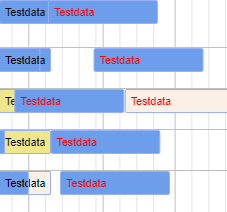 Thanks in advance

just in case anyone is still having this problem, I solved it by adding just one line of CSS:
.vis-item {
    transform: scale(0);
}
when it's time to show the timeline item, the inline transform style overrides this rule. So it shouldn't break anything now, but since I consider this fix destructive, I'm putting this disclaimer - it only fixes it now

just in case anyone is still having this problem, I solved it by adding just one line of CSS:
.vis-item {
    transform: scale(0);
}
when it's time to show the timeline item, the inline
transformstyle overrides this rule. So it shouldn't break anything now, but since I consider this fix destructive, I'm putting this disclaimer - it only fixes it now
Great! Thanks @Madd0g !
Tested with the 2 jsfiddle samples above and worked like a charm.
Facing same issue.
Visible and clear demonstration with flying items, that out of range.
The reason is not settled transform property for this items.
