visjs
visjs
Randomly stacked items that do not overlap.
I'm using V5. For some unknown reason I'm getting stacked items in a group. First, the items don't overlap (I've verified the start/end dates). Second, I have the stack option set to false. Attached is a screen shot showing the problem.
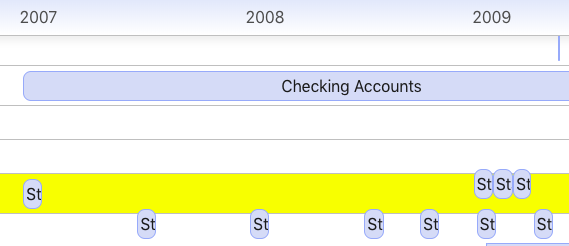
All the items you see that are straddling the line between groups actually belong to the group above where they are positioned. Very strange.
FWIW - I am using nested groups. The issue appears to happen if I set showNested=false in each main group. If I set showNested=true I see what I would expect.


Hi, I have a similiar issue.
vis-timeline version is 6.0.3
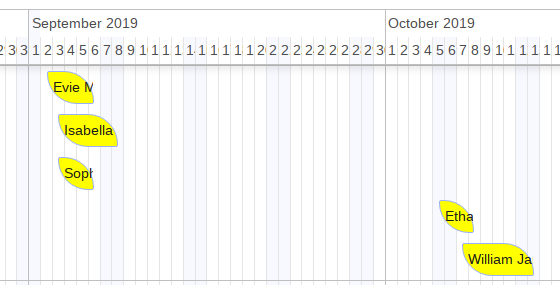
Timeline options: stack=false stackSubgroups=true
You are seeing items in a nested group, one level deep. Each item has a subgroup = item's id. If they have no subgroup specified OR share the same subgroup, then they will overlap. As you can see, there is a difference of 1 month between the items on the left side and those on the right side.

Can you please supply a jsbin so I can reproduce this and solve the bug? I can;t reproduce the issue.

Can you please supply a jsbin so I can reproduce this and solve the bug? I can;t reproduce the issue.
For my case: https://jsfiddle.net/j9otzmvx/
Setting stackSubgroups to false seems to fix the stacking issue and the items stack as expected, but then why do they stack when the option states that they should not stack...
https://jsfiddle.net/j9otzmvx/1/
The docs for stackSubgroups state:
If true (default), subgroups will be stacked on top of each other such that they do not overlap.