

 visioncortex
Automated mode
Thanks for such a needed and great project! During my exploration, I've tried to achieve similar quality to VectorMagic automated mode by adjusting different input parameters in https://www.visioncortex.org/vtracer/. Unfortunately, I didn't succeed. Also, manual parameters adjustments are very time-consuming.
In terms of quality I mean:
- Less complicated shapes
- More robustness on image noise
So, I had a thought that it would be great to have an automated mode. Probably, it would be possible to optimize parameters by employe some optimization frameworks (e.g. Hyperopt, Optuna) and optimize some quality function. Another assumption is that it might be a limitation of the VTrace algorithm.
If it is possible could you please give me a hint on where to dig to improve output SVG quality? I would love to contribute to your project to improve the quality of output SVG.

I think you didn't succeed :( Have you looked at visioncortex/visionmagic ? It indeed addressed the two factors you mentioned: shape complexity and image complexity.

@tyt2y3, I've tried to use visioncortex/visionmagic. Unfortunately, it leads to similar results or even worse.
I'm looking for a tool that will accurately convert the raster version of SVG back to SVG. If we will take a look at an example in VTrace Demo, we will see a lot of artifacts:

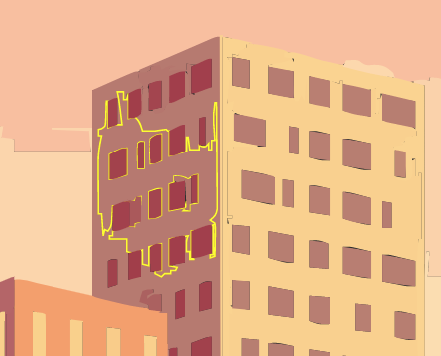
I tried to play around with parameters, but unfortunately, it does not lead to any quality improvements. In comparison, Vector Magic outputs almost perfect SVG.
