

 vircadia
Graphics are horribly mangled on AMD GPUs
Vircadia doesn't seem to work correctly on AMD GPUs:
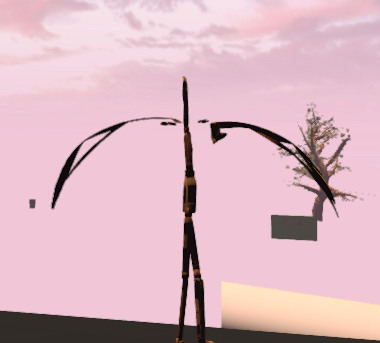
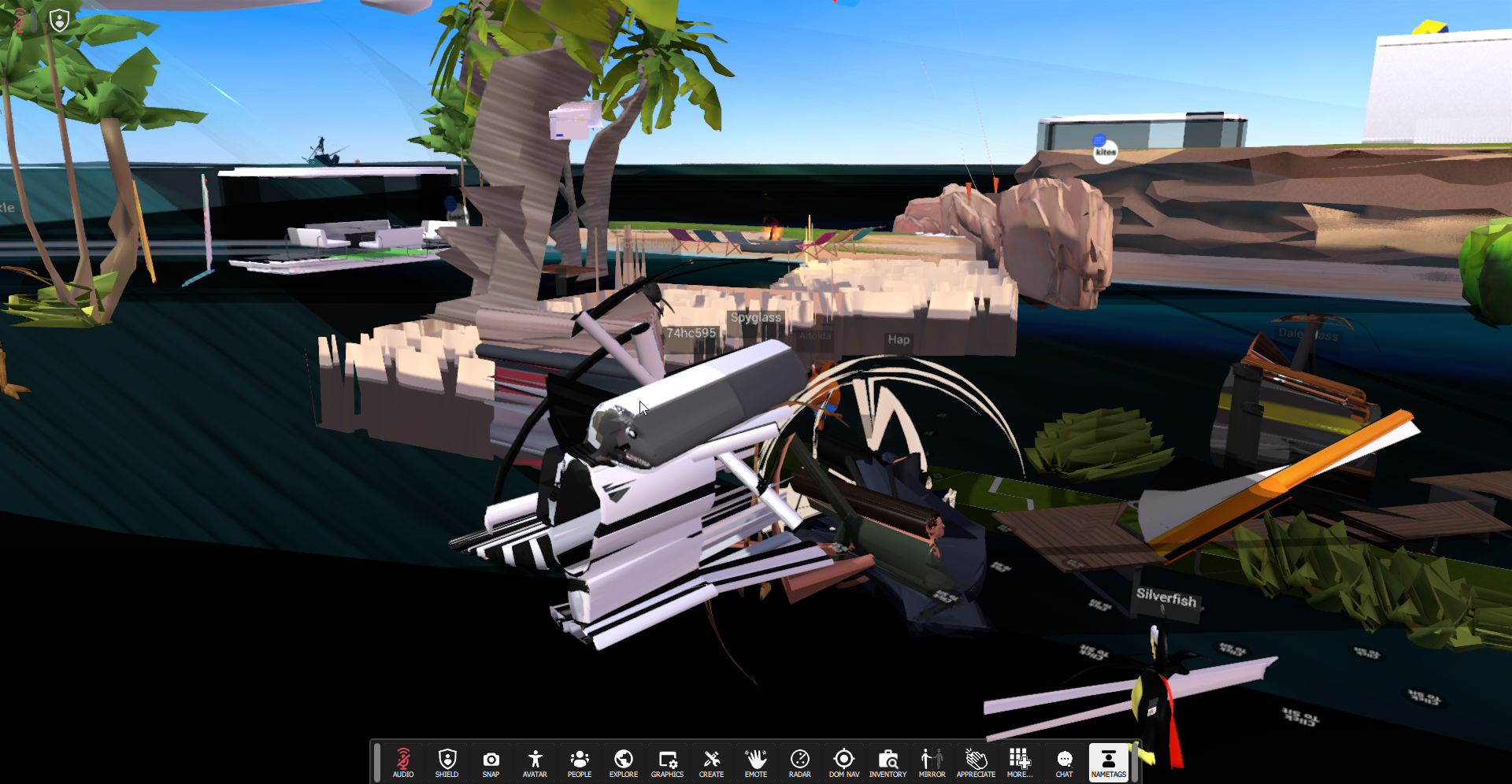 Here are the logs from a system with Windows 10 and Radeon Rx 560 4 GB:
vircadia-log_2021-10-12_04.30.51.txt
Here are the logs from a system with Windows 10 and Radeon Rx 560 4 GB:
vircadia-log_2021-10-12_04.30.51.txt

Wow, that's a mess. Hmm. Unfortunately we're very lacking in people knowledgeable in the details of rendering engines.
Could you set up a new domain with nothing in it and try adding stuff gradually until something breaks? Perhaps we can get some clue as to what is going wrong here.
You can easily clone the Hub and play with it, too.

That's a good idea. Sadly I don't have an AMD GPU to test it on, but I will create an empty domain and test it with a friend who has an AMD card. I suspect it's a vertex shader wrongly compiled by AMD drivers.
I can give it a test, but I am already 100% sure AMD just broke their driver again. Wouldn't be the first time.. or second.. or third..

Maybe we could contact them if we know which part is broken, or make some workaround?
~~I will give it a test later, but~~ realistically just downgrade your driver. Nevermind, Windows gives me a blue screen.
Rather an update would be worth trying. The log says that version 21.9.2 30.0.13017.5006 is used, and version 21.10.2 30.0.13025.5005 is available from AMD. https://www.amd.com/en/support/graphics/radeon-500-series/radeon-rx-500-series/radeon-rx-560
Since ksuprynowicz has concerns that this might be a longer standing issue, I will reinstall Windows and check it out.
So in my testing it works just fine.
I tried version 20.10.35.02 27.20.1034.6, version 21.4.1 27.20.21002.112 and version 21.5.2 27.20.20903.8001. (Clearing the shader and ktx cache in between)
I cannot easily try a newer version because AMD doesn't support my graphics card anymore..
Please try downgrading to a "recommended" driver version. See: https://data.moto9000.moe/sphinx/PR184/faq.html#amd-downgrade (This page is new. You can provide feedback at https://github.com/vircadia/vircadia-docs-sphinx/pull/184 )
Oh somehow I missed than when commenting.
It should be in %AppData%/../Local/Vircadia/. Just delete the shader folder. I cannot imagine the KTX cache causing that for two people simultaniously but not for me.
By the way, if downgrading fixes the issue I would be thankful if you can report that back. If it doesn't, I have more broken driver versions to add to the list.
We just tried 21.10.1 30.0.13025.1000 and it doesn't work. We will try older ones later.
We just tried 21.10.1 30.0.13025.1000 and it doesn't work. We will try older ones later.
Actually we know that 21.10.1 doesn't work. You posted a log with 21.9.2 that is supposed to have the issue.
Also did someone try reporting the issue to AMD according to their guide? https://www.amd.com/report
@makitsune I notice you guys have the same issue. Might be good to share any info we have. You can see all the driver versions that have this issue that we know here.
We need to add 21.8.2 27.20.22025.1006 to ones that have the issue. Graphics are mangled on RX570 with those drivers
I am also having this issue with driver version 30.0.13025.100 and Adrenalin version 21.10.1 on an RX460.

Thanks, that is a known broken driver version. Adrenalin 21.5.2 seems to be the newest working version.
Is it all versions after 21.5.2 that are broken? I think I must've misread the wiki, sorry.
Current AMD Adrenaline driver is 22.. - is this still an issue with the major update?

I can confirm it is still the issue with the latest 22... AMD driver.

I believe that forcing OpenGL 4.1 on AMD cards could be worth trying as a stopgap fix for this issue until I get Vulkan version running.
![stale[bot] avatar](https://avatars.githubusercontent.com/in/1724?v=4 "Published by a pub.dev verified publisher")