

 video-react
Customizing <Video> element causes crash
Describe the bug
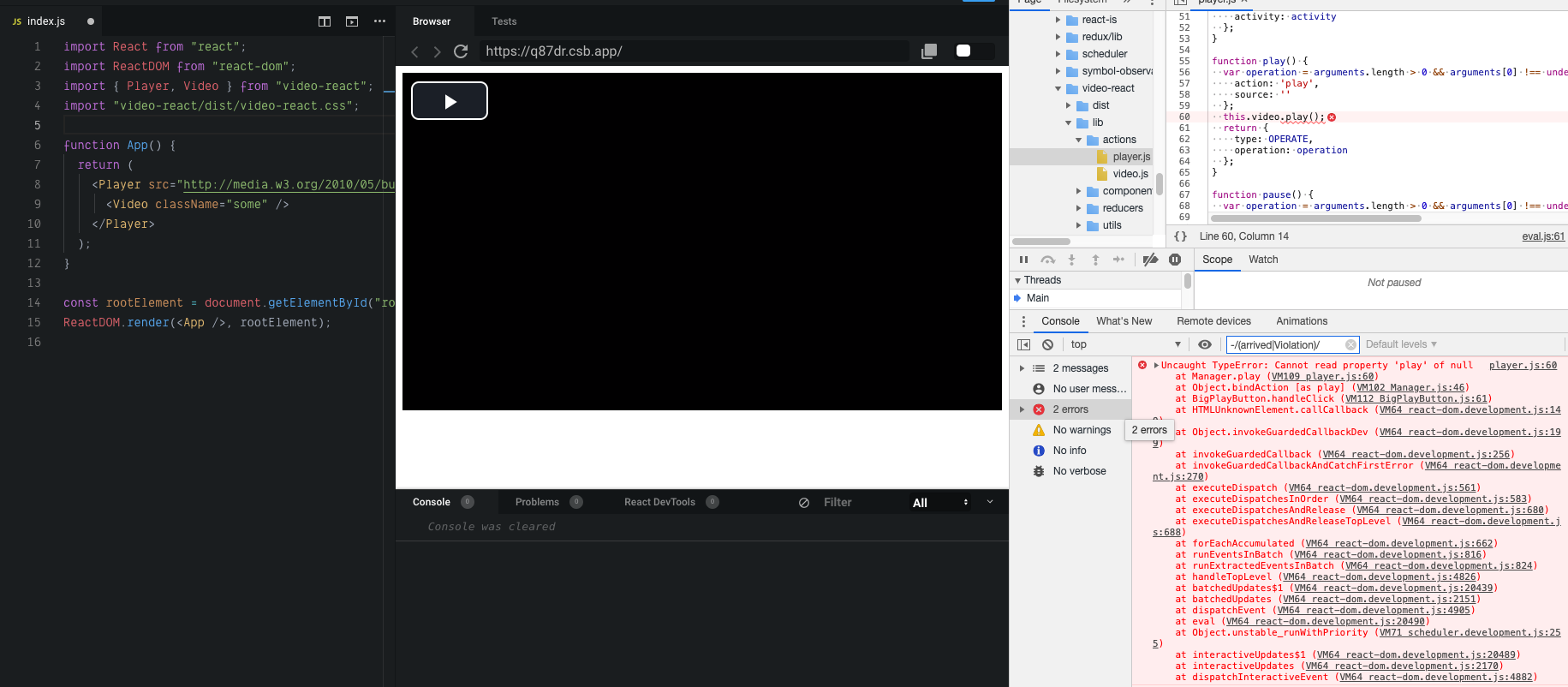
When passing <Video /> as child to <Player />, reference to video element is lost, which causes exception in Player when trying to play video.
To Reproduce
- Render following component:
import { Player, Video } from "video-react"

function MyPlayer() {
  return (
    <Player src="http://media.w3.org/2010/05/bunny/movie.mp4">
      <Video className="some" />
    </Player>
  )
}
- Press
BigPlayButtonon video. - See the exception in console.
Expected behavior
Player should work normally with customized <Video /> element.
Screenshots
Desktop (please complete the following information):
- OS: macOS Mojave
- Browser: any
Additional context
You're using React.cloneElement to get extra props for child elements, but you clone a customized element instead of default one. Thus, ref from default <Video /> is lost, as it's not a regular prop and so isn't cloned.
Using React.cloneElement(defaultComponent || element, ...) can fix the problem.
Demo https://codesandbox.io/s/video-react-broken-video-component-q87dr

Also, similar issue is with <source> / <track> Player children: in example above, they will be ignored – because in React.cloneElement used only element.props.children (which are empty in this case), and originalChildren from default <Video> are lost.