

 vercel
Error: Could not locate the bindings file. Tried:
What version of pkg are you using?
latest
What version of Node.js are you using?
14.15.4
What operating system are you using?
macOS
What CPU architecture are you using?
Intel
What Node versions, OSs and CPU architectures are you building for?
node14-linux-x64
Describe the Bug
pkg/prelude/bootstrap.js:1876
app_1 | throw error;
app_1 | ^
app_1 |
app_1 | Error: Could not locate the bindings file. Tried:
app_1 | → /snapshot/dpcm/node_modules/ibm_db/build/odbc_bindings.node
app_1 | → /snapshot/dpcm/node_modules/ibm_db/build/Debug/odbc_bindings.node
app_1 | → /snapshot/dpcm/node_modules/ibm_db/build/Release/odbc_bindings.node
app_1 | → /snapshot/dpcm/node_modules/ibm_db/out/Debug/odbc_bindings.node
app_1 | → /snapshot/dpcm/node_modules/ibm_db/Debug/odbc_bindings.node
app_1 | → /snapshot/dpcm/node_modules/ibm_db/out/Release/odbc_bindings.node
app_1 | → /snapshot/dpcm/node_modules/ibm_db/Release/odbc_bindings.node
app_1 | → /snapshot/dpcm/node_modules/ibm_db/build/default/odbc_bindings.node
app_1 | → /snapshot/dpcm/node_modules/ibm_db/compiled/14.19.2/linux/x64/odbc_bindings.node
app_1 | → /snapshot/dpcm/node_modules/ibm_db/addon-build/release/install-root/odbc_bindings.node
app_1 | → /snapshot/dpcm/node_modules/ibm_db/addon-build/debug/install-root/odbc_bindings.node
app_1 | → /snapshot/dpcm/node_modules/ibm_db/addon-build/default/install-root/odbc_bindings.node
app_1 | → /snapshot/dpcm/node_modules/ibm_db/lib/binding/node-v83-linux-x64/odbc_bindings.node
app_1 | at bindings (/snapshot/dpcm/node_modules/bindings/bindings.js:126:9)
app_1 | at Object.
Expected Behavior
The application should run with out error
To Reproduce
FROM base as mangled COPY ["uds-esbuild.js", "uds-esbuild.js"] RUN ["npm", "install", "esbuild"] RUN ["node","uds-esbuild.js"] RUN ["mkdir", "/tmp/dpcm/core/bin", "-p"] RUN ["cp","./core/bin/uds-submodule.js","/tmp/dpcm/core/bin/app.js"] RUN ["cp","./core/bin/uds-submodule.js.map","/tmp/dpcm/core/bin/app.js.map"] RUN ["cp","package.json","/tmp/dpcm/package.json"] RUN ["rm","-rf","/dpcm/*"] RUN ["cp","-r","/tmp/dpcm","/dpcm"] RUN ["chown","-R","appuser","/dpcm"]
FROM mangled as pkg RUN ["npm", "install","-g", "pkg"] RUN ["mkdir", "/pkg", "-p"] RUN ["pkg",".", "--target", "node14-linux","--output","/pkg/app-linux" ] RUN ["rm","-rf","/dpcm"] RUN ["chown","-R","appuser","/pkg"]
My docker fail has this cammands. The application works with out
RUN ["npm", "install","-g", "pkg"] RUN ["mkdir", "/pkg", "-p"] RUN ["pkg",".", "--target", "node14-linux","--output","/pkg/app-linux" ] RUN ["rm","-rf","/dpcm"] RUN ["chown","-R","appuser","/pkg"]


@robertsLando Thanks for immediate response.. I do tried this. Let me give another try.
@robertsLando The addded the below lines to package.json but no luck..
"directories": { "assets:": "node_modules/ibm_db/**" }
@Jyothi-Venkatesh that's not correct. You need to add a pkg entry to your package.json with assets array:
{
... // other package.json props
"pkg": { "assets": [ "node_modules/ibm_db/**" ] }
}
Please be sure to read the docs
@robertsLando After adding assets as mentioned. It getting hanged at " Fetching base Node.js binaries to PKG_CACHE_PATH "
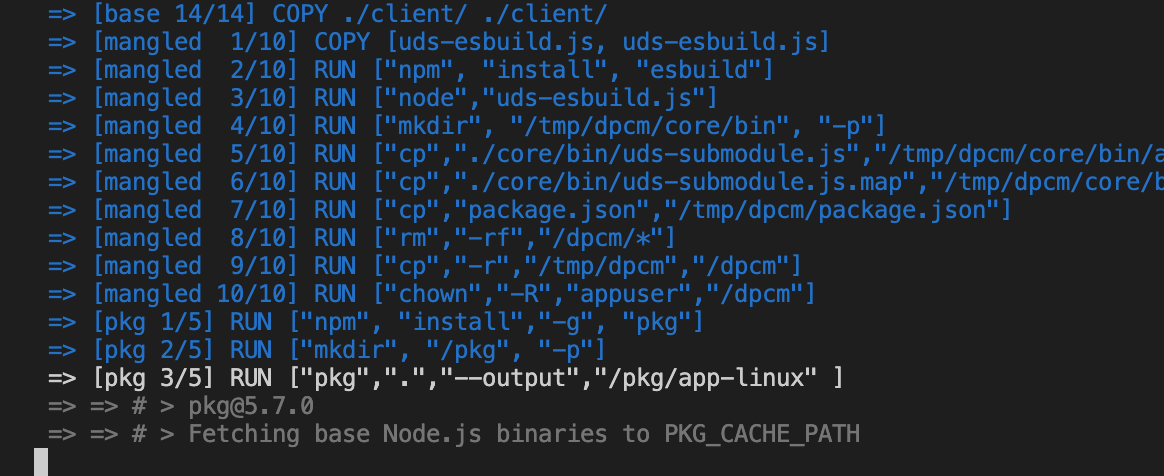
I tried playing with node versions which did not work out.
the command should be pkg package.json -t node16-linux-x64 --out-path /pkg/app-linux
You are missing to pass package.json. Again, read the docs please
@robertsLando node16-linux-x64 is added in the targets in package.json so I just removed from docker file.
"pkg": { "assets": [ "node_modules/ibm_db/**/*" ], "targets": [ "node16-linux-arm64" ] }
 after adding it to docker file. same issue
are you sure docker has internet connection? the exact same command works on my machine
RUN ["pkg",".", "--build","--target", "node14-linux","--output","/pkg/app-linux" ]
Yes it has internet connection. I added --build to not download prebuilt base binaries and ended up with
vcbuild.bat
#31 42.35 > Applying patches
#31 42.36 > Error! Error: spawnSync patch ENOENT
#31 42.36     at Object.spawnSync (node:internal/child_process:1111:20)
#31 42.36     at spawnSync (node:child_process:814:24)
#31 42.36     at /usr/lib/node_modules/pkg/node_modules/pkg-fetch/lib-es5/utils.js:148:51
#31 42.36     at step (/usr/lib/node_modules/pkg/node_modules/pkg-fetch/lib-es5/utils.js:33:23)
#31 42.36     at Object.next (/usr/lib/node_modules/pkg/node_modules/pkg-fetch/lib-es5/utils.js:14:53)
#31 42.36     at /usr/lib/node_modules/pkg/node_modules/pkg-fetch/lib-es5/utils.js:8:71
#31 42.36     at new Promise (<anonymous>)
#31 42.36     at __awaiter (/usr/lib/node_modules/pkg/node_modules/pkg-fetch/lib-es5/utils.js:4:12)
#31 42.36     at spawn (/usr/lib/node_modules/pkg/node_modules/pkg-fetch/lib-es5/utils.js:145:12)
#31 42.36     at /usr/lib/node_modules/pkg/node_modules/pkg-fetch/lib-es5/build.js:221:60
------
executor failed running [pkg . --build --target node14-linux --output /pkg/app-linux]: exit code: 2
ERROR: Service 'app' failed to build : Build failed
This issue is stale because it has been open 90 days with no activity. Remove the stale label or comment or this will be closed in 5 days. To ignore this issue entirely you can add the no-stale label
![github-actions[bot] avatar](https://avatars.githubusercontent.com/in/15368?v=4 "Published by a pub.dev verified publisher")
This issue is now closed due to inactivity, you can of course reopen or reference this issue if you see fit.