

 vercel
Importing pages from a symlinked folder does not work anymore
Verify canary release
- [X] I verified that the issue exists in the latest Next.js canary release
Provide environment information
Operating System:
      Platform: darwin
      Arch: x64
      Version: Darwin Kernel Version 21.6.0: Mon Aug 22 20:19:52 PDT 2022; root:xnu-8020.140.49~2/RELEASE_ARM64_T6000
    Binaries:
      Node: 18.10.0
      npm: 8.19.2
      Yarn: 1.22.15
      pnpm: 7.13.0
    Relevant packages:
      next: 12.3.2-canary.21
      eslint-config-next: 12.3.1
      react: 18.2.0
      react-dom: 18.2.0
What browser are you using? (if relevant)
Version 105.0.5195.125 (Official Build) (arm64)
How are you deploying your application? (if relevant)
No response
Describe the Bug
We have used symlinks to symlink pages from a shared folder so that we can reuse most of the pages in our application between different builds. This has worked until we updated nextjs to version 12.2.5, and from then on (even with latest canary) it has stopped working in routes that are dynamic.
When we navigate to a dynamic route it ends up sending us to a 404 page instead of the dynamic page. But a static route works as expected.
We needed to change the webpack config so that symlinks dont resolve. Without it, the symlinks don't work at all
We know that this is not intended behavior or not something we should do, but at the moment this is the best way possible for us to not have duplicate code for two different builds. And this worked perfectly before 12.2.5
update 02.11.22: Still happends with next 13
Expected Behavior
The dynamic page should load and show us the correct page.
Link to reproduction
https://github.com/aulonm/next-symlink-bug
To Reproduce
-
npm i -
npm run dev - Go to
http://localhost:3000/test(static page, returnsthis works) - Go to
http://localhost:3000/test/fail(dynamic page, should returnthis should work, but returns404)

I recently checked in a symlinked folder to our git repo and it's not working when publishing to Vercel.
This is a new addition though so not sure if the issue is on my end.

I recently checked in a symlinked folder to our git repo and it's not working when publishing to Vercel.
This is a new addition though so not sure if the issue is on my end.
I figured my issue out. Had to check Include source files outside of the Root Directory in the Build Step
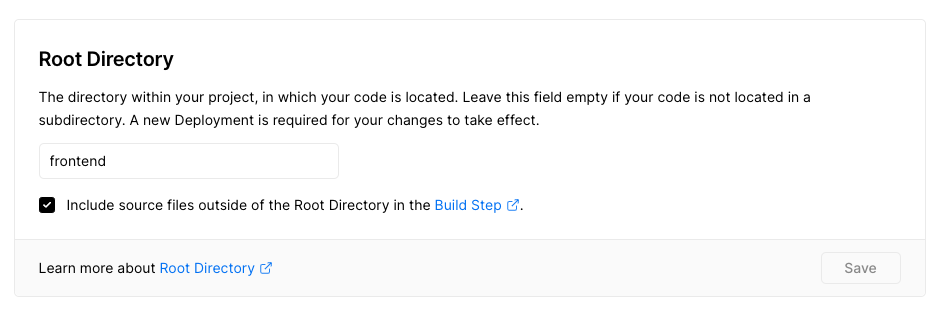
🤦
Same here. Using the latest v13 (13.1.1).
Seems like creating a symlink to some content under pages does not work - results in 404.

In my case this setting in next.config.js helped:
webpack: (config, { buildId, dev }) => {
    config.resolve.symlinks = false
    return config
}

